EDS-508A/505A Series User’s Manual Featured Functions
3-56
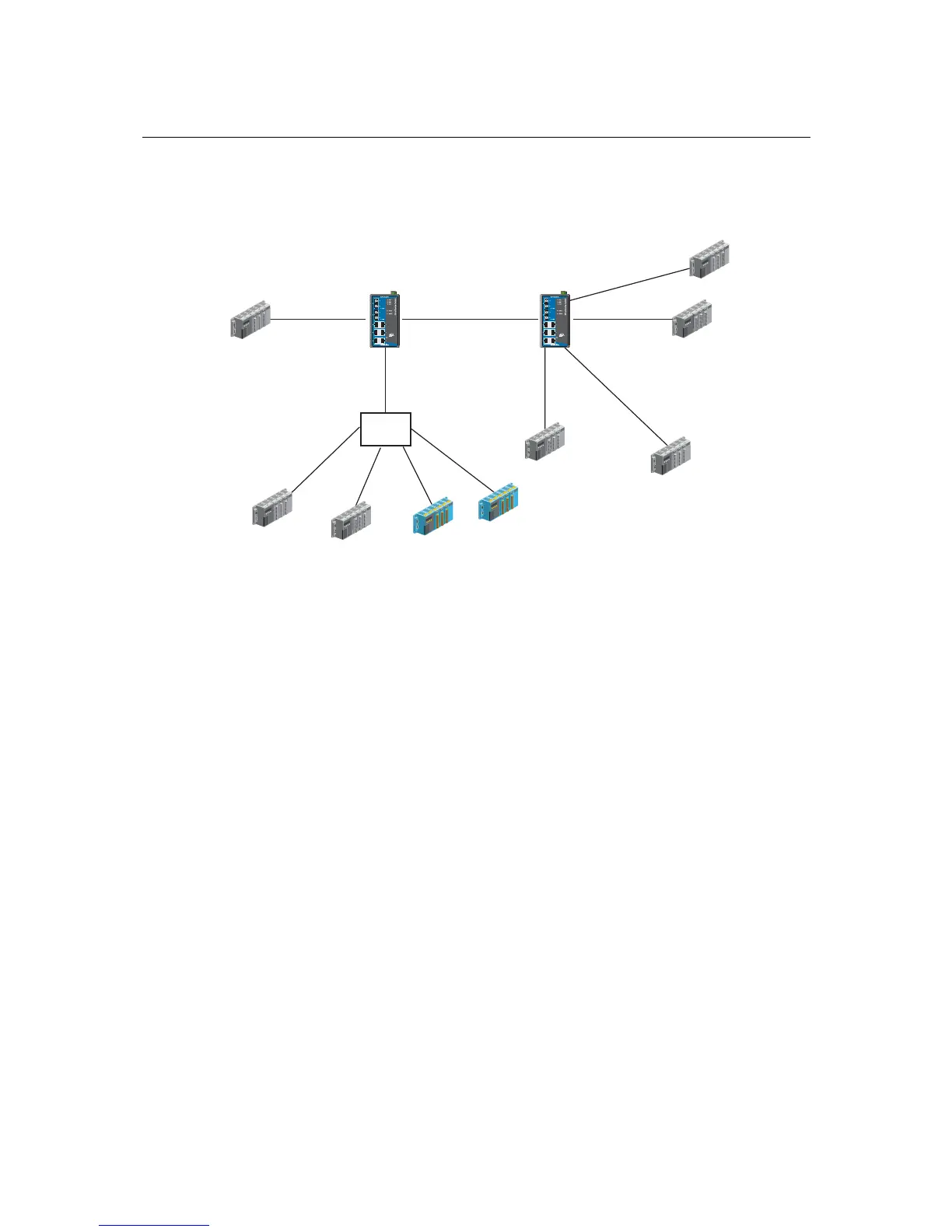
The following section illustrates how to use these ports to set up different applications.
Sample Applications of VLANs using the EDS-508A/505A
Port 3 (Trunk Port, PVID 1)
VLAN 5 Untagged Device
VLAN 3 Untagged
Device
VLAN 4 Untagged
Device
VLAN 5 Untagged Device
VLAN 2 Untagged
Device
VLAN 4 Tagged Device, VID 4
VLAN 3 Tagged Device, VID 3
VLAN 2 Untagged
Device
VLAN 2 Untagged
Device
Device A Switch A Switch B
Device C
Device B
Device D
Device E
Device F
Device G
Device H
Device I
Port 1 (Access Port
PVID 5)
Port 7 (Access Port
PVID 4)
Port 5 (Access Port
PVID 3)
Port 4 (Access
Port PVID 2)
Port 2 (Trunk Port PVID 2,
Fixed VLAN (Tagged)=3,4)
Port 6 (Access Port PVID 5)
HUB
In this application,
Port 1 connects a single untagged device and assigns it to VLAN 5; it should be configured as
“Access Port” with PVID 5.
Port 2 connects a LAN with two untagged devices belonging to VLAN 2. One tagged device
with VID 3 and one tagged device with VID 4. It should be configured as “Trunk Port” with
PVID 2 for untagged device and Fixed VLAN (Tagged) with 3 and 4 for tagged device. Since
each port can only have one unique PVID, all untagged devices on the same port can only
belong to the same VLAN.
Port 3 connects with another switch. It should be configured as “Trunk Port.” GVRP protocol
will be used through the Trunk Port.
Port 4 connects a single untagged device and assigns it to VLAN 2; it should be configured as
“Access Port” with PVID 2.
Port 5 connects a single untagged device and assigns it to VLAN 3; it should be configured as
“Access Port” with PVID 3.
Port 6 connect a single untagged device and assigns it to VLAN 5; it should be configured as
“Access Port” with PVID 5.
Port 7 connects a single untagged device and assigns it to VLAN 4; it should be configured as
“Access Port” with PVID 4.














 To Next Page