PT-7728 User’s Manual Featured Functions
3-64
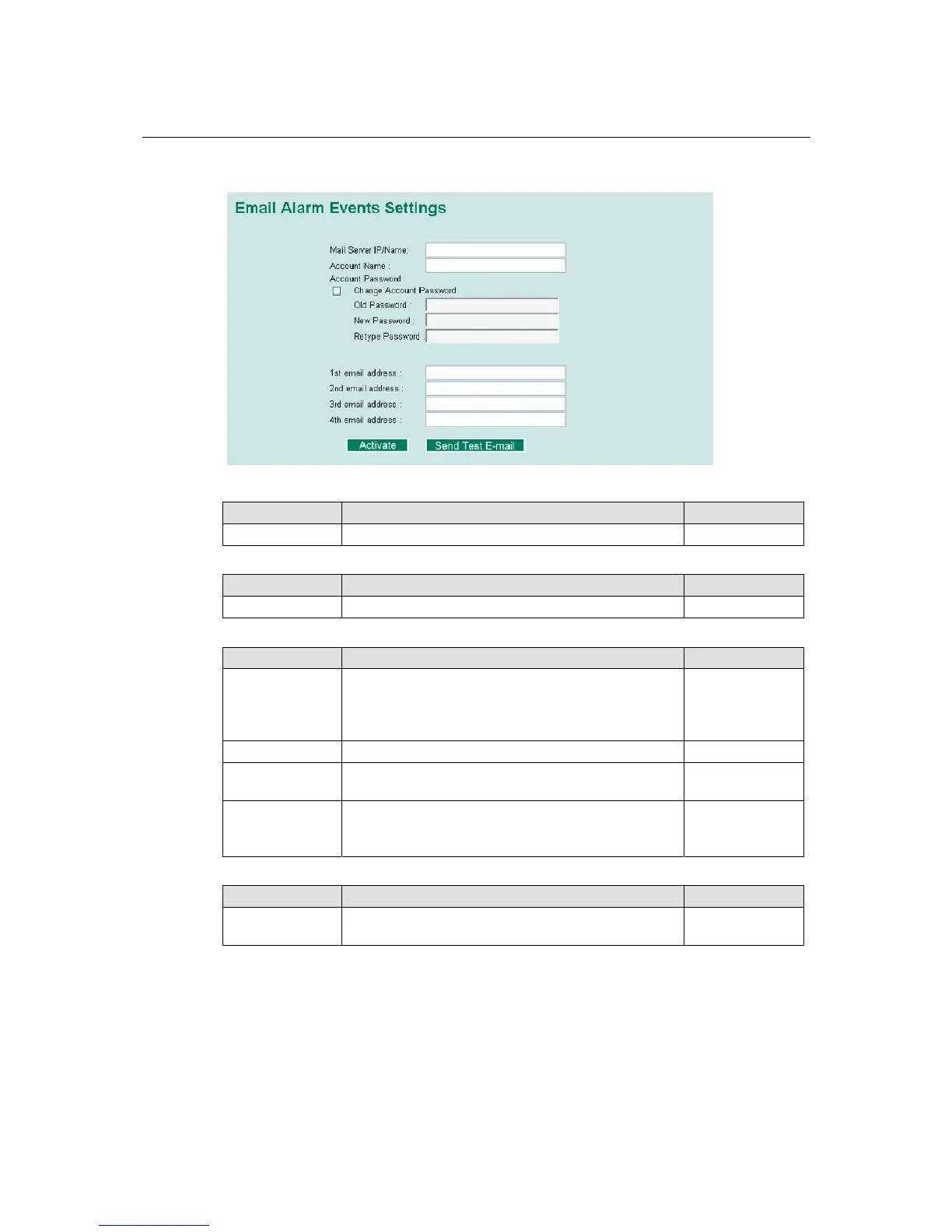
Email Setup
Mail Server IP/Name
Setting Description Factory Default
IP address The IP Address of your email server. None
Account Name
Setting Description Factory Default
Max. 45 Charters Your email account. None
Password Setting
Setting Description Factory Default
Disable/Enable to
change password
To reset the password from the Web Browser interface,
click the Change password check-box, type the Old
password, type the New password, retype the New
password, and then click Activate; Max. 45 characters.
Disable
Old password Type the current password when changing the password None
New password Type new password when enabled to change password;
Max. 45 characters.
None
Retype password If you type a new password in the Password field, you
will be required to retype the password in the Retype
new password field before updating the new password.
None
Email Address
Setting Description Factory Default
Max. 30
characters
You can set up to 4 email addresses to receive alarm
emails from PT-7728.
None
Send Test Email
After finishing with the email settings, you should first click Activate to activate those settings,
and then press the Send Test Email button to verify that the settings are correct.











 To Next Page