PT-7728 User’s Manual Featured Functions
3-49
y Packets from Device E will travel through Trunk Port 3 with tagged VID 4. Switch B will
recognize its VLAN, pass it to port 7, and then remove tags received successfully by Device I.
Packets from Device I will travel through Trunk Port 3 with tagged VID 4. Switch A will
recognize its VLAN and pass it to port 2, but will not remove tags received successfully by
Device E.
Configuring Virtual LAN
VLAN Settings
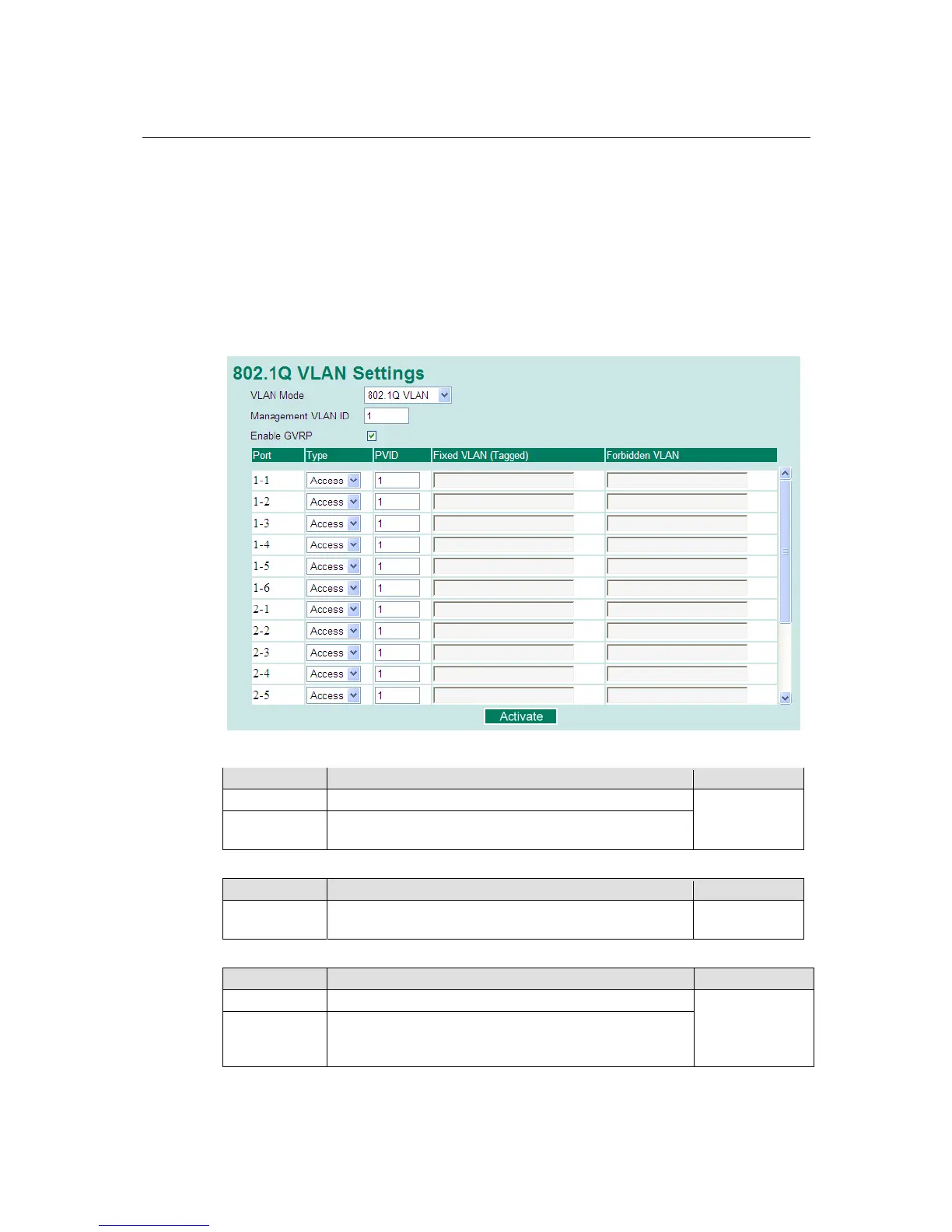
To configure 802.1Q VLAN on the PT-7728, use the VLAN Setting page to configure the ports.
VLAN Mode
Setting Description Factory Default
802.1Q VLAN Set VLAN mode to 802.1Q VLAN 802.1Q VLAN
802.1Q VLAN
(Unaware)
Set VLAN mode to Unaware
Management VLAN ID
Setting Description Factory Default
VLAN ID from
1 to 4094
Assigns the VLAN ID of this PT-7728. 1
Port Type
Setting Description Factory Default
Access This port type is used to connect single devices without tags.
Access
Trunk Select Trunk port type to connect another 802.1Q VLAN
aware switch or another LAN that combines tagged and/or
untagged devices and/or other switches/hubs.











 To Next Page