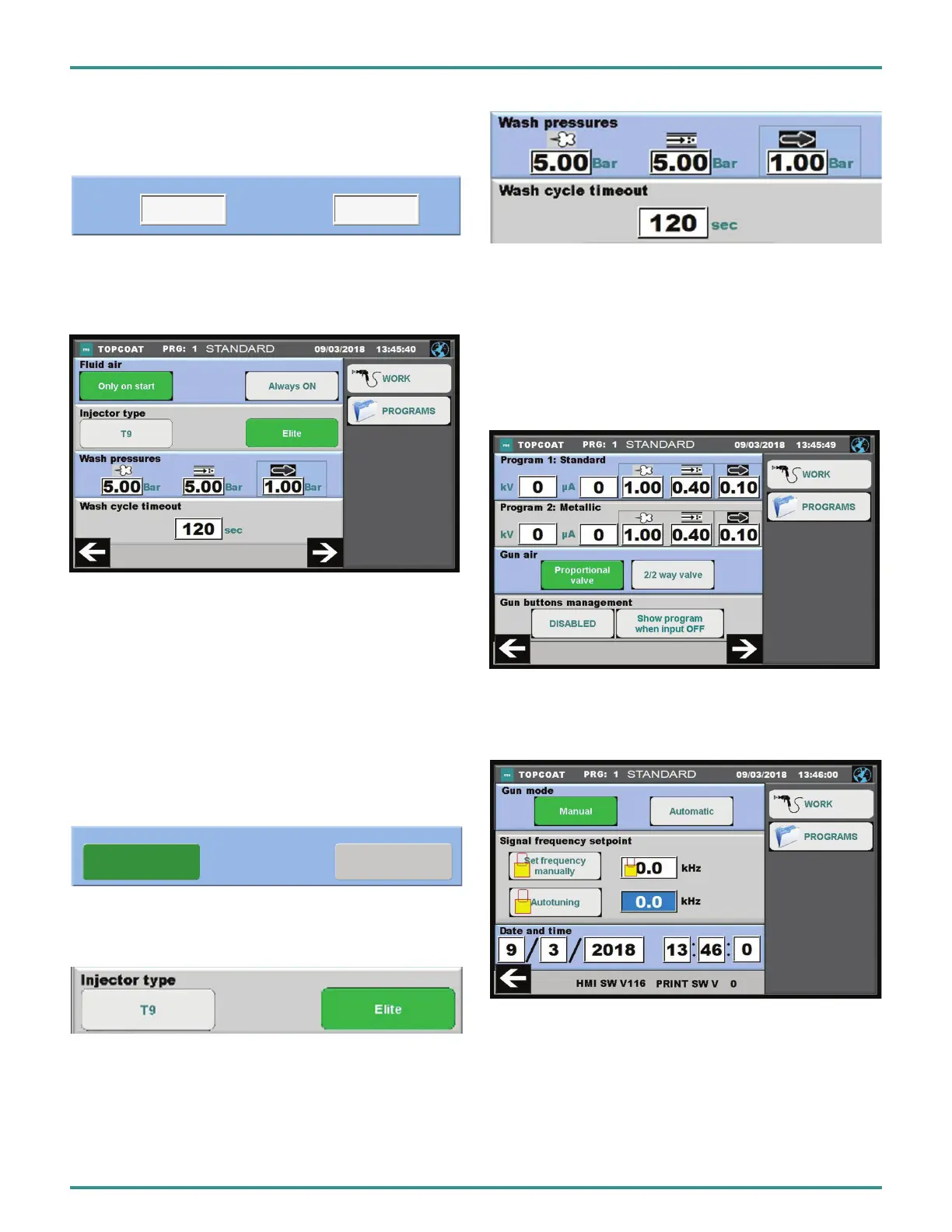
Fluid Box
Thecontrollercanbeconnectedtoauidizedboxbythe
Fluid Air port on the back panel.
Whenoperatingauidbox,theuidstandingairsetting
should be set to “ALWAYS ON”, so the powder remains in
suspension.Thelevelofthepowder-airmixtureremains
constant with this setting.
When the powder feed is through a suction pipe from a
box,theuidairsettingissetto“ONLYONSTART”.
50 6
Two layer mode
KV
µA
Only on start Always ON
Fluidbox
Two Layer Mode
In this mode one can adjust the settings used for the second
coating.
Area 2: Fluid Box And Cleaning
Inthisarea,thespeciedsettingoftheuidboxandclean-
ing process can be set.
Setting The Injector Type
Selects either the older injector type (T9) or newer Elite type.
Setting The Cleaning Data
In the lower rows the settings for the cleaning process can
be adjusted.
Area 3: Standard Program
Here are the settings for the standard programs. These
arestoredinthecongurationmenu,sothattheycannot
be overridden in the program mode.
These are already set upon delivery of the MS topcase to
the customer.
Area 4: Mode and Date/Time Settings
In this area, the gun operation mode and date/time are set.
PA-18-02-R0 (08/2018) 38 / 52 www.carlisleft.com
EN
INSTALLATION


 To Next Page