EasyManua.ls Logo

MSI Dyna-Link 2 - Key Descriptions

MSI Dyna-Link 2
61 pages
Print Icon
To Next Page IconTo Next Page
To Previous Page IconTo Previous Page
Loading...
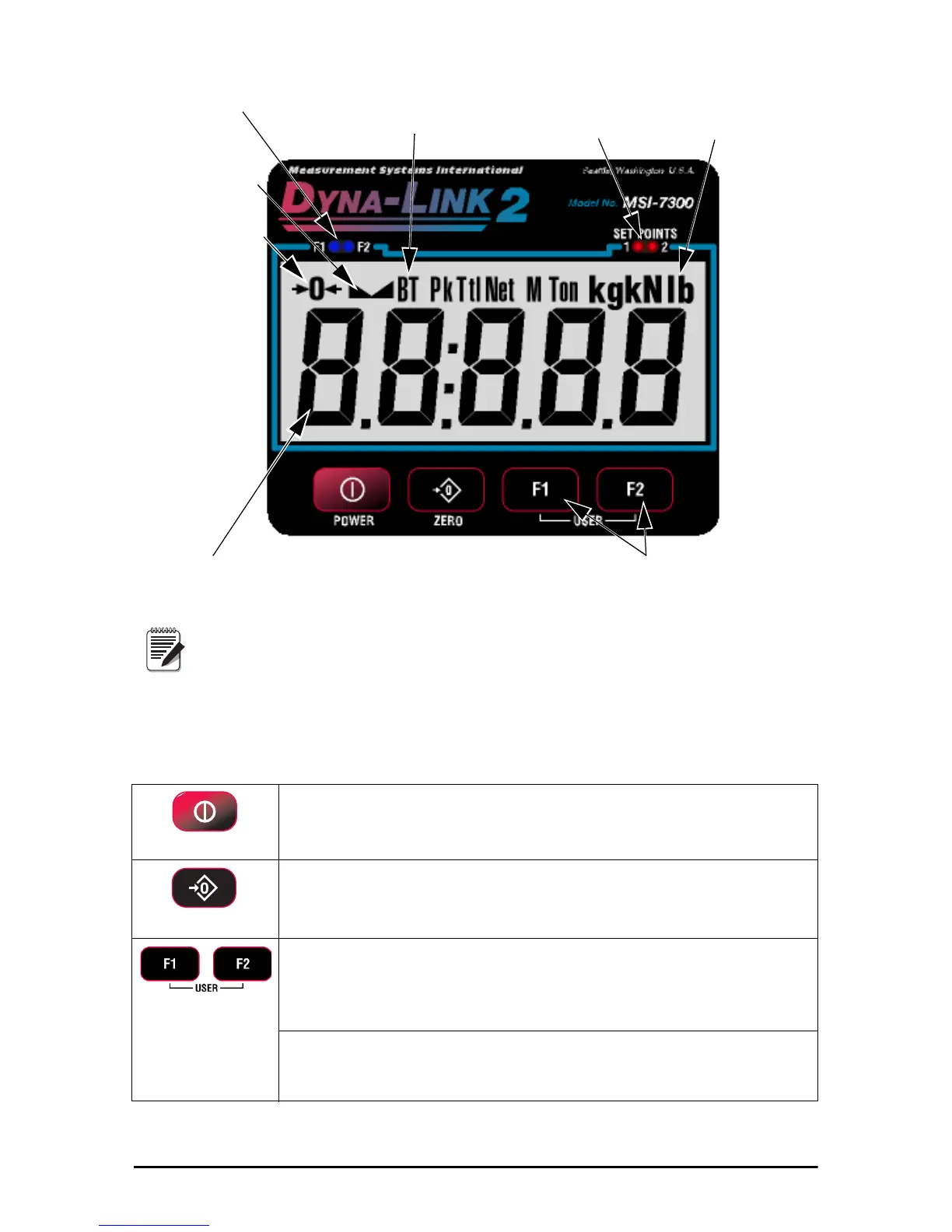
Function key LEDs
Battery low
Stable
Center of zero
5 Digit 1.22 in (31mm)
Sunlight visible
LCD Tension Display
Units with maximum capacity of
100000 lb and up come with a 6 digit
1 in (26 mm) display.
Note
Setpoint
alarm LEDs
Units & tension
mode annunciators
User programmable
function keys
Introduction 3
Figure 1-1. MSI-7300 Front Panel
1.2 Key Descriptions
POWER
Power Key - Turns the Dyna-Link 2 on and off.
Used as cancel or last menu in the menu mode.
Zero Key - Used to zero out residual tension on the link.
Used as enter or save in the menu mode
Common uses are units change or peak hold for dynamic testing.
F1- Pr
ogrammable to user selectable functions, see Section 3.0.
Default – peak hold.
Functions as the ENTER/SELECT key in the menu mode.
F2 -
Programmable to user selectable functions, see Section 3.0.
Default – display & function test.
Functions as the scroll key in the menu mode.


Related product manuals