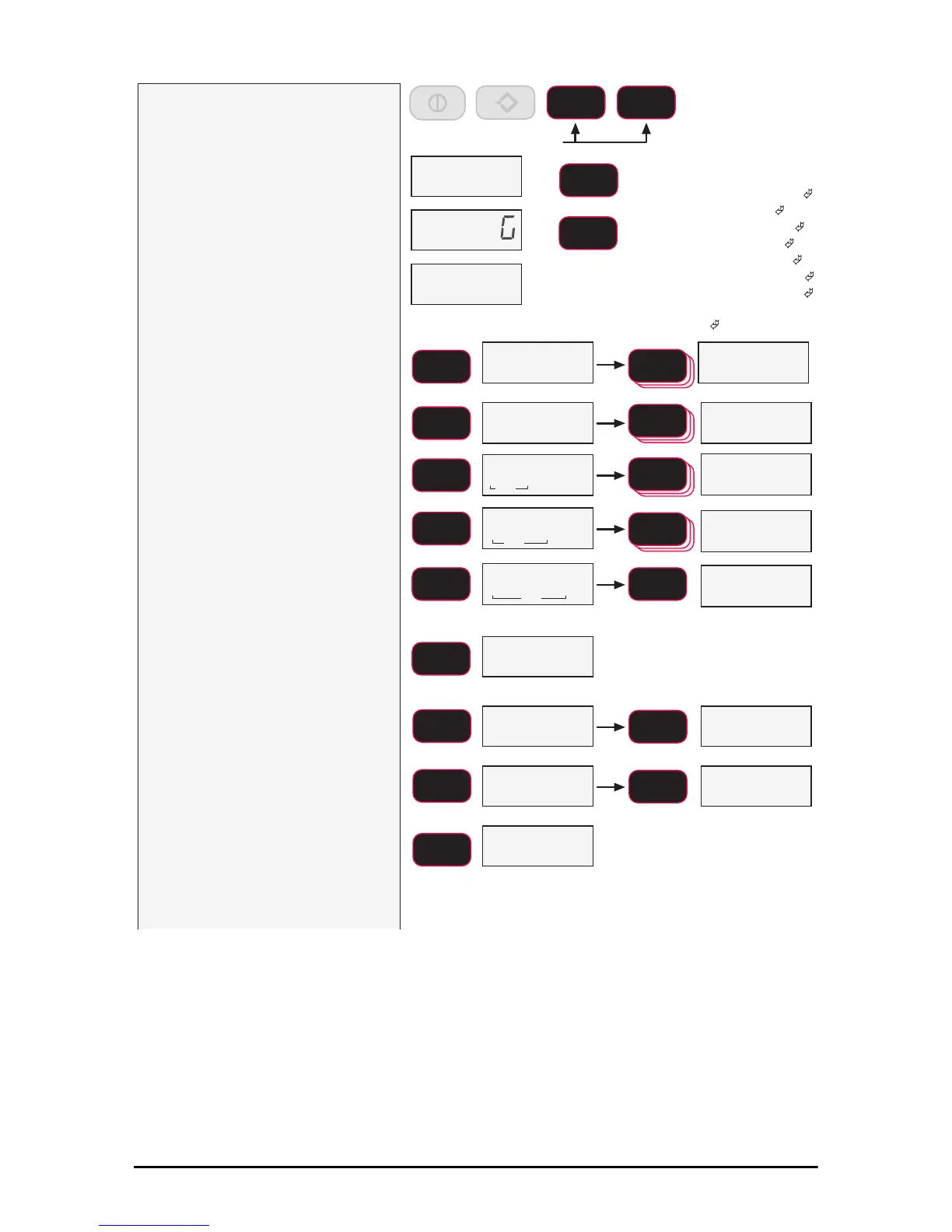
1) With the 7300 on, press the F1
and F2 key simultaneously.
2) The LCD shows Print. Press
F1.
3) The submenu item StrnG
appears. Press F1.
4) The current print mode format
number is displayed.
5)
Set up a print format with one or
more digits representing the data
type required for the print output.
In this example, we’ll set the print format
for a net, gross, tare output with a
carriage return/line feed between each
print output. The number entry required
will be 2349. The 2 is for net weight,
the 3 for gross weight, the 4 for tare
weight, and the 9 inserts a space before
the next print output.
6) Using the F2 Key, scroll through
the digits until the desired digit
is shown, then press F1 to enter
the digit value. Repeat for the
remaining digits.
7) When the entire number is
displayed press F1. The next
item in the print menu appears,
Cntrl.
8) Press F1 to enter the print
control menu. The last set control
mode will appear.
9) To change the print control mode,
press F2.
In this example, we’ll set the print control
mode to continuous.
10) Press F2 key until the desired
print control mode is shown.
11) When the desired print mode is
shown, push F1 to save. The
next print setup item, rAte
appears. If you have set
continuous (cont) as your print
control, proceed to step 12). For
any other control mode jump to
step 15
0
ZERO
F1 F2
Press and Hold
blinking
blinking
fixed
fixed
fixed
&QWUO
ENTER/SELECT
F1
ENTER/SELECT
F1
ENTER/SELECT
F1
Next Print Menu Item
3ULQW
6WUQ
ENTER/SELECT
F1
ENTER/SELECT
F1
blinking
SCROLL
F2
SCROLL
F2
ENTER/SELECT
F1
ENTER/SELECT
F1
xed
blinking
SCROLL
F2
SCROLL
F2
Example Value
blinking
SCROLL
F2
blinking
ENTER/SELECT
F1
2))
SCROLL
F2
2))
SCROLL
F2
8V(U
Function Key PrintsPrint is disabled
SCROLL
F2
/R$G
SCROLL
F2
&RQW
Function Key PrintsPrint is disabled
UDWH
Next Print Menu Item
ENTER/SELECT
F1
1= Current Wt
(Wt-Unit-Mode
)
2= Net Wt (Wt-Unit-Net )
3= Gross Wt (Wt-Unit-Grs )
4= Tare Wt (Wt-Unit-Tare )
5= Total Wt (Wt-Unit-Total )
6= Total Count
(#Samples-TCNT
)
7= Current Wt
(no units or mode
)
8=
(Reserved)
9= CR-LF ( )



 To Next Page