Communication Setup 41
6.3 Comm Port Hardware
The Dyna-Link 2 RS-232 comm port is used for software updates, connecting to a
remote display, and for connecting to any RS-232 device.
Table 6-2. Comm Port Hardware
Connector M12 industrial IP67 rated. An adapter cable (P/N 503363) is
required to connect the Dyna-Link 2 to a computer. This
adapter cable converts the
Dyna-Link 2 connector to a
standard D9 serial connector.
Data Configuration The data output is fixed at 8-1-N.
Baud Rate Programmable for 300 to 230.4k baud in eight steps. The
bootloader for updating softwar
e is always 38.4k baud.
Handshaking No hardware handshaking is supported XON/XOFF softwar
e
handshaking is always on.
It may be necessary to disconnect the shield drain wire at the D-9
connector frame to prevent ground loops. Ground loops can cause
unstable readings. In extreme cases it may be necessary to use an
opto-isolated RS-232 interface.
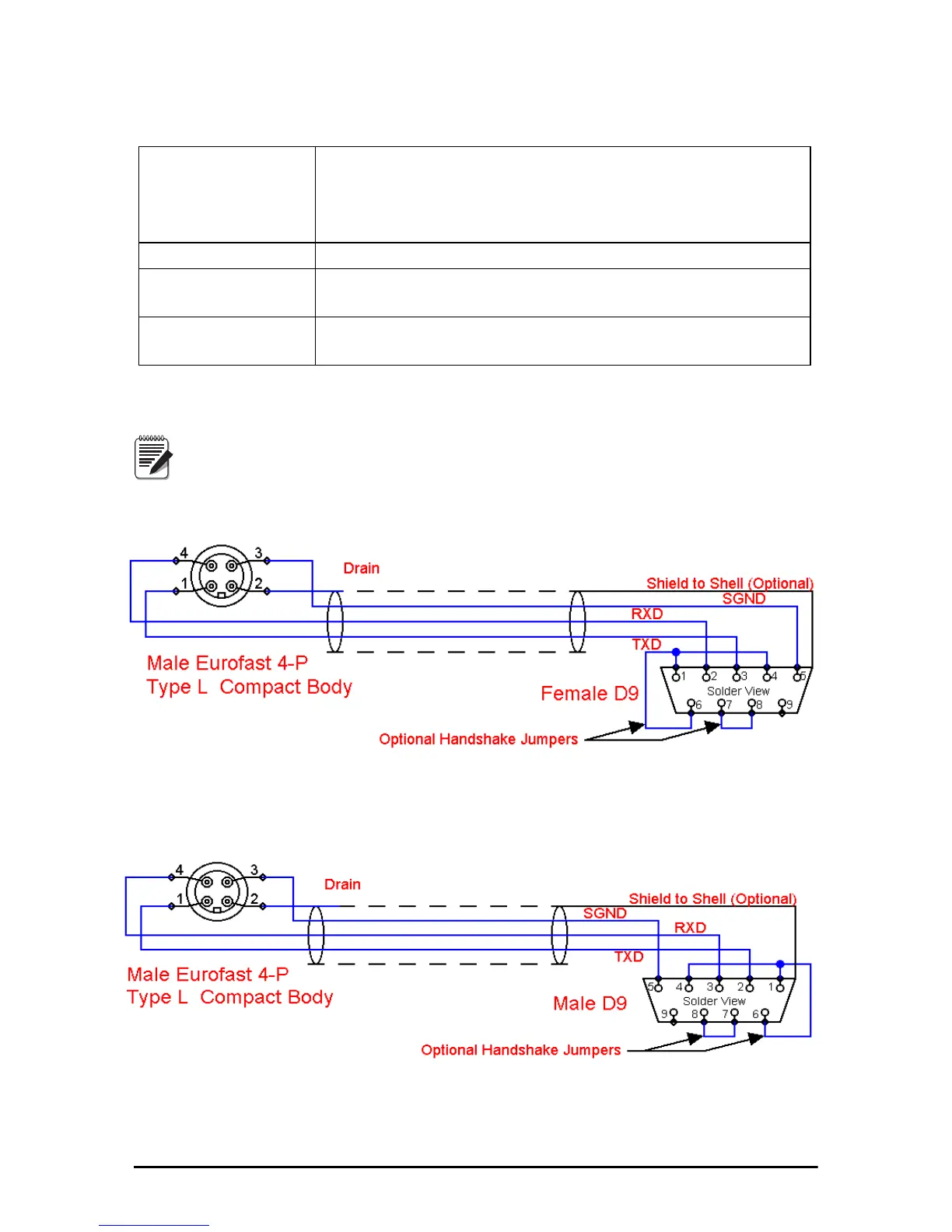
Figure 6-4 Serial Cable Schematic, DCE Configuration for
Connecting to a Computer
Figure 6-5 Serial Cable Schematic,
DTE Configuration for Connecting Directly to a DCE Printer



 To Next Page