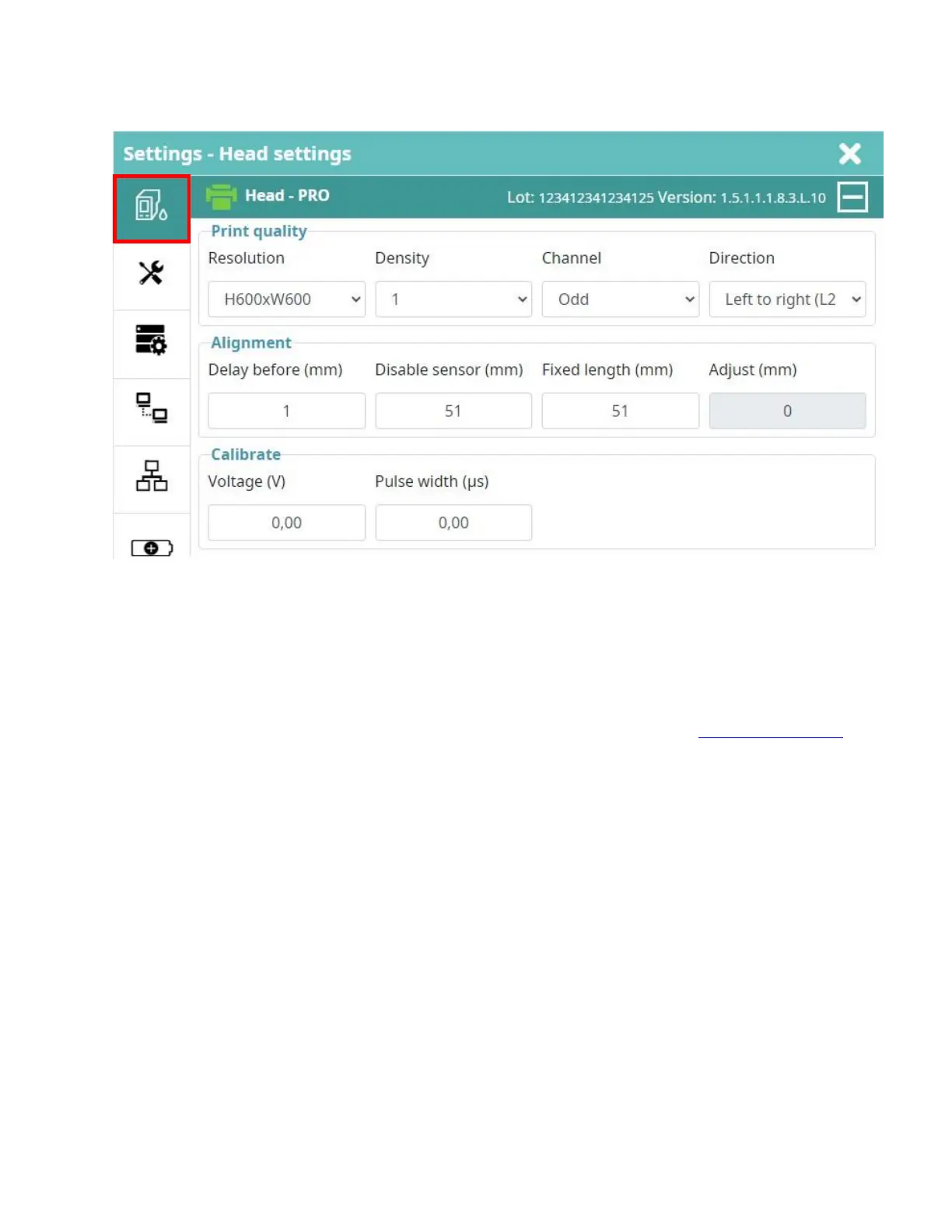
Printing parameters
Head Settings
Resolution
Smart-Jet
®
DUO PRO: Support up to 18 printing resolutions: 600x600, 600x300, 600x200, 600x150,
600x120, 600x100, 300x600, 300x300, 300x200, 300x150, 300x120, 300x100, 150x600,
150x300, 150x200, 150x150, 150x120 and 150x100dpi.
Smart-Jet
®
DUO MAX/Smart-Jet
®
DUO REACH: Support up to 6 printing resolutions: 300x600, 300x300,
300x200, 300x150, 300x150 and 300x100dpi.
The resolution will change the maximum printer speed. Refer to the printing Printing speed table.
Density
Select the number of ink drops for each pixel. Support 1 drop, 2 drops and 3 drops.
Channel
Smart-Jet
®
DUO PRO:
ODD: The printer will use the ODD side nozzles on the cartridge to print only. EVEN:
The printer will use the EVEN side nozzles on the cartridge to print only. NOTE: If
600dpi resolution is used, both nozzle sides will print together.
Smart-Jet
®
DUO MAX: The IUT cartridge has only 1 channel.
Smart-Jet
®
DUO REACH:
ODD: The printer will use the ODD side nozzles on the cartridge to print only. EVEN:
The printer will use the EVEN side nozzles on the cartridge to print only.



 To Next Page