Chapter 3 – SMSFinder Basics and Setup Wizard
Multi-Tech Systems, Inc. SMSFinder User Guide for System Administrators (Document S000451B) 21
Configuring the SMSFinder Using the Wizard Setup
Using the SMSFinder Wizard Setup
Use the Wizard Setup for Quick Configuration
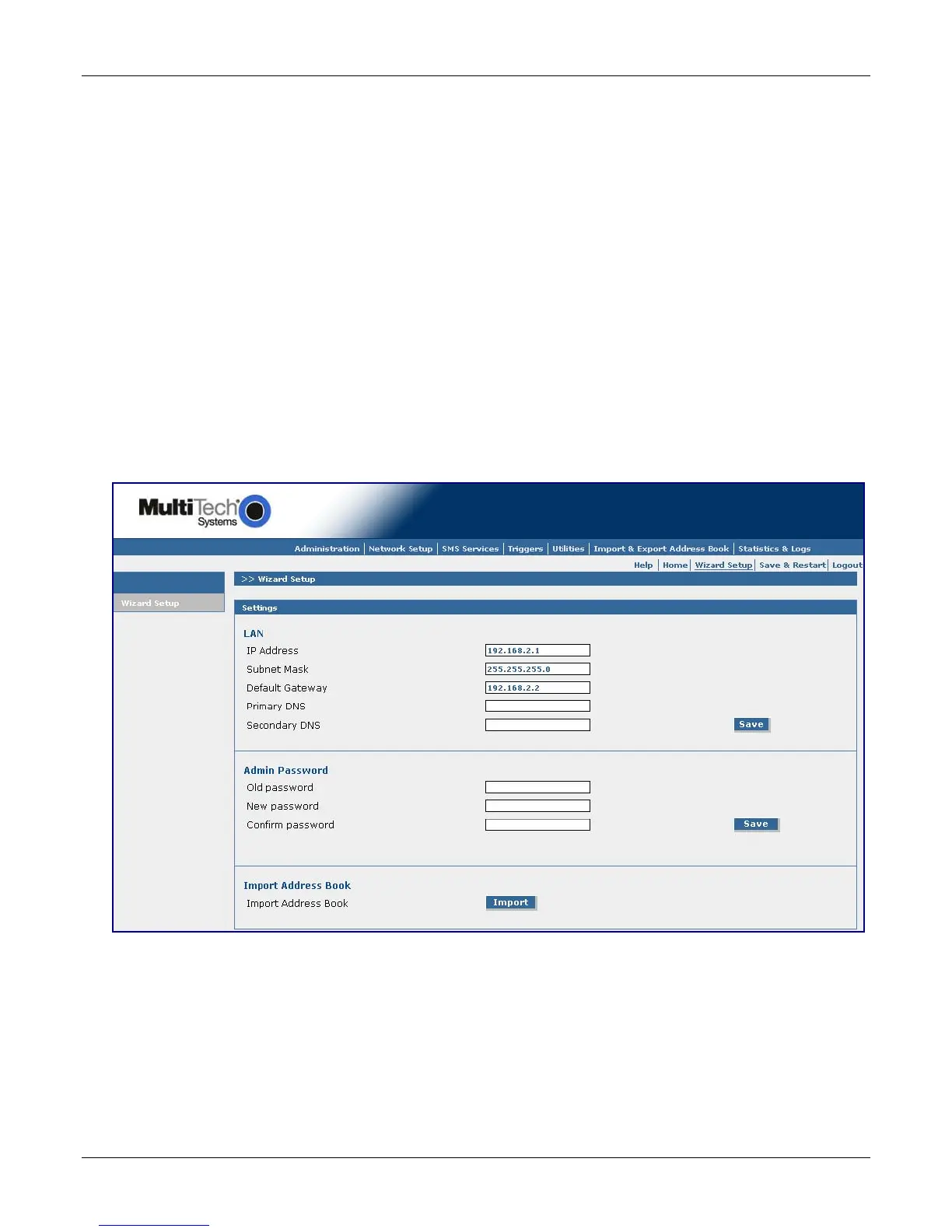
A quick way to configure the SMSFinder is to use the Wizard Setup. The Wizard Setup can be opened by
clicking the words Wizard Setup located under the menu bar. The information entered here will default to
other screens that require this information.
Benefits of Using the Wizard Setup
• Saves time so that you are not entering the same information several times.
• Allows you to start using your device with a minimum configuration.
• Provides a short way to enter and save information needed to create a connection to the Internet.
Note: Additional features and functions can be set up using the complete Web Interface.
Open the Wizard Setup Screen
After you have logged in, open the Wizard Setup screen by clicking on the words "Wizard Setup" located
under the Menu Bar.
Settings – Enter the following information for your Ethernet network.
LAN IP Address – 192.168.2.1 defaults into this field.
Subnet Mask – 255.255.255.0 defaults into this field.
Default Gateway – Enter a default IP Address: example: 192.168.2.2.
Primary DNS – Enter a primary DNS (Domain Server Name) IP Address.
Secondary DNS – Enter a secondary DNS IP Address.
Save – Click the Save button.



 To Next Page