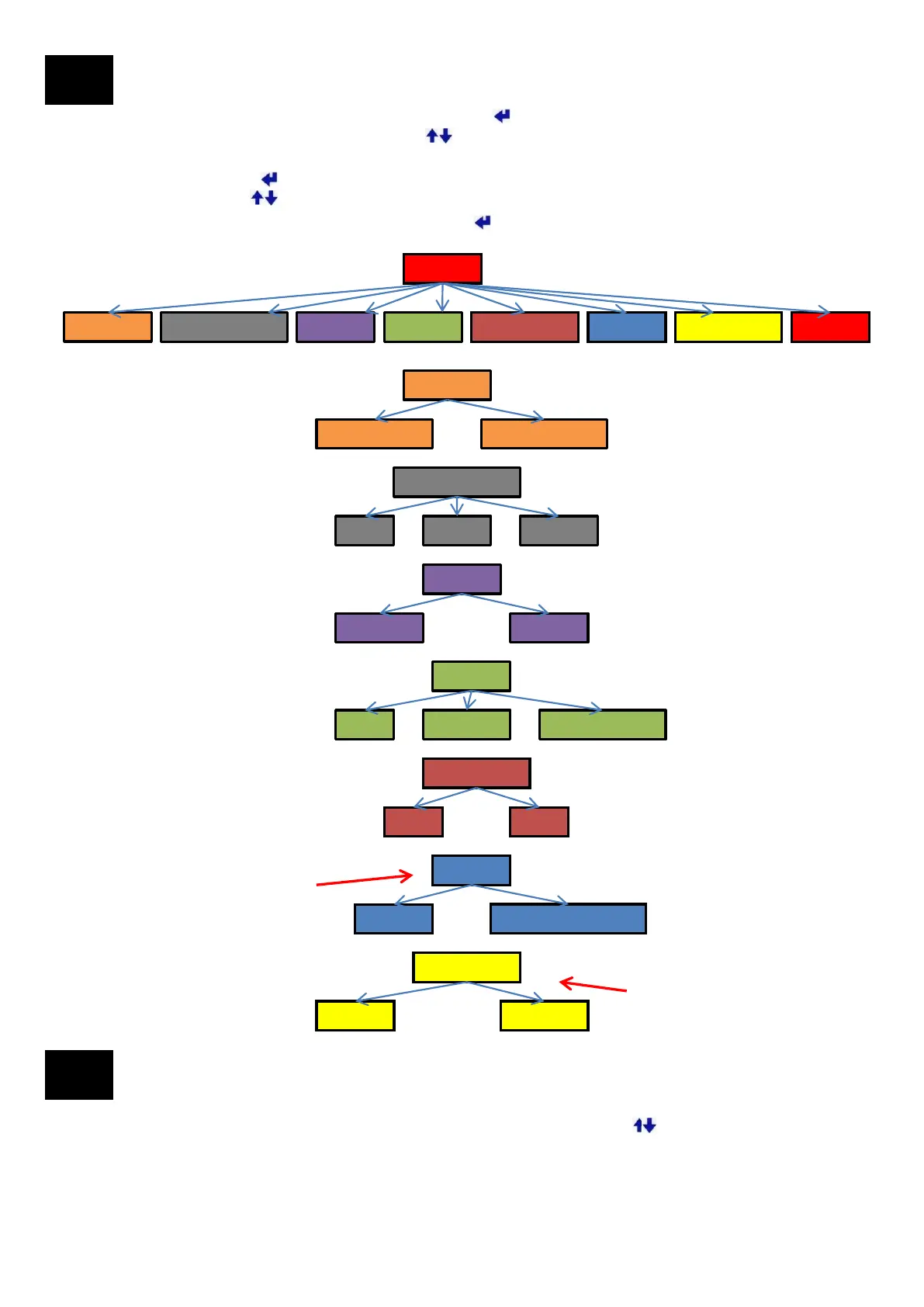
To view the User Interface Menu press the Menu Enter button
Scroll through the menu using the Up/Down buttons
There will be a > next to the selected menu item.
Press the Menu Enter button to toggle the selection.
Use the Up/Down buttons to continue through the menu.
When finished go to EXIT and press the Menu Enter button
The item(s) selected will be saved.
If you are having problems connecting to
WiFi you can select a specific channel.
AUTO: Selects the best available channel
automatically.
LOCN = LOCATION (Latitude & Longitude)
D.D: Decimal Degrees
DM.M: DegreesMinutes.DecimalMinutes
DM.S.S: Degrees Minutes Seconds
EVENTS: Such as when a solution is
calculated there will be a beep.
BTNS: When a button is pressed there will
be a beep.
Laser: TruPulse 200 Laser Rangefinder.
Used for Laser AGL measurement.
User Menu
11
Viewing the Diagnostic and Information Menu
12
Diagnostic and other Information can be viewed by pressing the Up/Down buttons from the main screen
Latitude, Longitude, Elevation, AGL, Tilt, Roll (Information)
Firmware version, Serial Number, WiFi channel (Information)
GLN and GPS Satellite information (Diagnostic)
CSEP, HDOP, GPS>50, GLN>50 (Diagnostic)
MENU
AZIMUTH
LOCN FORMAT UNITS SOUND BACKLIGHT WIFI CH DATA PORT EXIT
AZIMUTH
TRUE NORTH GRID NORTH
LOCN FORMAT
D.D DM.M DM S.S
SOUND
OFF EVENTS BTNS &EVNTS
UNITS
METERS FEET
BACKLIGHT
ON OFF
WIFI CH
CHANNEL 1 TO 11
AUTO
DATA PORT
DATA LASER
12


 To Next Page