Advanced App Features
14
The App contains several advanced features that may not be used that often or not required by the Carriers. The
advanced features are: Import/Export of a csv file, Azimuth Tolerance, and Laser Rangefinder measurements.
Import/Export of a csv Site File
This option allows the user or RF engineer to enter the antenna information into a csv file. The csv file can then
be emailed and directly imported into the Smart Aligner App. The user imports the file and the Antenna Setup
information is populated. Multiple antennas can be listed. It is best to create a blank/generic csv file with the App
and then modifying it for import into the App. Once imported and used to align the antennas a csv file can be
exported with all the alignment measurement data.
Create a Blank/Generic csv File
Run Smart Aligner App
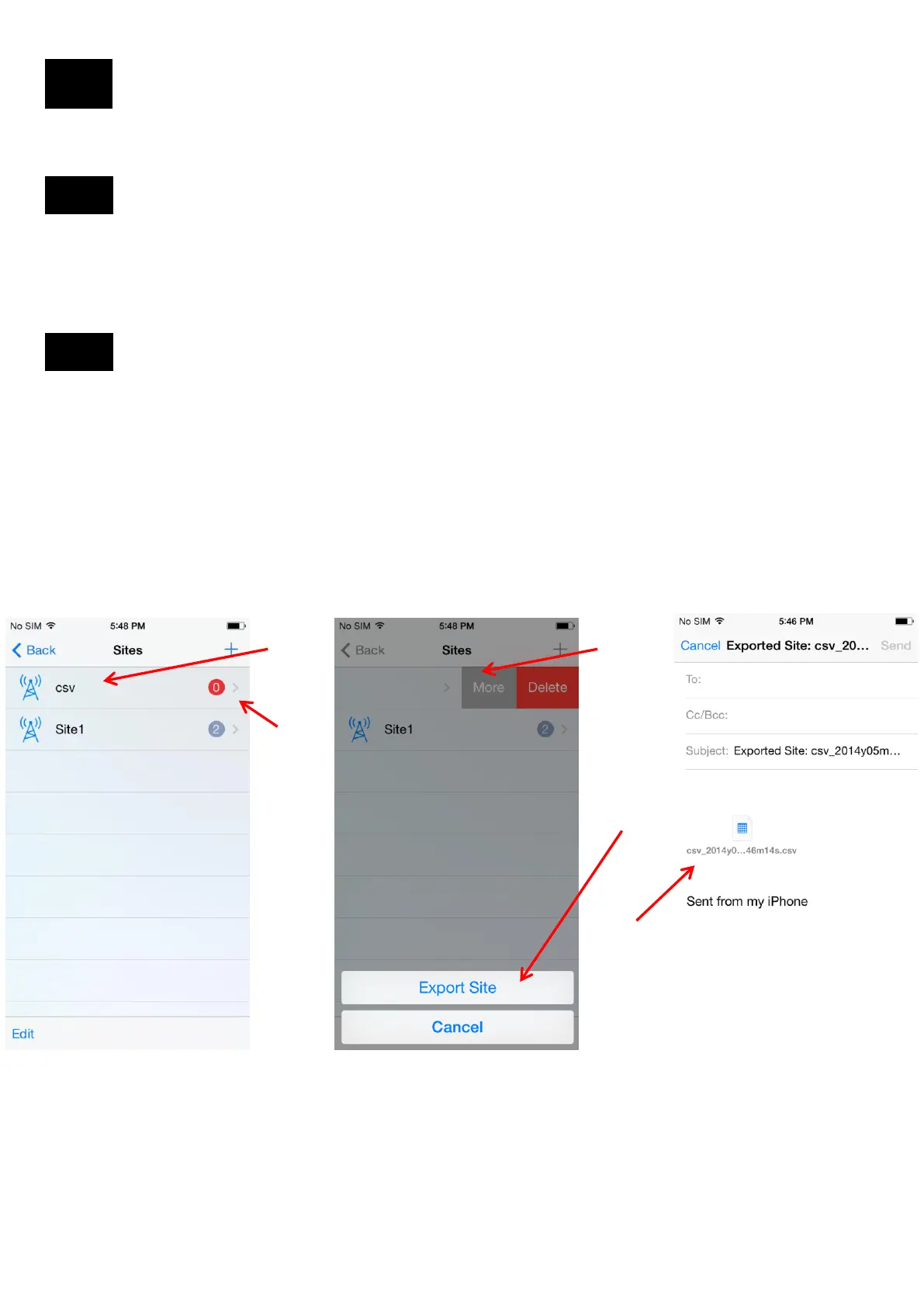
1. Create a “New Site”. For example call it “csv”
2. Swipe left from the “>” and
3. Tap “More”
4. Tap “Export Site”
5. Tap “Yes”
6. The csv file is attached to your email client. The file can now be emailed.
1
2
3
4,5
6
14.1
14.2
22


 To Next Page