16
Optional Brackets
Ericsson AIR 21 Bracket
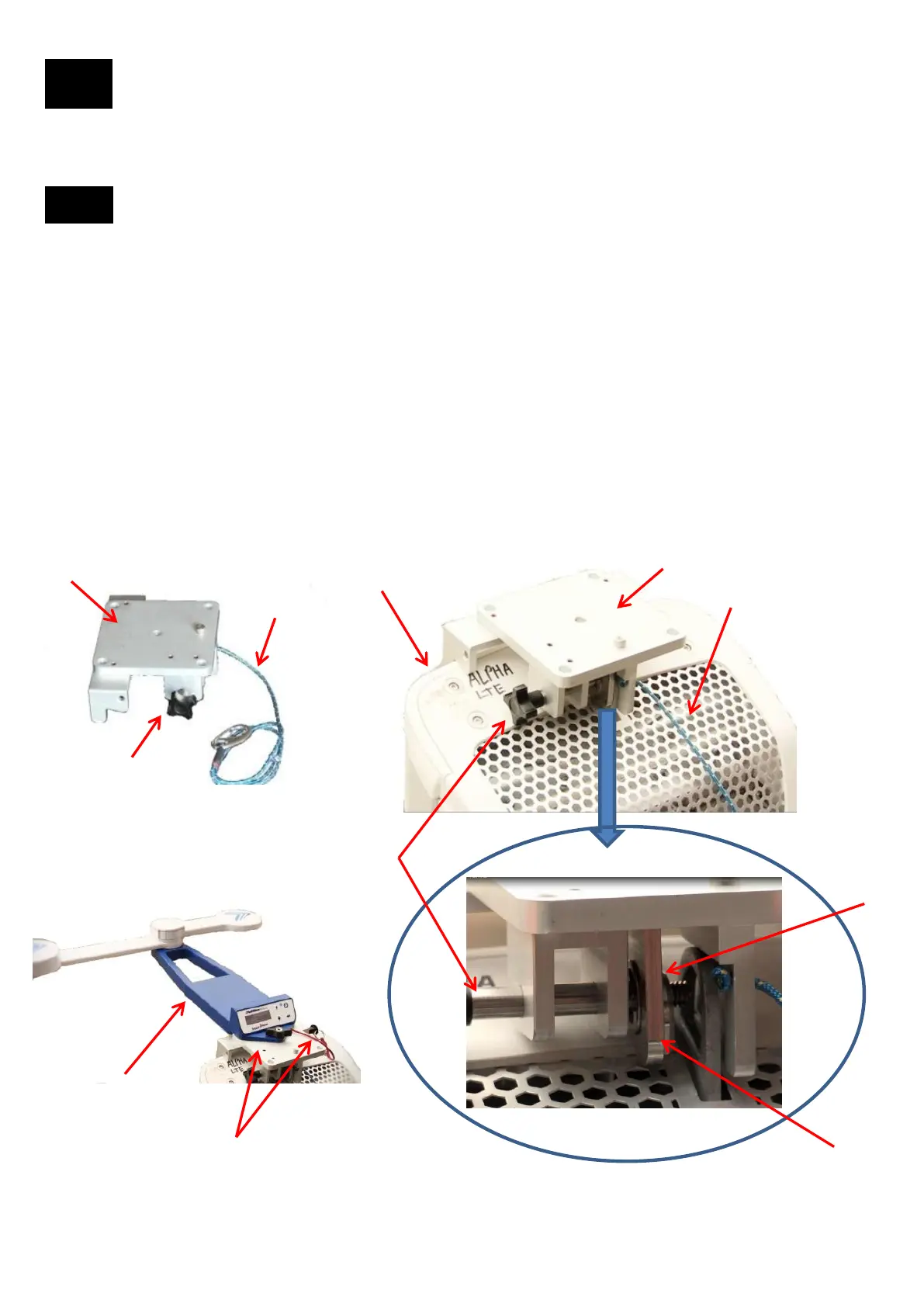
The Ericsson AIR 21 antennas shape and form factor require a custom bracket to be used with the Tool to ensure
accurate results. For this antenna, we have produced an optional bracket that attaches to the top of the AIR21
antenna. It is used instead of the Bracket. The AIR21 Bracket can be stored in the accessory bay in the case.
To attach the AIR 21 Bracket:
1. First attach the AIR 21 Bracket tether to the structure.
2. Place the AIR 21 Bracket over the top the antenna.
3. Open the screw knob so that the antenna lifting ring can be clamped.
4. Once the AIR 21 Bracket is seated squarely on the antenna, start screwing the bolt in until the bracket clamping
plate is tight. The AIR 21 Bracket should be firmly attached to the antenna.
5. The Tool can then be mounted to the top of the mounting plate. Make sure the Tool is tethered to the AIR 21
Bracket. Please note that you can mount the Tool forward, left or right, but not backwards.
The AIR21 Bracket is similar to the Bracket in that the tool will automatically sense what position it is in relative to the
antenna. The Tool is now used in the exact same way to perform an alignment and verification.
There are some antennas that the Bracket is not suited for. Those antennas either have non-flat backplanes, are odd
shapes or have flanges that could interfere with the bracket. We have therefore designed several brackets and
adapters so as to easily mount to these type of antennas.
16.1
1
2
AIR 21
Bracket
Tether
Screw
knob
5
AIR 21 lifting ring
AIR 21
antenna
Bracket clamping plate
4
Tool can be mounted
“Forward” as shown or
“Left” or “Right”
29
3


 To Next Page