App Detailed Description
Main Screen
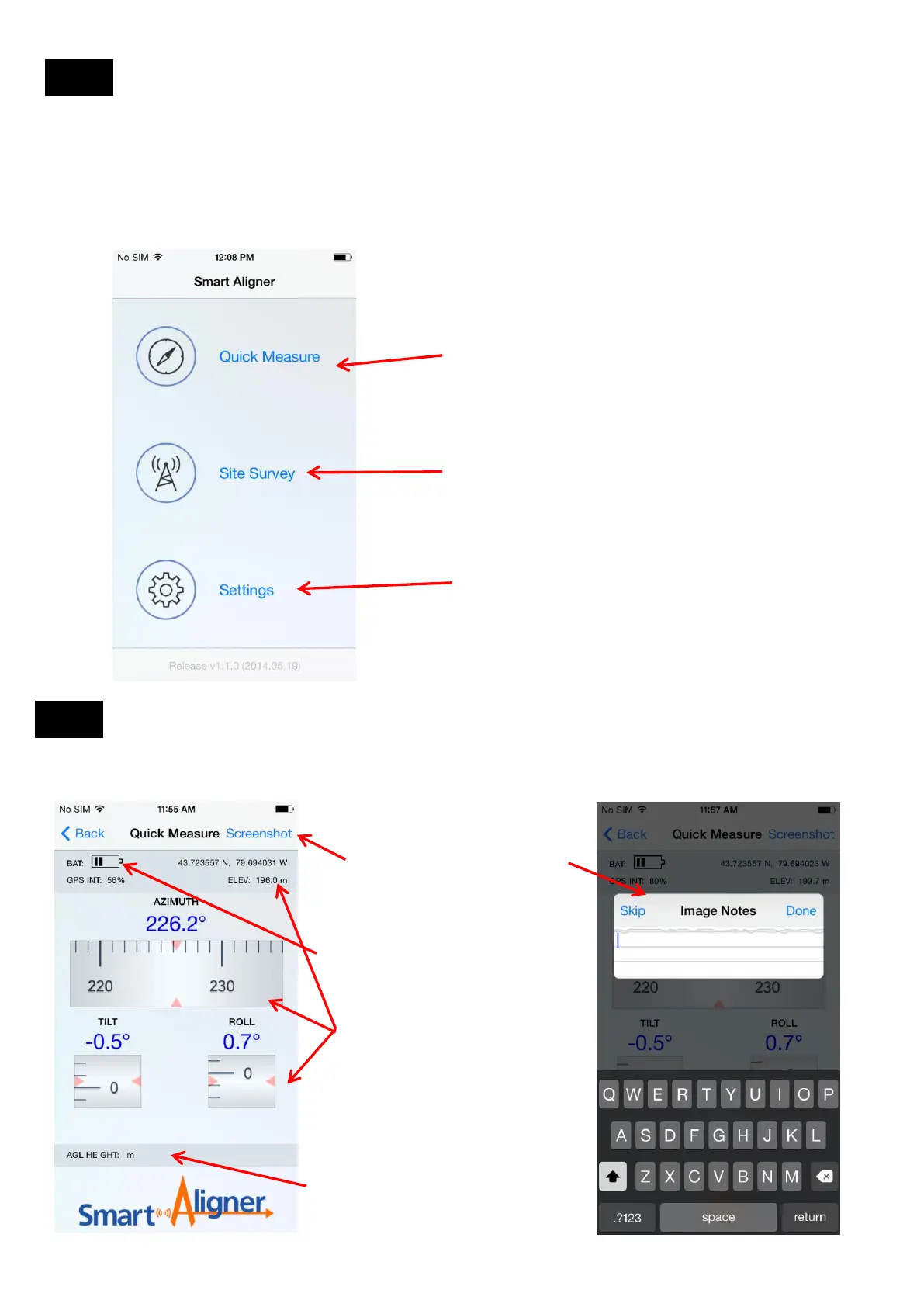
Quick Measure
Quick Measure displays all the relevant
alignment data without having to create a
Site. The user has the option of taking a
screenshot of the alignment data and add
notes to the image.
Site Survey is used to add/edit a site,
perform an alignment, verify the alignment
and create a closeout report. Pictures can
also be taken which are then added to the
report.
User Settings: Units, Location format, and
Simulation Mode
Relevant antenna alignment data
is shown: Azimuth, Tilt , Roll,
Latitude, Longitude and GPS
Elevation.
BAT: Tool battery life. Five bars
represent around 10hrs of
battery life.
AGL HEIGHT: The Laser can be
used to measure AGL HEIGHT
and will be displayed here.
When “Screenshot” is selected an
“Image Notes” screen is
displayed with the keyboard . The
user can then add text such as
Site or other information. The text
and time/date will be annotated to
the image and copied to the
Camera Roll directory.
This section will describe the different screens and features available on the App. After the end of this section there will
be a step by step guide for the user to follow to get familiar with the App. There are some advanced features in the App
that will be described in the Advanced Features section.
Screen 1
Screen 2
After Pressing “Screenshot” in Screen 1
13.2
13.3
14


 To Next Page