Arm Positions
6
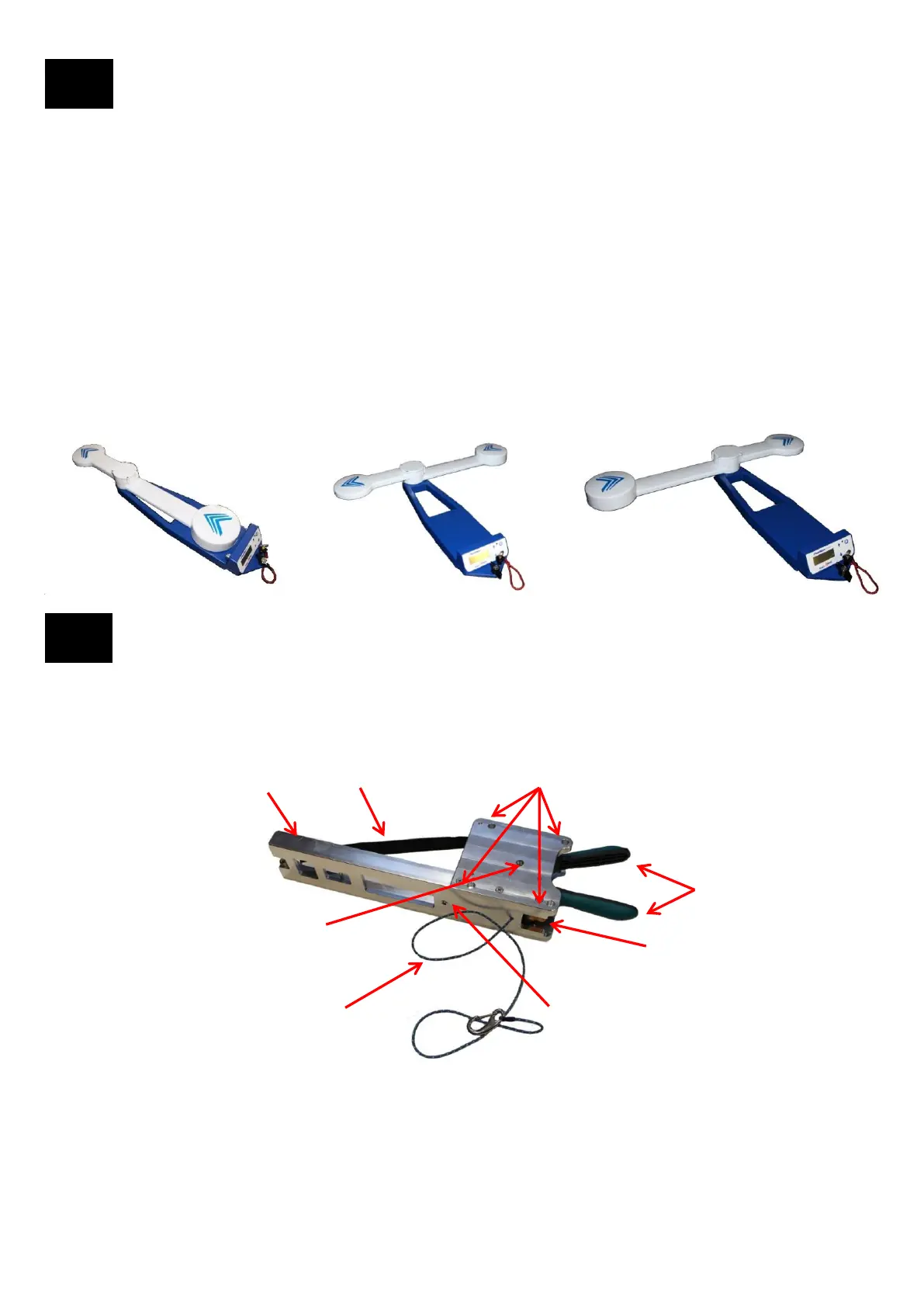
The Long Arm and Short Arm each contain a GPS antenna. The arms can be rotated to three different fixed baseline
positions. Each position sets the two GPS antennas at a separation of 0.5m for optimum accuracy. The “T” positions
also extend the baseline away from the antenna that is being aligned to minimize or eliminate GPS multipath errors.
For each of the positions the Tool compensates the Azimuth measurement so that the Azimuth is always calculated
based on the Forward position. For example: If the Forward azimuth is 0° then moving the arms to the Left T position
would point the arms at 270°. Sensors in the arms detect the rotation and compensate the azimuth +90° back to 0°
(or 270° + 90° = 360° = 0°). In the Right T position the arms would point at 90°. Sensors in the arms detect the
rotation and compensate the azimuth -90° back to 0° (or 90° - 90° = 0° ). When the Tool is mounted on the Bracket
there are sensors that compensate the Azimuth based on how the Tool is mounted. Tilt and Roll are also compensated
in all configurations.
Forward Left T Right T
Bracket Description
7
Strap Release (orange button)
Ratcheting Handles
Dowel Pin Receptacles x 4
Mounting Screw Knob Receptacle
Tether Line
(to mast or other solid location)
Tether Line Receptacle (from Tool)
Ratchet Strap Fastening Pins
Ratchet Strap with hook
Ratchet Strap Fastening Pins: Ratchet Strap hook attaches to Pin.
Ratchet Strap with hook: Strap goes around the front of the antenna and hook is attached to the Fastening Pins
Dowel Pin Receptacles: The two Mounting Dowel Pins on the Smart Aligner Tool mate to two Dowel Pin Receptacles
on the Bracket. The Tool can be attached Front or Back or Right/Left.
Mounting Screw Knob Receptacle: Mounting Screw Knob on Smart Aligner Tool is secured here.
Ratcheting Handles: When handles are ratcheted the strap is tightened around the antenna to be aligned.
Strap Release: Releases tension on Strap.
Tether Line Receptacle (from Tool): Tether Line from Smart Aligner Tool is secured here.
Tether Line (to mast or solid location): Tether Line is secured to the mast or any solid location
The Bracket attaches to the antenna to be aligned. The Tool attaches to the Bracket by mating the Mounting Dowel Pins
on the Tool to the Dowel Pin Receptacles on the Bracket. The Bracket can be attached to the left or right side of the
antenna (right side position is shown). The Tool can be attached in three different positions on the Bracket. Sensors in the
Bracket compensate the Azimuth based on the three different positions.
6


 To Next Page