Maintenance Manual – SC Cutting Plotter
58 AP-74030, Rev / B
6.2.9. Pressure roller pressure adjustment.
Step 1 : Switch off the machine and place the pressure rollers on top of a grid roller.
Step 2 : Remove the transparent cover (Please refer to 6.2.2. Transparent cover).
Step 3 : Remove the Y-rail cover (Please refer to 6.2.4. Y-rail cover).
Step 4 : Take a piece of polyester film of ± 300 cm long, 2.5 mm wide (12” X 1”) and put it between the
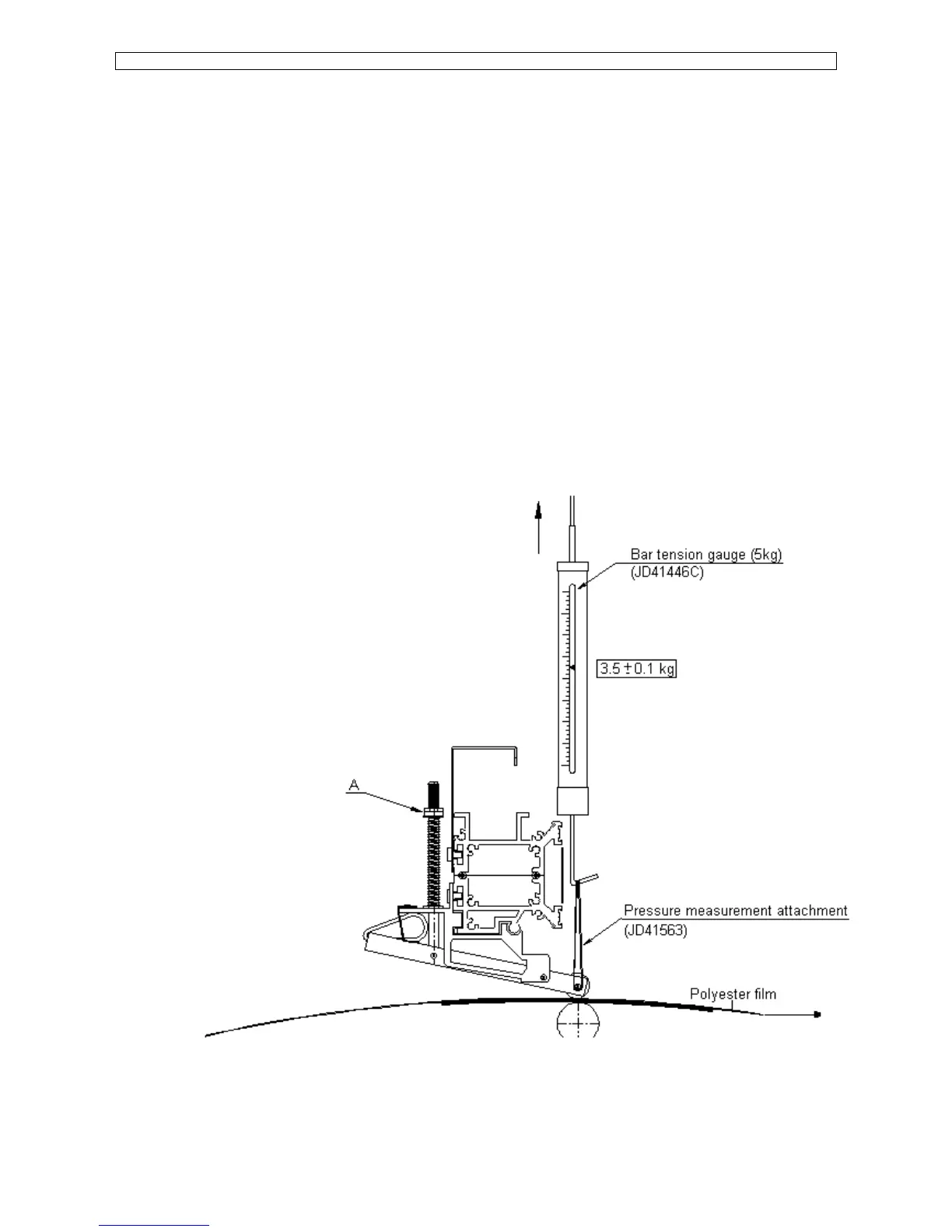
grid roller and the pressure roller (Please refer to the picture mentioned below).
Attach the bar tension gauge (range 5 kg, MUTOH Part# JD-41446C) to the pressure roller shaft
with a piece of rope or with the pressure measurement attachment JD-41563 and pull
simultaneously the film and the tension gauge under 90° angle.
The moment that the film is slipping between the rollers, is the moment to read the value on the
tension gage.
The value should be 3.5 kg ± 0.1 kg.
To adjust the pressure, change the spring tension by turning the nuts A (Please refer to the figure
mentioned below) CW to increase or CCW to decrease the pressure on the rollers.









 To Next Page