Next Call Routing Mailbox
152 ◆ Chapter 2: Features IntraMail System Guide
Related Features
Call Forward to a Mailbox (page 47)
The Next Call Routing Mailbox dial options also apply to a subscriber’s Direct Inward Line while it is
forwarded to their mailbox.
Record and Send a Message (page 158)
Turn to this feature for an explanation of the options a caller can dial while recording.
Programming
Programming Subscriber Mailboxes
Step 1 Assign the Next Call Routing Mailbox to a Subscriber Mailbox (if required).
1.1 1808 - IntraMail Subscriber Mailbox Options: Next Call Routing Mailbox on page 206.
- Specify the Routing Mailbox (000-015) that should provide the caller leaving a message
with additional dialing options.
✔By default, this option is 0 (Call Routing Mailbox 000).
Step 2 Optionally allow the caller to dial additional digits (not just 0) once in the Next Call Routing
Mailbox.
2.1 1808 - IntraMail Subscriber Mailbox Options: Dialing Option on page 205.
- Enter Y (9) to enable additional dialing options.
✔By default, this option is N (6).
Programming Announcement Mailboxes
Step 1 Assign the Next Call Routing Mailbox for the Announcement Mailbox (if required).
1.1 8006 - IntraMail Routing Mailboxes: Next Call Routing Mailbox on page 229.
- Specify the Routing Mailbox (000-015) to which the caller should route after hearing the
Announcement Mailbox message.
✔By default, this option is UND (Undefined - entered by pressing CLEAR).
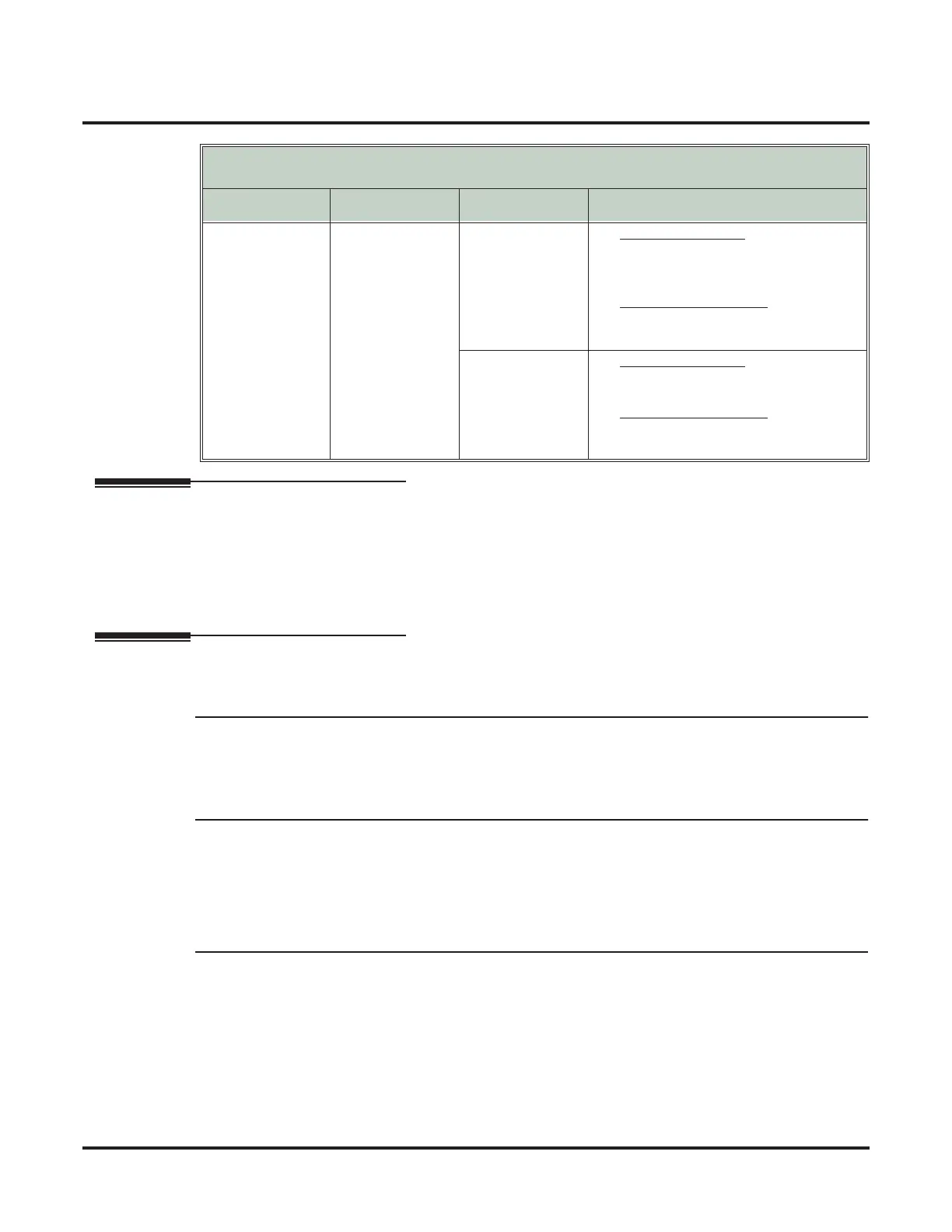
0-15 (valid Call
Routing Mailbox)
x (x number of
repeats)
No ■ If caller doesn’t dial, they hear the
announcement x number of times and
then route to the Next Call Routing
Mailbox.
■ If the caller dials a digit during the
announcement, they route to the Next
Call Routing Mailbox.
Yes
■ If caller doesn’t dial, they hear the
announcement x number of times and
then IntraMail hangs up.
■ If the caller dials a digit during the
announcement, they route to the Next
Call Routing Mailbox.
Routed Announcement Mailbox Routing (Page 2 of 2)
(If the outside caller routes to the Announcement Mailbox from a Call Routing Mailbox)
8006-Next Call
Routing Mailbox
8006-Repeat
Count
8006-Hang Up
After
Action



 To Next Page