Dial Action Table
66 ◆ Chapter 2: Features IntraMail System Guide
Programming
Step 1 Assign a Dial Action Table to each active Call Routing Mailbox.
1.1 8006 - IntraMail Routing Mailboxes: Dial Action Table on page 228.
- The Call Routing Mailbox uses the Dial Action Table assignment to provide dialing options
to callers.
✔The default Call Routing Mailboxes (000-007) use Dial Action Table 1.
Step 2 Customize the Dial Action Table options.
2.1 Turn to 8008 - IntraMail Dial Action Tables on page 246 for a description of all the Dial
Action Table options and the features to which they apply.
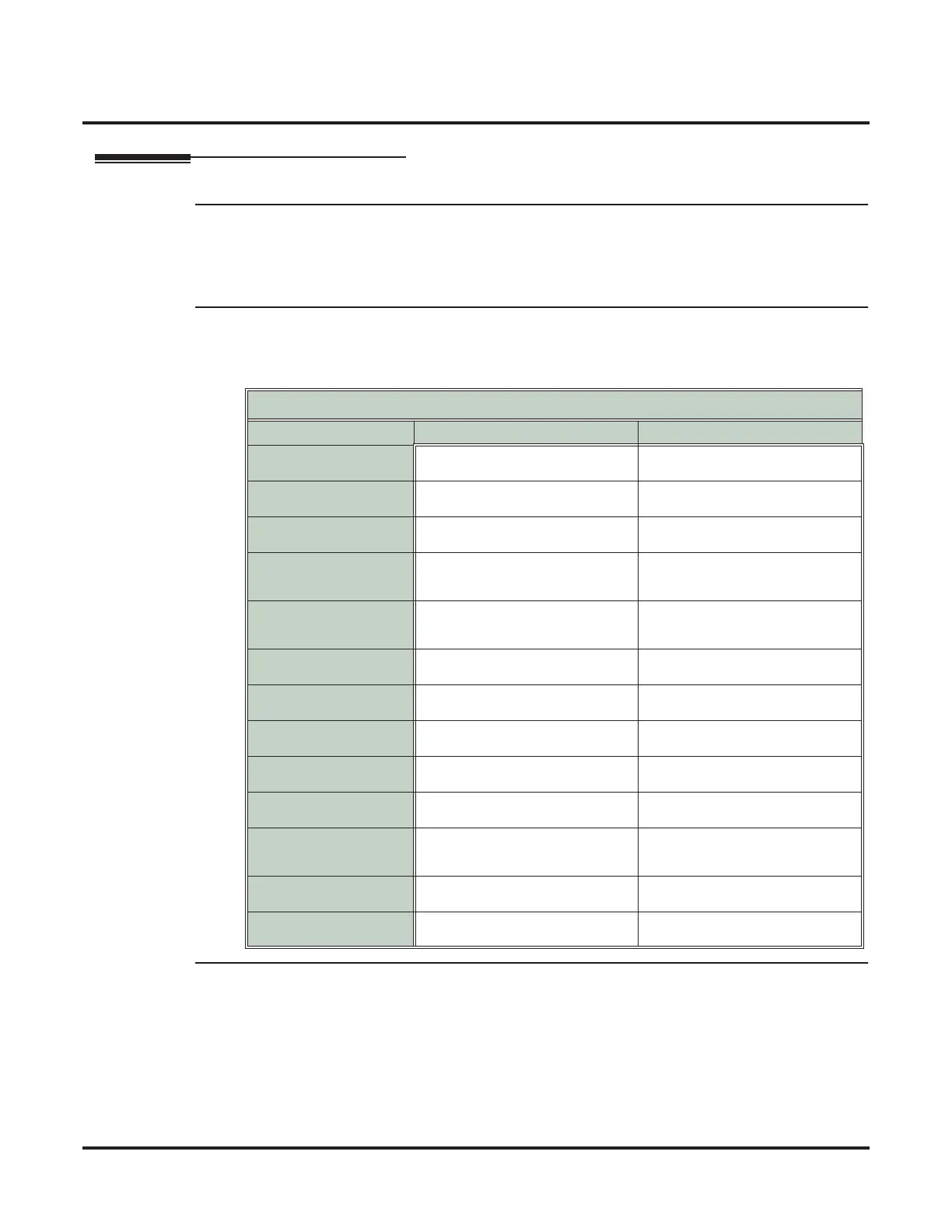
✔The default Dial Action Table dialing options are:
Step 3 Set how long Automated Attendant caller have to dial commands.
3.1 8006 - IntraMail Routing Mailboxes: Time Limit for Dialing Commands on page 228.
- Enter the Time Limit for Dialing Commands interval (0-5 seconds).
✔By default, the interval is 5 seconds.
Dial Action Table Default Settings
Key Dial Action Table 1 Dial Action Tables 2-16
0 UTRF to 300
(Unscreened Transfer to operator)
UND
(Undefined)
1 UND
(Undefined)
UND
(Undefined)
2 UND
(Undefined)
UND
(Undefined)
3 UTRF to XXX
(Unscreened Transfer to user-dialed
extension)
UND
(Undefined)
4 UTRF to XXX
(Unscreened Transfer to user-dialed
extension)
UND
(Undefined)
5 UND
(Undefined)
UND
(Undefined)
6 UND
(Undefined)
UND
(Undefined)
7 UND
(Undefined)
UND
(Undefined)
8 UND
(Undefined)
UND
(Undefined)
9 HNGUP
(Hangup)
UND
(Undefined)
* REC1 to IXXX
(Quick Message with Greeting to user-
dialed extension)
UND
(Undefined)
# LOGON to IXXX
(Logon to user-dialed mailbox)
UND
(Undefined)
Timeout UTRF to 300
(Unscreened Transfer to operator)
UND
(Undefined)



 To Next Page