EasyManua.ls Logo

NEC MH240 - User Manual

NEC MH240
104 pages
Print Icon
To Next Page IconTo Next Page
Loading...
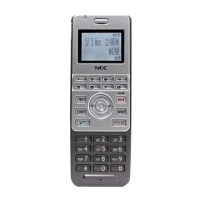
MH240 Wireless IP Telephone
USER’S GUIDE
Preliminary Issue, November 2008

Table of Contents

Other manuals for NEC MH240

Questions and Answers

  • S
    stephaniepalmerAug 15, 2025
    Why is communication lost and audio breaking up on my NEC IP Phone?
    • K
      Kimberly JonesAug 15, 2025
      If you are experiencing communication loss or audio break-up on your NEC IP Phone, try the following: First, check the receiving signal strength. Next, check the battery level when indicated. Finally, ensure your phone is more than 50cm away from the Access Point.
  • M
    mlloydAug 18, 2025
    What to do if my NEC MH240 IP Phone can not power on?
    • C
      colin20Aug 18, 2025
      If your NEC IP Phone won't power on, try these steps: First, press and hold the power key for more than 2 seconds. Second, ensure the battery is properly inserted. Finally, charge the battery.
  • M
    Michael LewisAug 21, 2025
    How to fix NEC MH240 that can not sustain battery power?
    • K
      Kenneth MooreAug 21, 2025
      If your NEC IP Phone battery is draining quickly, try these steps: - Ensure the battery is properly inserted. - Place the battery on the proper position of your cradle. - Replace the battery.
  • K
    Kathryn RobinsonAug 25, 2025
    Why does my NEC MH240 IP Phone not ring?
    • S
      sotobrianAug 25, 2025
      If your NEC IP Phone is not ringing, first check if your phone is placed in courtesy mode, and if so, cancel it. Also, check the ring volume and adjust it to a level other than “Off”.
  • Y
    yperezAug 27, 2025
    What to do if I can not see Antenna Icon on my NEC MH240 IP Phone?
    • C
      Cody TorresAug 28, 2025
      If you cannot see the Antenna Icon on your NEC IP Phone, move to an area where a sufficient signal can be obtained. If this issue persists, it may indicate that SIP server registration is incomplete; in this case, please contact your network administrator.
  • T
    Tonya DavisAug 30, 2025
    What to do if NEC MH240 IP Phone does not ring?
    • K
      Kevin ThompsonAug 30, 2025
      If your NEC IP Phone isn't ringing, first ensure it's not in courtesy mode by canceling it. Also, check the ring volume and adjust it to a level other than 'Off'.
  • H
    Holly BeardSep 2, 2025
    Why does my NEC IP Phone communication have audio break-up?
    • H
      hdorseySep 2, 2025
      If you lose communication or experience audio breakup on your NEC IP Phone, try the following: check the receiving signal strength, check the battery level when indicated, and ensure your phone is more than 50cm away from the Access Point.
  • J
    Jesse PopeSep 5, 2025
    How to power on NEC MH240?
    • A
      Amy HartSep 5, 2025
      If you can't power on your NEC IP Phone, try the following: Press and hold the power key for more than 2 seconds. Ensure the battery is properly inserted. If it still doesn't power on, charge the battery.
  • M
    moodyjessicaSep 8, 2025
    What to do if NEC MH240 keys are not working?
    • A
      Andrea RogersSep 8, 2025
      If you cannot operate the keys on your NEC IP Phone, unlock the phone if a lock icon is displayed. Also, unlock the phone if 'Handy Key Lock' is displayed.
  • M
    Michael FrancisSep 12, 2025
    Why can't I see the antenna icon on my NEC MH240 IP Phone?
    • J
      Jennifer RangelSep 12, 2025
      If you cannot see the Antenna Icon on your NEC IP Phone, move to an area where a sufficient signal can be obtained. If the issue persists, it might be due to an uncompleted SIP server registration. Contact your network administrator in this case.

Summary

PRECAUTION

IMPORTANT SAFETY INFORMATION

Crucial safety precautions for lithium-ion battery packs and general product handling.

INTRODUCTION

WHAT IS MH240?

Introduces the MH240 as a wireless VoIP phone and its key features.

KEYS AND PARTS

Identifies and describes the various keys and physical parts of the MH240 phone.

ICONS

Explains the meaning of icons displayed on the MH240 phone screen.

GETTING STARTED

HOW TO INSERT THE BATTERY

Provides step-by-step instructions for inserting the battery into the phone.

HOW TO CHARGE THE BATTERY

Explains how to charge the phone's battery using the cradle or AC adapter.

BASIC OPERATION

TO POWER ON THE PHONE (STANDBY MODE)

Instructs on how to turn the phone on and enter standby mode.

TO ANSWER A CALL

Explains how to answer an incoming call and reject it.

TO MAKE A CALL

Describes methods for initiating a phone call using the MH240.

TO TRANSFER A CALL

Explains how to transfer an active call to another phone.

FEATURES

TO USE CONFERENCE (3-WAY CALL)

Explains how to establish a three-way conference call.

TO USE SPEAKERPHONE

Guides on activating and using the speakerphone function.

CALL HISTORY

TO VIEW CALL HISTORY

Explains how to access and view the phone's call history records.

TO ADD PHONE NUMBER TO DIRECTORY

Describes how to save call history entries into the phone's directory.

DIRECTORY

TO VIEW DIRECTORY

Explains how to access and browse the phone's directory.

TO SEARCH DIRECTORY

Details methods for searching contacts within the directory.

TO ADD A NEW ENTRY

Explains how to add new contacts to the directory.

SPEED DIAL;PRESET DIAL

TO USE SPEED DIAL

Guides on using speed dial functionality assigned to function keys.

TO USE PRESET DIAL

Guides on using preset dial functionality assigned to dial pad keys.

SETTING

RING VOLUME

Guides on adjusting the phone's ring volume levels.

RING TONE

Explains how to select and customize ring tones for different call types.

LANGUAGE

Explains how to change the phone's display language.

CHANGE PASSWORD

Guides on changing the password for password lock features.

INFORMATION

TO DISPLAY IP ADDRESS

Guides on viewing the phone's IP address, Net Mask, and Gateway.

PASSWORD LOCK

TO USE MANUAL LOCK

Explains how to manually lock the phone for security.

TO UNLOCK YOUR PHONE

Guides on unlocking the phone using the password.

PREFIX DIAL

TO USE PREFIX DIAL

Explains how to use prefix dialing for making calls.

FAVORITES

TO USE FAVORITES

Explains how to access and customize the Favorites menu.

MENU LIST

MENU LIST

Provides a comprehensive list of menu categories and their default values.

TROUBLE SHOOTING

MESSAGE MEANINGS AND SUGGESTIONS

Explains common phone messages and provides troubleshooting suggestions.

TIPS AND SUGGESTIONS

Offers general tips and solutions for resolving operational problems.

SPECIFICATIONS

TECHNICAL SPECIFICATIONS

Lists the technical specifications of the MH240 phone.

LED SPECIFICATIONS

Details the LED status indicators for the phone and cradle.

NEC MH240 Specifications

General IconGeneral
BrandNEC
ModelMH240
CategoryIP Phone
LanguageEnglish

Related product manuals