Hangzhou NeoDen Technology Co.,Ltd.
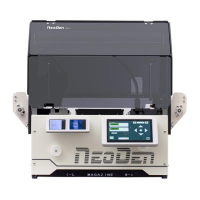
2.1.4 Component list setting
Function: display the information of mounting component, the mounting order of component,
which can via manual programming or import process file to add component quantity and
mounting information, see below figure (2.1.4), operation method:
Figure (2.1.4)
2.1.4.1 Manual programming
●Component edit firstly
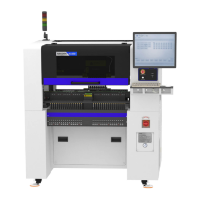
Firstly, select manual programming, there will be a row of example components in the
component information, modify the sample component and click position “align”, the page
will switch to the vision of up-looking camera automatically, see figure (2.1.4.1)
Figure (2.1.4.1) note: a component diagram has been found


 To Next Page