Hangzhou NeoDen Technology Co.,Ltd.
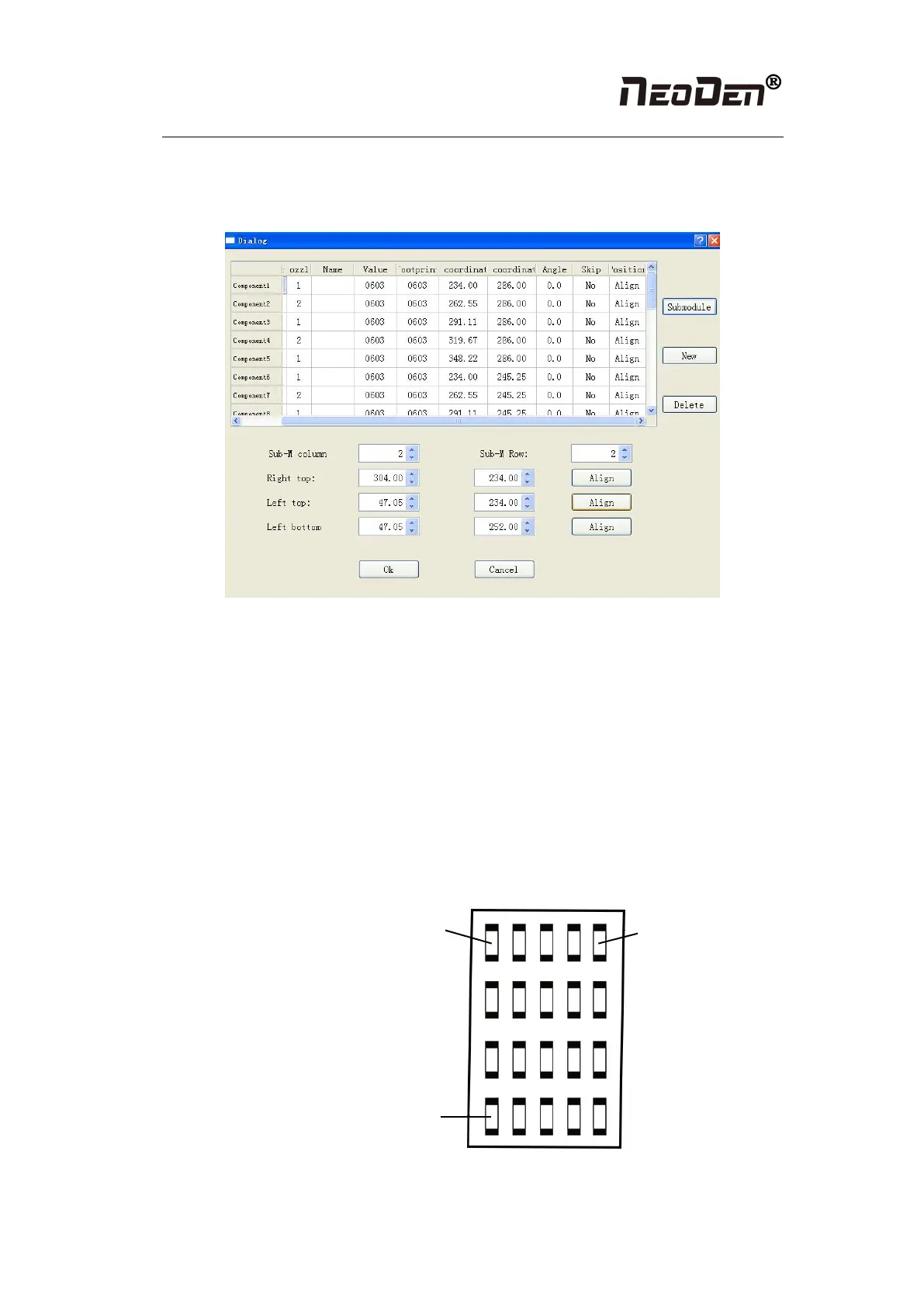
input 2 rows and 2 columns, find 3 head components, after finishing generating it, the
submodule is shown in the figure: we also can select stack, nozzle, name, specification and etc.
to adjust in this page.
Figure (2.1.3.2-4)
There are two ways to submodules can be produced in batches, one is a rectangle, the other is a
circle
① The way to generate rectangle panel: an example is shown as figure (2.1.3.2-5), click:
“producing component in batches”, which will appear a project is shown as figure (2.1.3.2-5),
component specification and component footprint need to input the specification and footprint
what you need. If you look at this lamp panel figure, we can see that it's uniformly symmetric
in four rows and five columns. We can add 4 rows and 5 columns in the row, column of the
machine, follow the tips to find the 3 points orderly to align. The component degree will be
based on actual situation to choose. (Notice: this angle here is the angle in the stack setting, the
default value is 0, follow the actual situation to modify. Click generate, the machine will
automatically generate all components’ coordinate in the figure (2.1.3.2-5)
Figure (2.1.3.2-5)


 To Next Page