INTELLIGENT REACTIVE POWER MANAGEMENT
RM-12P
18
3.9.b.b Inductive Ratio Setting
SAUE
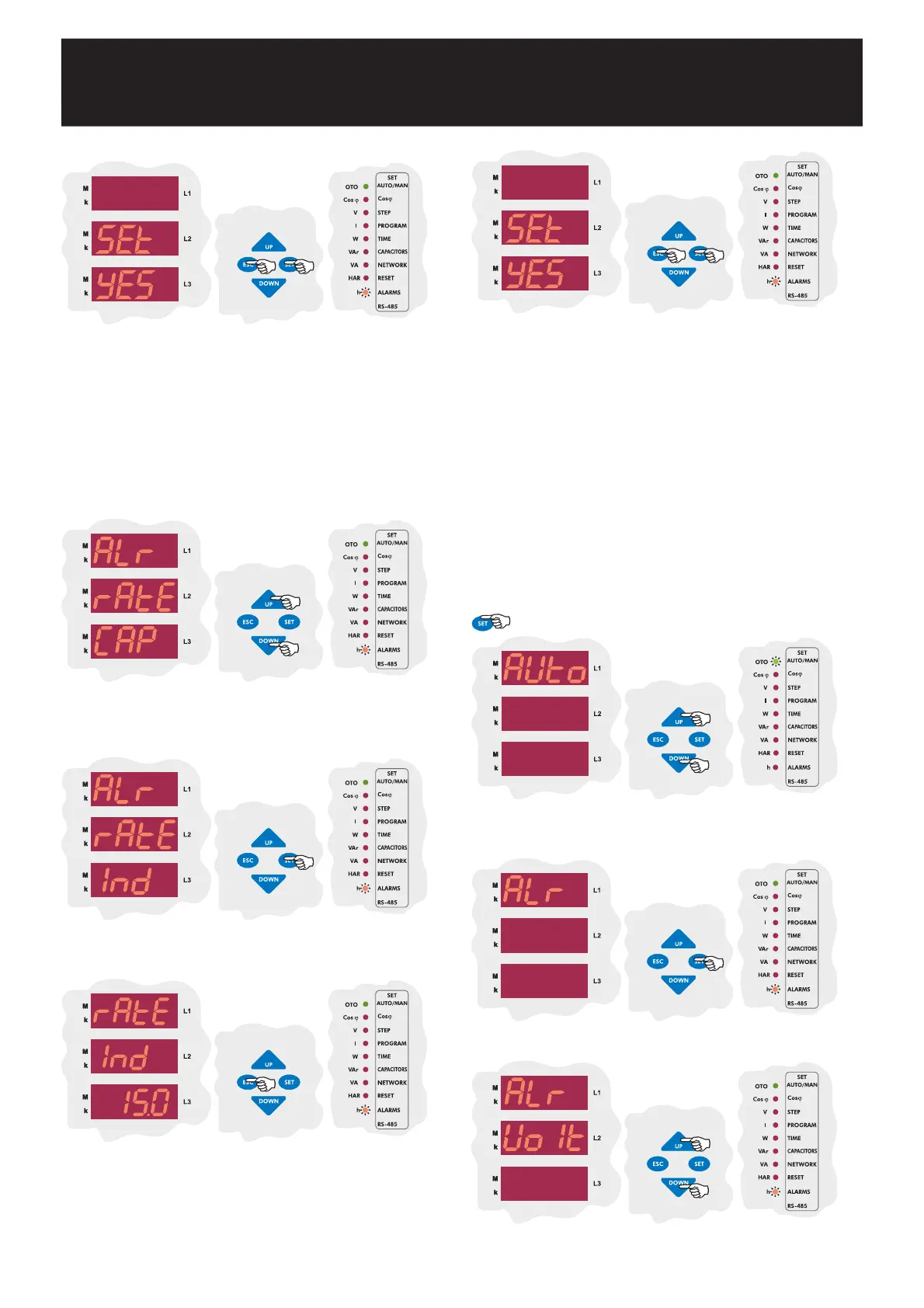
If you do not want to set another parameter, in order to quit from the
menu, press ESC button one by one until SAVE SEt yES is displayed.
Press SET button to save your changes or press ESC button to quit
without saving.
In order to provide accurate compensation, high set value of inductive/active
ratio is set in this menu. This value can be set between 0-99 %. When
inductive/active ratio of the network exceeds preset value, an alarm occurs.
If this value is set as 0, this function is disabled.
When Alr rAtE CAP is displayed, find rAtE Ind menu by using
UP/DOWN buttons.
Enter the inductive/active ratio between 0-99 % and press SET button.
If you do not want to set another parameter, press ESC button.
Press SET button for inductive/active ratio settings.
Enabling the alarm relays according to high value of temperature is
programmed in this menu. This value can be programmed between
00.0-99.9 °C.
(Refer to Technical Features section for measurement ranges)
3.9.c.a Programming the Hihg Limit of Temperature Alarm
Note : Temperature measurement feature is optional for RM-12P.
In order to protect the capacitors from over temperature, high (HEAt SP-
H), low (HEAt SP-L) set values between 00.0-99.9 °C and step protection
(HEAt StEP) are programmed in this menu. After a 10 sec. increasing of
the high value of the temperature, which is programmed in the device,
RM-12P gives an alarm signal (Erro r-10); according to selected step value
(HEAt STEP) relays going to be switched-off or keep remained. After the
temperature decrease the lower limit then alarm situation is disabled.
3.9.c Temperature Alarm Settings
SAUE
If you do not want to set another parameter, in order to quit from the
menu, press ESC button one by one until SAVE SEt yES is displayed.
Press SET button to save your changes or press ESC button to quit
without saving.
Press SET button for alarm settings.
By UP/DOWN buttons, find fan relay (HEAT) menu.
By UP/DOWN buttons, find Alarm (ALr) menu. When Alarm menu
is selected, alarm led lights.
Press SET button for 3 sec. in order to enter to the menu.
3 sec.


 To Next Page