INTELLIGENT REACTIVE POWER MANAGEMENT
RM-12P
19
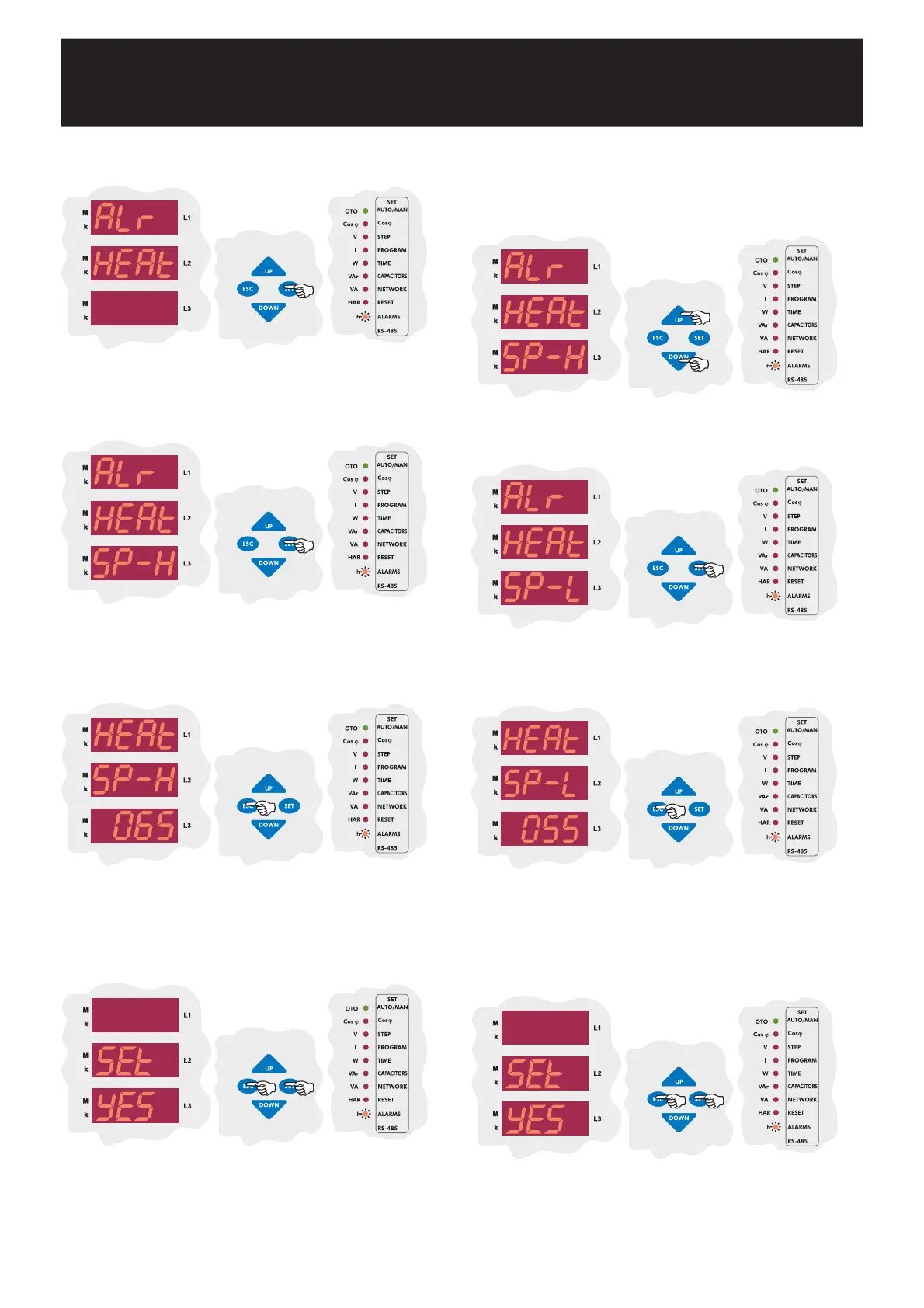
Press SET button to select high set value of temperature (SP-H).
Press SET button to select SP-H parameter for high set value settings.
Enter a value between 00.0-99.9 °C and press SET button. If you do
not want to set another parameter, press ESC button.
SAUE
If you do not want to set another parameter, in order to quit from the
menu, press ESC button one by one until SAVE SEt yES is displayed.
Press SET button to save your changes or press ESC button to quit
without saving.
3.9.c.b Disabling the Temperature Alarm
In order to switch off the fan relay, low set value of temperature is set in this
menu. This value can be set between 00.0-99.9 °C .
(Refer to Technical Features section for measurement ranges)
When ALr HEAt SP-H is displayed, find low setvalve of temperature
value (SP-L) by using UP/DOWN buttons.
Press SET button to set low setvalve of temperature (SP-L)
Enter the low setvalve temperature between 0-99 °C and press SET
button. If you do not want to set another parameter, press ESC button.
SAUE
If you do not want to set another parameter, in order to quit from the
menu, press ESC button one by one until SAVE SEt yES is displayed.
Press SET button to save your changes or press ESC button to quit
without saving.


 To Next Page