EasyManua.ls Logo

Ness ECO8x - Timer Settings

Ness ECO8x
28 pages
Print Icon
To Next Page IconTo Next Page
To Previous Page IconTo Previous Page
Loading...
NESS ECO8x CONTROL PANEL – USER'S MANUAL
22
prOgrAMMINg
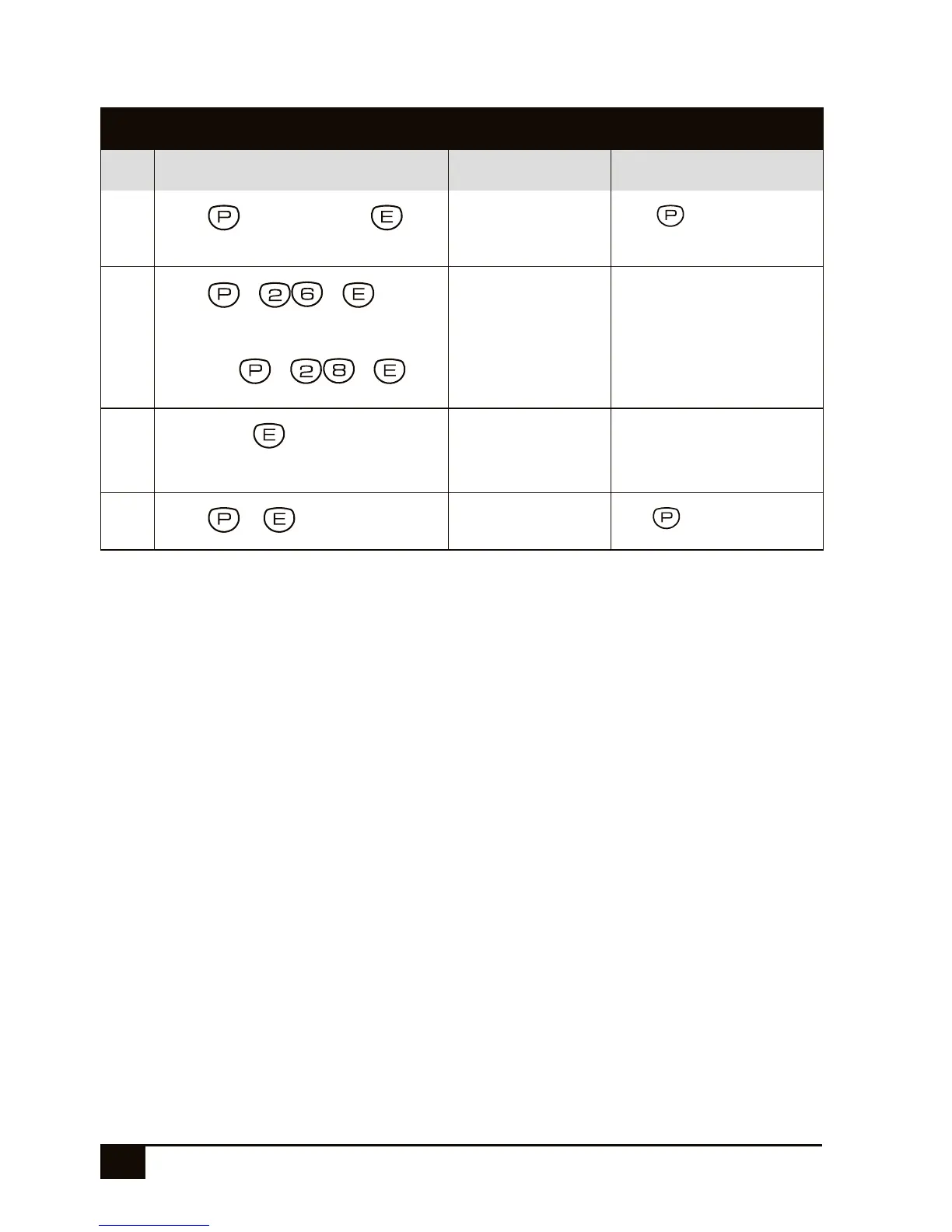
Programming TIMERS
STEP KEYSTROKES DESCRIPTION COMMENT
1
Press +[Master Code]+
Enters User Program
Mode.
The button will light
up in red.
2
Press + +
Enter the option
number for Entry
Delay Time 1.
The existing time, if any, will
be displayed by the keypad
one digit at a time.
...or Press + +
Or enter the option
number for Exit
Delay Time.
3
[new tiMe]+
Enter the new time in
seconds. Example,
enter 25 seconds as
25 + E.
The new time will be dis-
played by the keypad one
digit at a time.
4
Press +
To exit User Program
Mode.
The light will turn off.
See page 20 for the entry and exit delay factory default settings.

Other manuals for Ness ECO8x

Related product manuals