MT 48 | 23
Reverb
Every channel has a send to the built-in reverb. Please note that there is only one reverb pro-
cessor for all four mixers. So, the send level in the individual channels is the same in all four
mixers. However, the Reverb has its own output fader. Using the REV fader, the total amount of
reverb can be adjusted in each mixer individually.
Please note that reverb is for monitoring purposes only, i.e. to give singers and musicians
a more inspiring sound in their headphones. Reverb is not recorded, not even in the PostFX
driver channels.
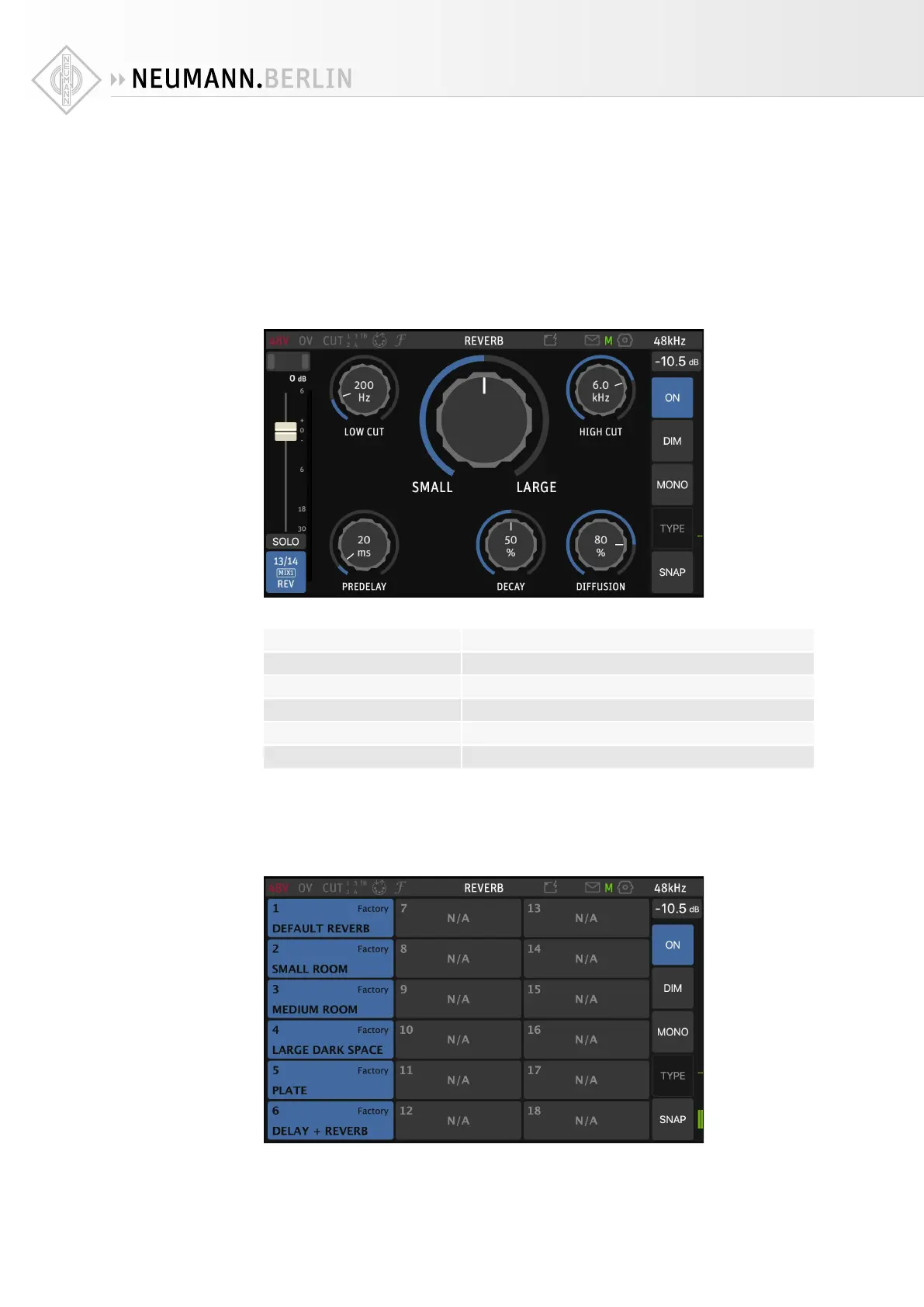
The Reverb parameters can be edited. Press on the REV channel name and select Edit REV:
The controls are similar to what you would find in a plug-in or hardware unit:
LOW CUT 10 Hz … 20 kHz
ROOM SIZE small … large
HIGH CUT 10 Hz … 20 kHz
PREDELAY 0 … 300 ms
DECAY 0 … 100%
DIFFUSION 0 … 100%
Snapshots
EQ, Dynamics, and Reverb each have their own snapshots (presets), which, of course, is par-
ticularly useful for the Reverb:


 To Next Page