EasyManua.ls Logo

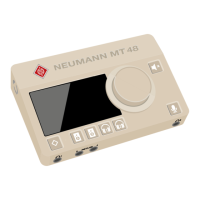
Neumann.Berlin MT 48 - User Manual

Neumann.Berlin MT 48
39 pages
Print Icon
To Next Page IconTo Next Page
Loading...
   ·  .  ·   · 
  () /   - ·  - · @. · ..
MT 48
 
. /
A brief introduction
Question and Answer IconNeed help?

Do you have a question about the Neumann.Berlin MT 48 and is the answer not in the manual?

Summary

Preface: Mission Statement

Whats in the Box? MT 48 Contents

System Requirements for MT 48

MT 48 Overview and Key Features

Input and Output Connectivity

Analog I;O Port Details

Details the analog input and output connections on the device.

Digital I;O and Connectivity Options

Digital I;O Expansion (ADAT, S;PDIF, AES67)

Explains ADAT, S/PDIF, and AES67 expansion capabilities.

GPIO and MIDI Port Usage

Describes the function and usage of GPIO and MIDI connectors.

Powering the MT 48 Audio Interface

Product Registration and Driver Installation

Register Your MT 48 Product

Instructions for registering the MT 48 device online.

MT 48 Driver Installation Guide

Steps for installing the necessary MT 48 drivers on your computer.

Initial Setup and Gear Connection

MT 48 Device Placement and Setup

Guide on placing and connecting the MT 48 for the first time.

Connecting Audio Gear to MT 48

How to connect speakers, headphones, mics, and instruments.

Adding I;O via ADAT, S;PDIF, and AES67

Configuring MT 48 USB I;O

USB I;O: Inputs Routed to Computer

Configure which analog, optical, or peered inputs are sent to the computer via USB.

USB I;O: Software Playback to Mixer

Software Playback to MT 48 Mixer

Set up DAW playback channels that are routed to the MT 48 mixer for monitoring.

USB I;O: Software Playback Direct Routing

Software Playback - Direct Routing

Bypass the MT 48 mixer for DAW playback, routing directly to outputs.

Routing Example: External Outboard as DAW Plug-ins

DAW Integration and Setup

DAW Setup Basics and Driver Selection

How to select the MT 48 driver and general DAW integration.

DAW Buffer Size and Latency Settings

Adjusting buffer size for optimal latency and CPU performance in the DAW.

Setting Up DAW Inputs and Outputs

Working with the MT 48 Mixer

Mixer Structure and Output Routing

Understanding the four independent stereo output mixers and their routing.

Preamp Controls and Settings

Adjusting gain, pad, phase, low-cut, and phantom power for inputs.

EQ Module Functionality

Details of the 4-band parametric equalizer on each channel.

Dynamics Processor (Gate, Compressor, Limiter)

Using the Gate, Compressor, and Limiter sections for signal processing.

Reverb and Snapshot Features

Built-in Reverb Controls

Adjusting reverb parameters for monitoring purposes.

Device Snapshot Management

Storing and recalling device configurations using snapshots.

Monitor Control and Mixer Details

Monitor Controller Functions

Using DIM, MONO, and SOLO features for monitoring.

MT 48 Mixer Channel Strip Customization

Renaming, coloring, linking, and grouping channels in the mixer.

Strips Setup Configuration

MT 48 Status Bar Indicators

Remote Control and Web Interface

MT 48 Remote Control App

Using the computer app for remote control of the MT 48.

Web Control Interface Overview

Accessing and controlling the MT 48 via a web browser.

Controlling MT 48 from a Tablet

Advanced Settings and Output Options

Output Level Adjustments

Setting maximum output levels for analog and headphone outputs.

Speaker A;B Latch Mode

Enabling A/B speaker switching with automatic muting.

Output Routing Configuration

Output EQ and Dynamics Processing

Output EQ Settings

Applying 4-band EQ to mixer outputs for room correction.

Output Dynamics Module

Using Gate, Compressor, and Limiter on mixer outputs.

Configuring Headphone Outputs

Headphone Output Level Settings

Adjusting maximum output levels for headphone outputs.

Headphone Crossfeed Simulation

Applying crossfeed to simulate loudspeaker listening on headphones.

Talkback Functionality

Sampling Rate and Clocking Settings

DAC Filter Modes

Device Snapshot Storage and Recall

Appendix: Firmware, MA1, and FAQ

Firmware Update Procedure

Step-by-step guide to update the MT 48 firmware.

Using MT 48 with Neumann MA 1 Alignment

Connecting and using the MT 48 with the MA 1 system.

Frequently Asked Questions (FAQ)

Answers to common questions about the MT 48.

MT 48 Signal Flow Diagram

Neumann.Berlin MT 48 Specifications

General IconGeneral
Digital I/OADAT, S/PDIF
USBUSB-C
PowerExternal power supply
TypeAudio Interface
Sample RateUp to 192 kHz
Bit DepthUp to 24-bit
Phantom Power48V
Internal ProcessingDSP
DisplayTouchscreen
Channels4 in / 4 out
SoftwareIncluded control software
Analog Inputs4 x XLR/TRS combo

Related product manuals