PPRROOGG
GG RR AA BB LLIIVV EE RR EE PP EE AA TT
00 33 33 00
MMUUSSIICC OONN
RRPPTT 5500
LLEENN 4400
RRPPTT 11
LLEENN 3300
RRPPTT 22
LLEENN 3300
RRPPTT 11
LLEENN 4400
RRPPTT 11
LLEENN 0055
RRPPTT 22
LLEENN 0055
RRPPTT 55
LLEENN 0055
RRPPTT 0033
LLEENN 3300
RRPPTT 11
LLEENN 0055
RRPPTT 0033
LLEENN 0055
RRPPTT 0033
LLEENN 0055
RRPPTT 0033
LLEENN 0055
LL EE NN GG TT HH
MM UU SSIICC UU NN IITT SS
0022
0011 0022 0033 0044 0055 0066
0077 0088 0099 1100 1111 1122
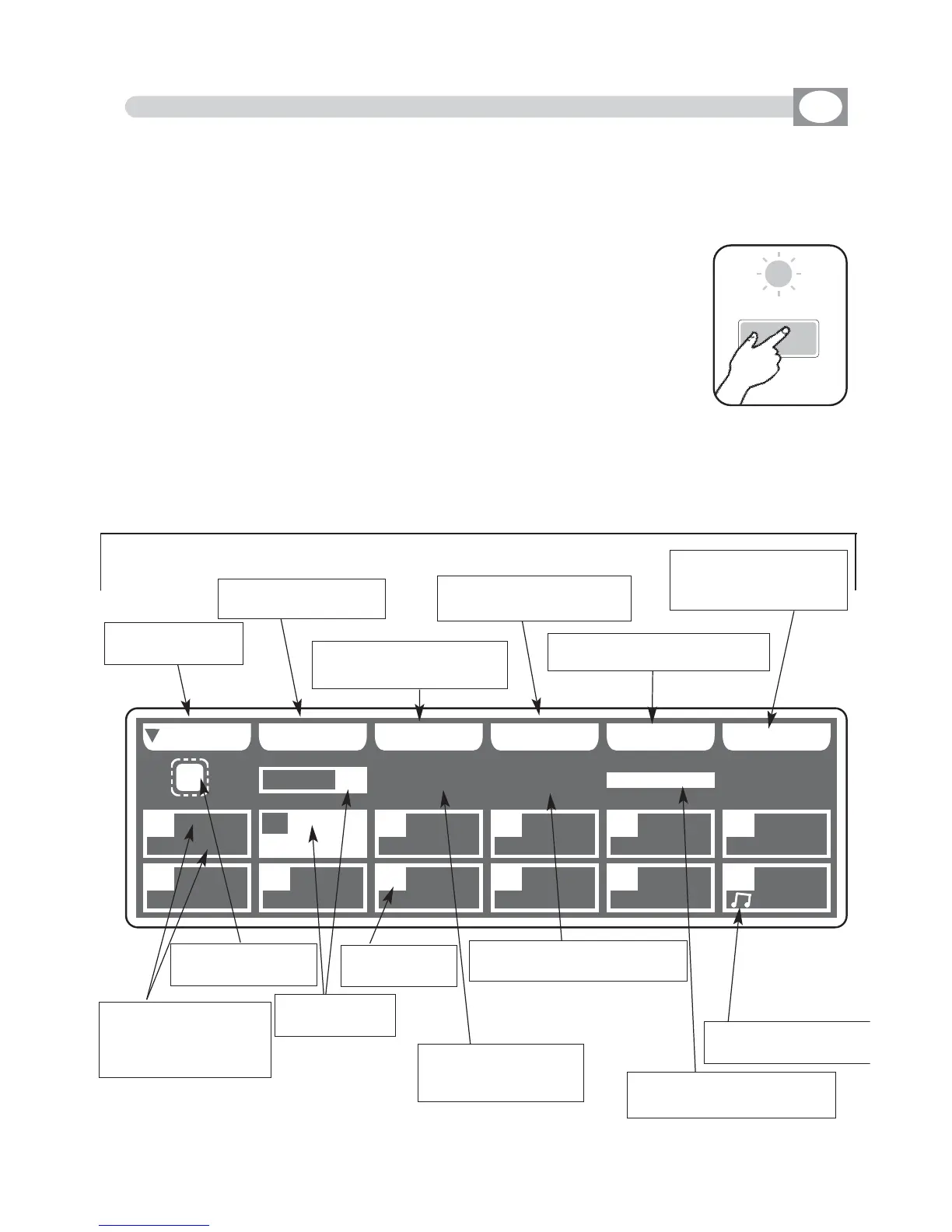
5.1 EDIT PROGRAM MODE
GB
Press
PROGRAM
key to activate
PORGRAM
function.
(Fig. 14)
The
PROGRAM
key led will light up to indicate the activation of this
function, and the display changes as shown in
(Fig. 15).
The graphic display indicates the program (
hhiigghhlliigghhtteedd
) currently active
(Fig. 15).
THIS FUNCTION ALLOWS TO ACTIVATE A PROGRAM AND CHANGE THE PARA-
METERS OF THE SAME.
A PROGRAM IS A SEQUENCE OF SCENES (STATIC) , EXECUTE IN SEQUENCE
FROM 1 TO MAX 48.
Press one of the 1÷12 keys to select the program.
For successive programs use the
PPAAGGEE
key.
Function Keys
see par 5.2
Fig. 14
Fig. 15
the repetition of the
active program from
1 to 99
Indicate if the program is in
musical with
MMUUSSIICC OONN//OOFFFF
Indicate if the program
is in musical with
NNOOTTAA
Indicate the length of the
active program from 1 to 48
the number of
the program
Shows the acti-
ve program
Shows with
RRPPTT
how
many times to repeat
program and with
LLEENN
the length
Indicate that the
program is in stop
Key to start the
program
Key to select more
programs
Key to modify the repeti-
tion of the program
Key to modify the length
of the program
Key activate the program in
musical mode
Key to select the unit
that must work in the
program
Program



 To Next Page