EEFFFFTT
GG OO !! SS EE LL EE CC TT RR EE PP EE AA TT
00 11 00
NNOORRMMAALL
RRPPTT 001100 RRPPTT 001100
CCIIRRCC//ZZIIZZGG CCIIRRCC//ZZIIZZGG
RRPPTT 001100
CCIIRRCC//ZZIIZZGG
RRPPTT 001100
SSQQRR//HHOOLLAA
RRPPTT 001100
HHOOLLAA//CCIIRRCC
RRPPTT 001100
CCIIRRCC//CCIIRRCC
RRPPTT 001100
VVEERRTT//VVEERRTT
RRPPTT 001100
OOFFFF//OOFFFF
RRPPTT 002255
SSQQRR//SSQQRR
RRPPTT 000055
CCIIRRCC//SSQQRR
RRPPTT 001100
HHOOLLAA//SSQQRR
RRPPTT 001100
CCIIRRCC//ZZIIZZGG
22 nn dd RR OO WW
EE DD II TT UU NN IITT SS
0022
0011 0022 0033 0044 0055 0066
0077 0088 0099 1100 1111 1122
7.1 EFFECT MODE
GB
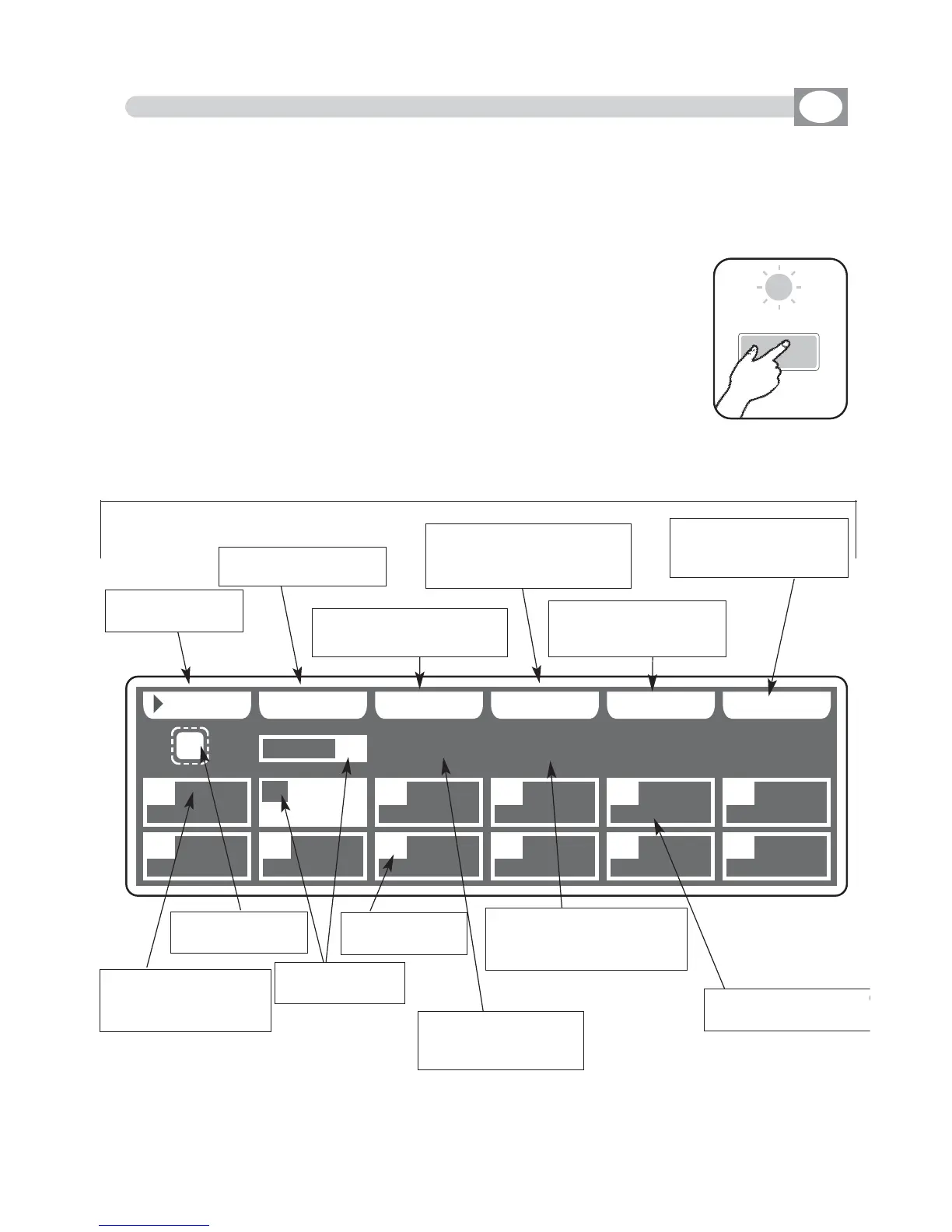
Press
EFFECT
key to activate
EFFECT
function
(Fig. 18)
The
EFFECT
key led will light up to indicate the activation of this
function, and the display changes as shown in (Fig. 31).
The graphic display indicates the effect (
hhiigghhlliigghhtteedd
) currently active
(Fig. 32).
THIS FUNCTION ALLOWS TO ACTIVATE AN EFFECT GENERATOR AND MODIFY
THE PARAMETERS.
USING THIS MODE OF OPERATION IT IS POSSIBLE CREATE ANIMATIONS
OF NOTABLE EFFECT WITH AN ONLY COMMAND.
Press one of the 1÷12 keys to select the effect.
For successive effect use the
PPAAGGEE
key
Function Keys
see par 7.2
Fig. 31
Fig. 32
the repetition of the
active effect from
001 to 999
Indicate the applied
effect for
PAN/TILT
Indicate the applied effect
of the second row of the
selected scanner
the number of
the effect
Shows the active
effect
Shows with
RRPPTT
how
many times to repeat
effect
Indicate that the
effect is in stop
Key to start the
effect
Key to select more
effect
Key to modify the repeti-
tion of the effect
Key to modify the effect of
the second row of the
selected scanner
Key to create or modify
the active effect see
par
77..33
Key to select the unit
that must work in the
effect
Effect



 To Next Page