42
TemBreak PRO P_BE-UM-001-EN V1.3.0
Commissioning
LTD Adjustments (I
r
, t
r
)
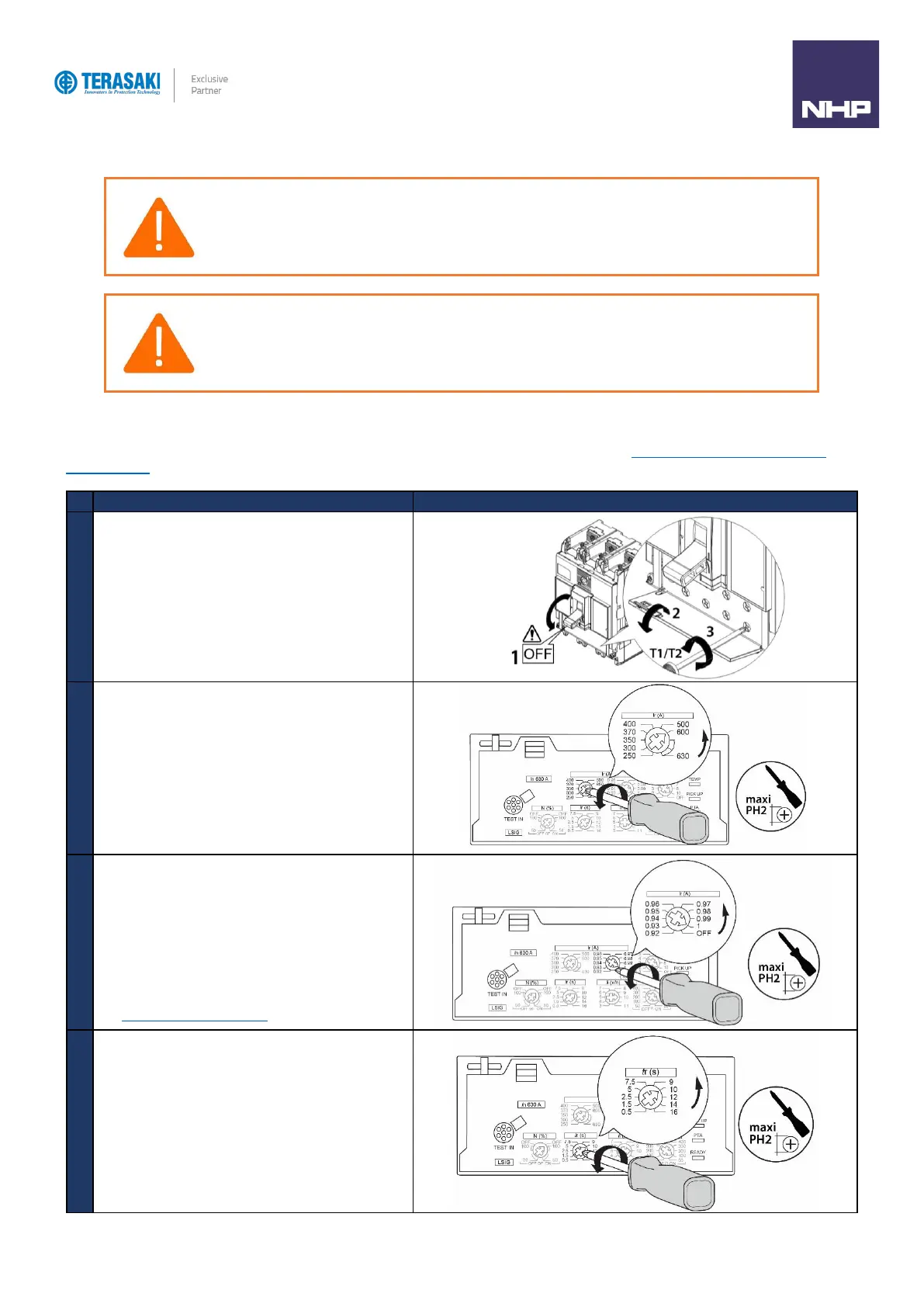
The LTD protection is configured by the I
r
and t
r
adjustment rotary dials, which is performed as follows. Refer to Protection Settings – Long Time Delay
Protection (LTD) section for further detail on setting I
r
and t
r
Turn the MCCB to the OFF Position
Open the transparent flap to access the max l
r
adjustment
dials
Using a PH1, PH2 or PZ2 size screwdriver, rotate the I
r1
adjustment dial to the maximum scale value of I
r
in Amperes.
If required, turn the I
r2
fine adjustment dial to the required
percentage of the maximum scale I
r1
as configured in the
previous step.
NOTE: To turn off LTD protection, set I
r2
to the OFF position.
This will also disable STD protection and the OCR will be set
as INST protection only.
See INST Protection Only Setting.
Set the time delay by rotating the t
r
dial to the required value
in seconds.
WARNING: Before applying power to the MCCB for the first time, an initial inspection must be performed.
WARNING: Risk of nuisance tripping.
Only qualified personnel are to set the protection levels. Failure to respect these instructions may cause death,
serious injuries or equipment damage.


 To Next Page