37
Digitax SF Instruction Manual
Tuning
7
7. Tuning
3. Tuning Parameters
3. Tuning Parameters
Y
N
N
①
②
N
Y
N
Y
Y
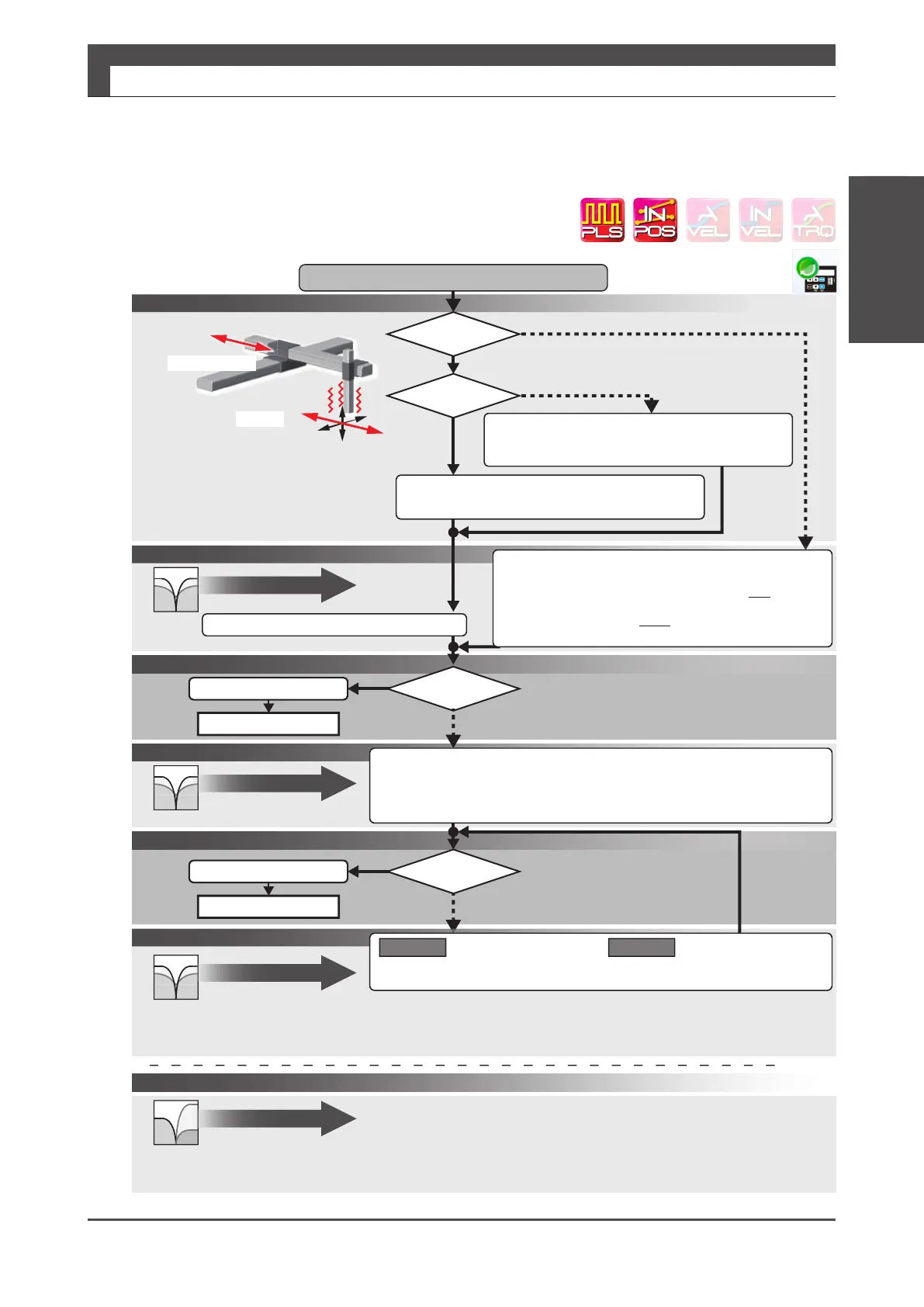
Measuringvibrationfrequency
Machinemotionandthedirectionofvibration
*1)vibrationthatdoesnotaffecttorquecommandvaluenorpositionerror
Setthefrequencytothebestpossiblevaluefirst,thensetthenotchdepth.
Vibration
*2)Setthehigh-frequencygaintoalowervalue.
Notethatdecreasingthegainwilltendtocauseapositionerror trip.
①
②
Coaxial
Measurepositionerrorvibration
withalaserdisplacementsensororDigitax SF Connect.
Orthogonal
Measurethefrequencywithalaserdisplacement
sensor.
(Digitax SF Connect doesnotwork
(*1)
)
Incasesettingthenotchfilteraloneisnotenoughtosuppressvibration
Setγー NotchFilter
(*2)
Isameasurementtool
available?
Ismeasuring
vibrationpossible?
Ameasurementtoolsuchasalaserdisplacement
sensorisavailable.
Directlymeasurevibrationfrequency.
Nomeasurementtool.
ByusingDigitax SF Connect,measuretorquecommandvalue
andvibrationofpositionerror.
Settheparametertothevibrationfrequency
WritetoDrive
SetupComplete
Settingmorethanonenotchfiltermayaffectthelowerlevel filter.Check
thefrequencyandwidthagain.
Whensettingthesecondlevelfilter,changethenotchdepthaccordingly.
Decreasingthenotchdepthmayreducevibration.
Furtheradjustwithintheacceptablerange
ofposition error
WritetoDrive
SetupComplete
Notchfilter
Page39
SettingPositioncommandfilter
Findthebestfrequencythatwillsuppressthevibration.
Step1Coarsetuningoffrequency
Changethemeasuredvibrationfrequencyby1Hzatatime.
Step2Finetuningoffrequency
Changethesettingby0.1Hzatatimeaftercoarsetuningisdone.
Frequency:20Hzorless(givenasaguideline)
Checkforvibration
Wasthevibration
suppressionsuccessful?
SettingPositioncommandfilter
AdjustingNotchWidth
IncreaseNotchWidthwhilecheckingtheeffectofthefilter.
Width:Increase(fromtheinitialvalueof512)uptoapproximately800-givenasaguideline.
Useofthenotchfilterwillincreasethepositionerror.
Adjustthewidthwithintheacceptablerangeofthepositionerror.
Checkforvibrationagain
SettingPositioncommandfilter
Setthesecondlevelfilter.largernotchwidthsetting.
about:1,000
Method1 Method2
or
【application】 SettingPositioncommandfilter
Notchfilter
Page39
Notchfilter
Page39
γー Notchfilter
Page40
UsingPositioncommandfilter
Wasthevibration
suppressionsuccessful?
Directionofmotion






 To Next Page