14
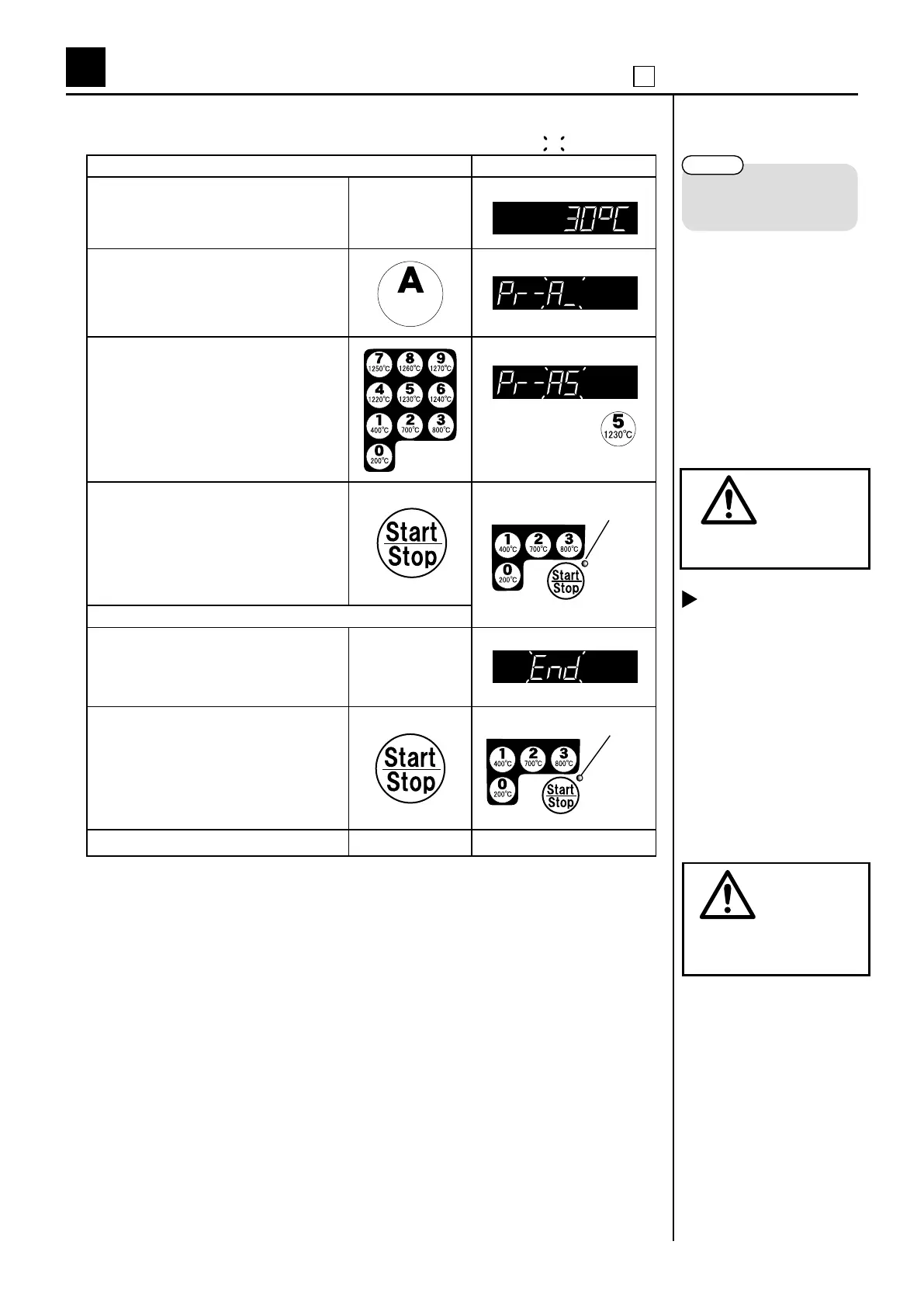
Operating procedure Display panel
(1)
Switch the power (breaker) on.
It is showing the kiln temperature.
(2)
Push the “Basic program” key. A Basic
(3)
Select the program and push the key.
※ Please decide the temperature by the
characteristics of glaze.
(4)
Push “Start” key.
― During ring ―
(5)
Firing nishes when the display shows “End”.
(6)
Push “Stop” key.
(7) Switch the power (breaker) off.
5
Firing by controller
1 Firing by “Basic programs”
2. Firing by “Basic programs”
After finishing <Hold 2>,
it moves to natural cooling.
The display panel flashes on
and off showing “End” once
the kiln temperature drops
down to 120℃ .
The indicator lights up.
*If you do not operate any keys for 10
seconds, the display goes back to show
the kiln temperature.
The indicator lights off.
Do not touch the kiln for
high temperature.
For example
Basic
Prog.
P.10
Please be sure to read
『Before Firing』 before
ring.
Be sure to switch the power
(breaker) off when you open
the door.
DANGER
DANGER
shows ashing.



 To Next Page