27
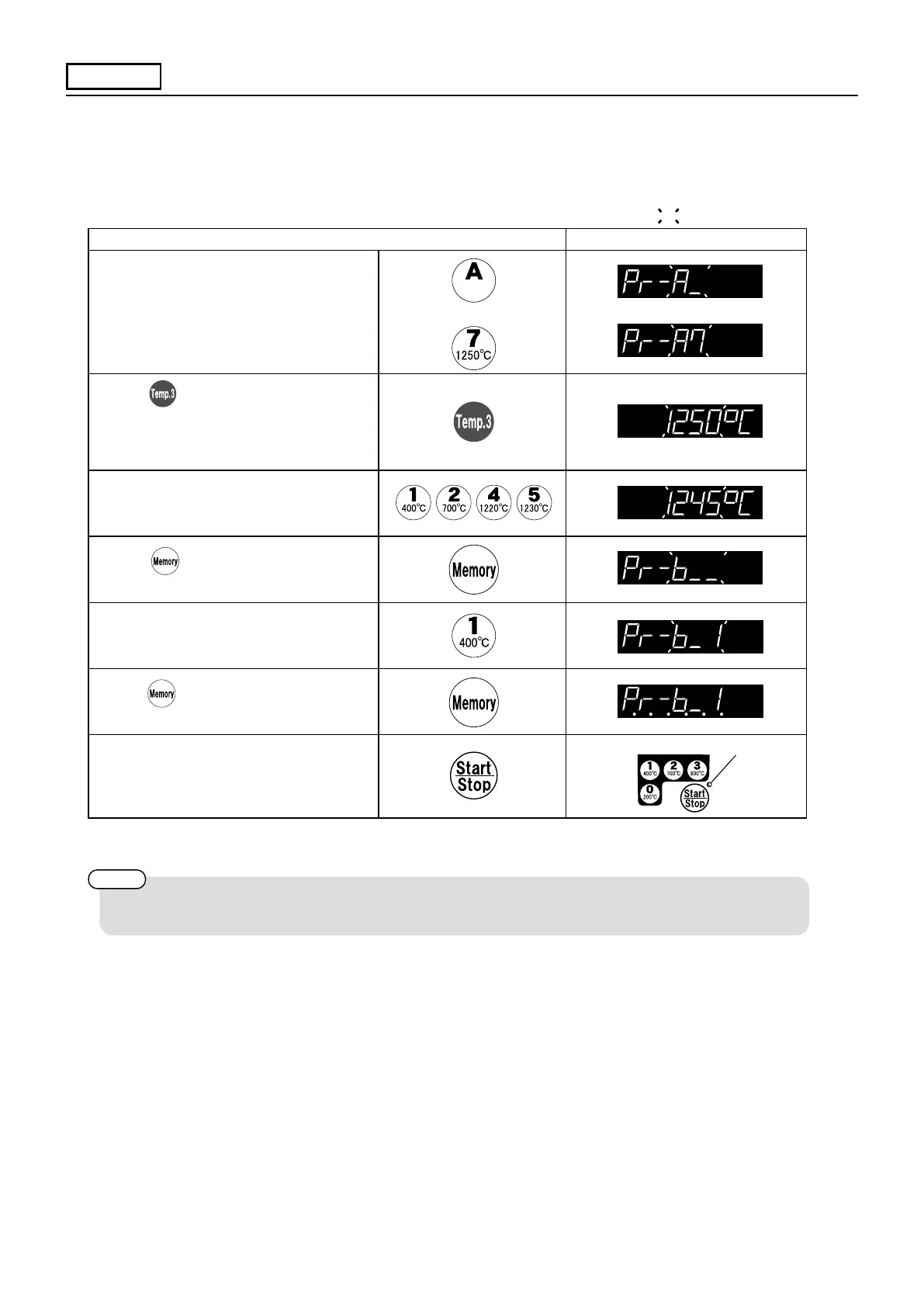
Operating Procedure Display panel
(1)
Call up a “Basic program” similar with
the program which you want to make.
Choose [7] since you want to set
maximum temperature at 1240℃ this
time and the content is similar.
(2)
Display shows the temperature which
is set in at present.
(3)
Input 1245℃ which you want to set.
〈In case of starting ring without registration 3 → 7〉
(4)
(5)
Number the programs which you
register (preserve). Input any numbers
(1 ~ 20).
(6)
(7)
Push 「start」 .
P.28
Basic
Prog.
→
Appendix
〈Example of “Self-produced programs” by controller〉
You can change a program into your own program based on “Basic program” .
You can make your own program easily by changing the content based on “Basic program”
which is similar with the one you prefer
*When you want to set maximum temperature at 1240℃
shows ashing.
Push
Push after making custom program
in order to preserve the setting content.
Push again and secure it.
Registration nishes when buzzer sounds.
The indicator lights up.
You can register 20 variations for custom programs. Please number program. (1 ~ 20).
Please use 〈Temperature chart for basic program〉 to understand the content of basic program and
〈Note for custom program〉 to register your own program.



 To Next Page