68
Shooting Features
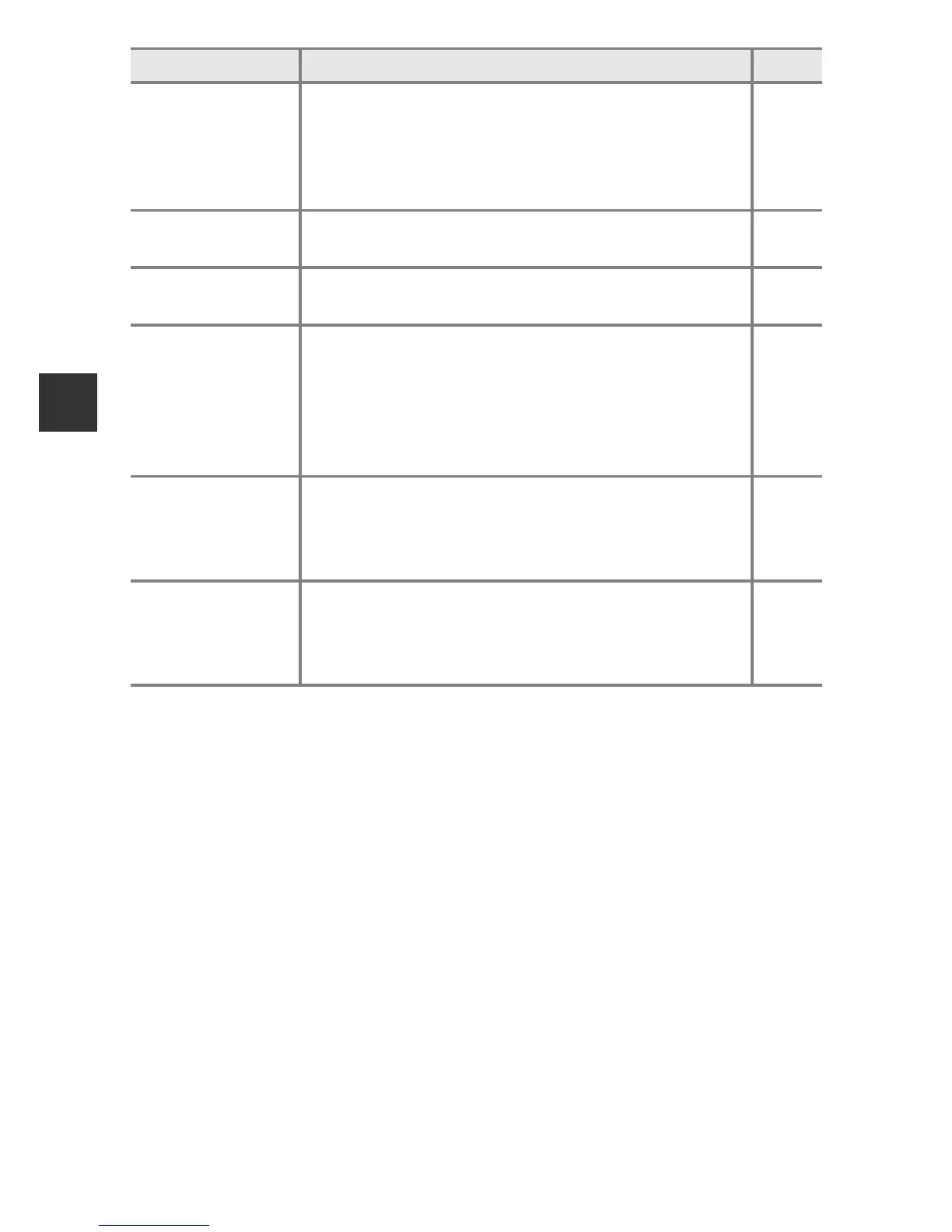
Multiple
exposure
Allows you to combine two to three images and save
them as a single image.
• Default setting:
- Multiple exposure mode: Off
- Auto gain: On
E48
Save user
settings
Allows you to save the current settings in mode dial
i (A51).
52
Reset user
settings
Allows you to reset the settings saved to mode dial
i.
52
Zoom memory
When the zoom control is moved, the zoom position
(equivalent to focal length/angle of view in 35mm
[135] format) is switched to the positions that have
been selected by setting the check box to on in this
menu option.
• Default setting: Off
E50
Startup zoom
position
Allows you to set the zoom position (equivalent to
focal length/angle of view in 35mm [135] format) for
when the camera is turned on.
• Default setting: 24 mm
E51
M exposure
preview
Allows you to set whether or not to reflect the
brightness to the shooting screen when the
exposure is changed in D (manual) mode.
• Default setting: Off
E51
Option Description A





 To Next Page