EasyManua.ls Logo

Nikon COOLPIX P340 - Using Menus (the MENU Button)

Nikon COOLPIX P340
292 pages
Print Icon
To Next Page IconTo Next Page
To Previous Page IconTo Previous Page
Loading...
I
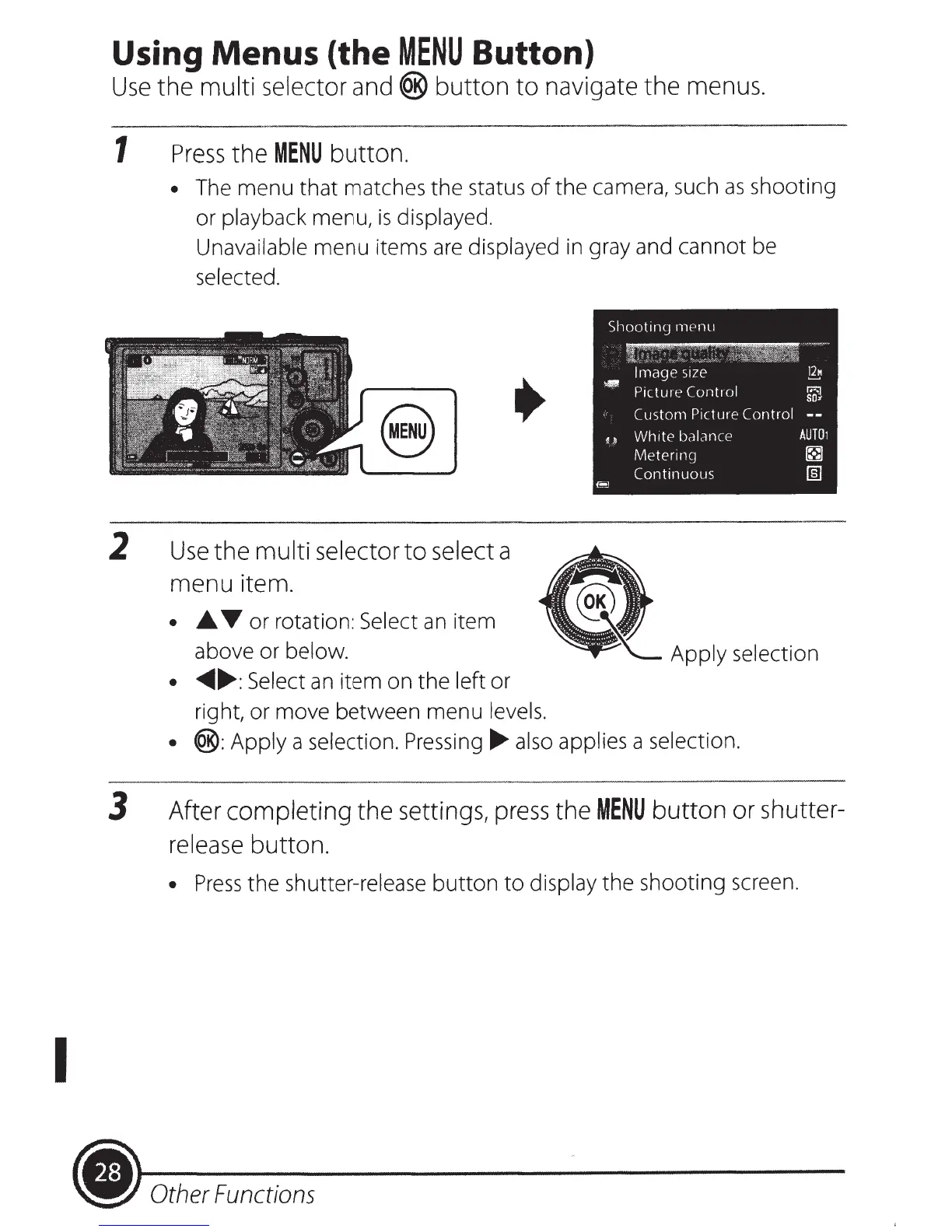
Using Menus (the
MENU
Button)
Use
the multi selector and
®
button
to
navigate the menus.
1
Press
the
MENU
button.
The menu that matches
the
status
of
the camera, such
as
shooting
or
playback
menu,
is
displayed.
Unavailable
menu items
are
displayed
in gray and cannot be
selected.
2
Use
the multi selector
to
select a
menu item.
.A.,.-
or rotation:
Select
an
item
above or
below.
~
.....
:Select
an
item on the
left or
right, or move between menu
levels.
®:Apply
a
selection. Pressing
.....
also applies
a
selection.
3 After completing the settings,
press
the
MENU
button
or shutter-
release button.
Press
the
shutter-release
button
to
display
the
shooting screen.
.)
Other
Functions

Table of Contents

Other manuals for Nikon COOLPIX P340

Related product manuals