78 Menu Guide
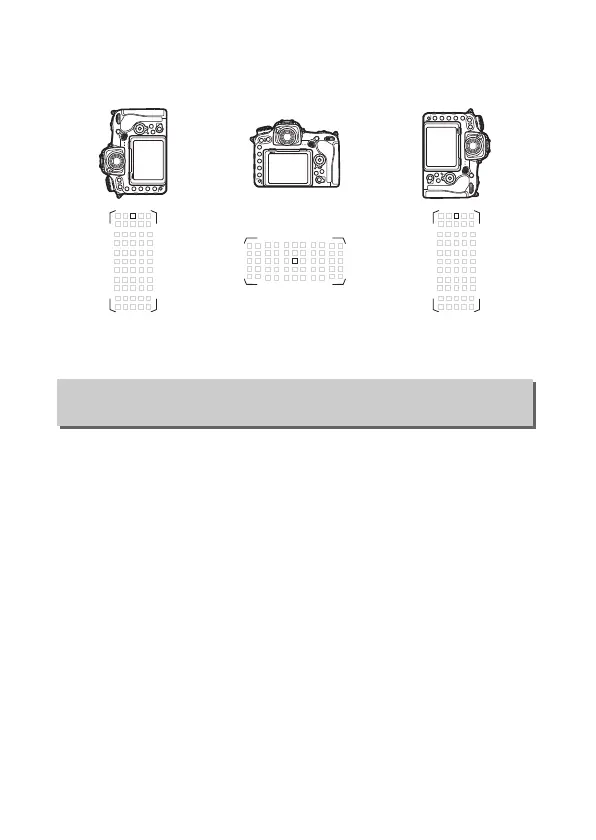
Choose Focus point to enable separate focus-point selection, or
Focus point and AF-area mode to enable separate selection of
both the focus point and the AF-area mode.
Choose whether the shutter-release button can be used to focus
(Shutter/AF-ON) or if focus can only be adjusted using the AF-ON
button or other controls to which AF-ON has been assigned
(AF-ON only).
Highlighting AF-ON only and pressing 2
displays an Out-of-focus release option; select Enable to allow
pictures to be taken without focusing, or Disable to prevent the
shutter being released before the camera has been focused
using the AF-ON control.
To take pictures when Disable is
selected, use the AF-ON control to focus and press the shutter-
release button all the way down to release the shutter.
Note that
Disable only applies if Focus is selected for Custom Setting a1
(AF-C priority selection) or a2 (AF-S priority selection) and an
option other than auto-area AF is selected for AF-area mode.
Camera rotated
90°counter-clockwise
Landscape (wide)
orientation
Camera rotated
90°clockwise
a8: AF Activation
G button ➜ A Custom Settings menu



 To Next Page