96 Menu Guide
This option determines which settings are affected when AE &
flash or AE only is selected for the Auto bracketing set option
in the photo shooting menu in manual exposure mode.
Flash bracketing is performed only with i-TTL or qA (auto
aperture) flash control.
If a setting other than Flash only is
selected and the flash is not used, ISO sensitivity will be fixed at
the value for the first shot when auto ISO sensitivity control is on
(0 49).
At the default setting of MTR > under > over (H), exposure,
flash, and white balance bracketing are performed in the
following order: the unmodified shot is taken first, followed by
the shot with the lowest value, followed by the shot with the
highest value.
If Under > MTR > over (I) is selected, shooting
will proceed in order from the lowest to the highest value.
This
setting has no effect on ADL bracketing.
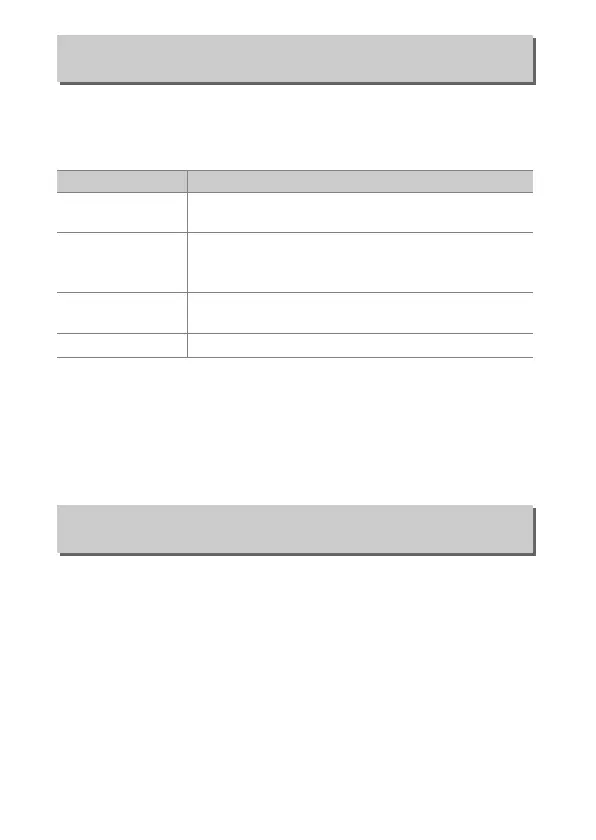
e6: Auto Bracketing (Mode M)
G button ➜ A Custom Settings menu
Option Description
F
Flash/speed
Camera varies shutter speed (AE only) or shutter
speed and flash level (AE & flash).
G
Flash/speed/
aperture
Camera varies shutter speed and aperture (AE
only) or shutter speed, aperture, and flash level (AE
& flash).
H
Flash/aperture
Camera varies aperture (AE only) or aperture and
flash level (AE & flash).
I
Flash only Camera varies flash level only (AE & flash).
e7: Bracketing Order
G button ➜ A Custom Settings menu



 To Next Page