84 Menu Guide
This option controls whether the E button is needed to set
exposure compensation.
If On (Auto reset) or On is selected,
the 0 at the center of the exposure display will flash even when
exposure compensation is set to ±0.
b4:
Easy Exposure Compensation
G button ➜ A Custom Settings menu
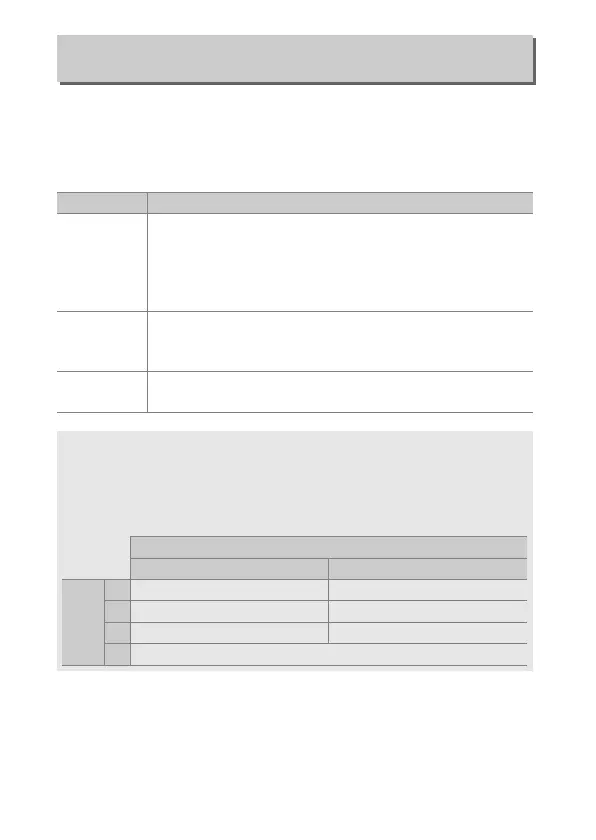
Option Description
On (Auto reset)
Exposure compensation is set by rotating one of the
command dials (see note below).
The setting selected
using the command dial is reset when the camera turns
off or the standby timer expires (exposure compensation
settings selected using the E button are not reset).
On
As above, except that the exposure compensation value
selected using the command dial is not reset when the
camera turns off or the standby timer expires.
Off
Exposure compensation is set by pressing the E button
and rotating the main command dial.
A Change Main/Sub
The dial used to set exposure compensation when On (Auto reset) or
On is selected for Custom Setting b4 (Easy exposure compensation)
depends on the option selected for Custom Setting f4 (Customize
command dials)> Change main/sub (0 111).
Customize command dials > Change main/sub
Off On
Exposure
mode
P Sub-command dial Sub-command dial
S Sub-command dial Main command dial
A Main command dial Sub-command dial
M N/A



 To Next Page