76
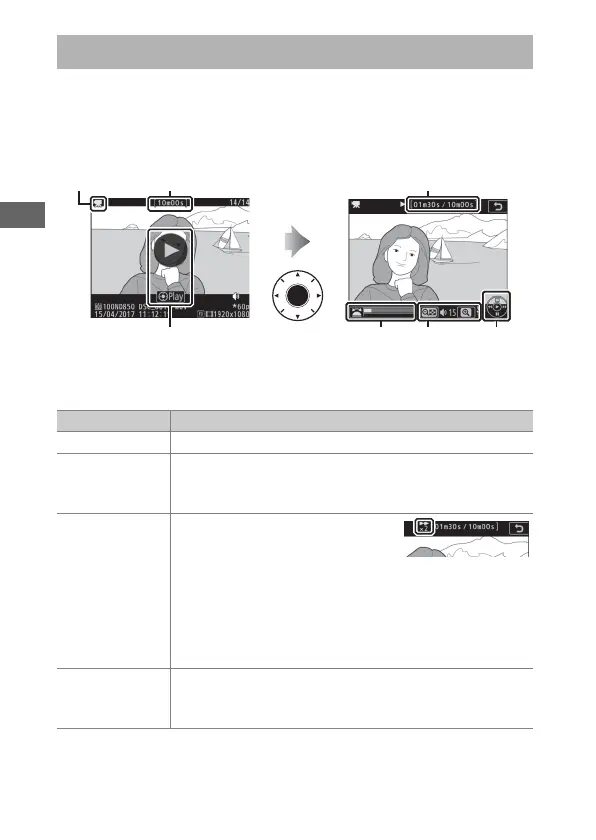
Movies are indicated by a 1 icon in full-frame playback (0 223).
Tap the a icon in the monitor or press the center of the multi
selector to start playback; your current position is indicated by
the movie progress bar.
The following operations can be performed:
Viewing Movies
1 icon Length Current position/total length
a icon Movie
progress bar
Volume Guide
To Description
Pause Press 3 to pause playback.
Play
Press the center of the multi selector to resume
playback when movie is paused or during rewind/
advance.
Rewind/
advance
Press 4 to rewind, 2 to advance.
Speed increases with each press,
from 2× to 4× to 8× to 16×; keep
the control pressed to skip to beginning or end of
movie (first frame is indicated by h in top right corner
of monitor, last frame by i). If playback is paused, the
movie rewinds or advances one frame at a time; keep
the control pressed for continuous rewind or advance.
Start
slow-motion
playback
Press 3 while the movie is paused to start slow-
motion playback.



 To Next Page