136
Shutter speed lock is available in shutter-priority auto and
manual exposure modes, aperture lock in aperture-priority auto
and manual exposure modes. Shutter speed and aperture lock
are not available in programmed auto exposure mode.
1 Assign shutter speed and aperture lock to a camera control.
Assign Shutter spd & aperture lock to a control using
Custom Setting f1 (Custom control assignment, 0 268).
2 Lock shutter speed and/or aperture.
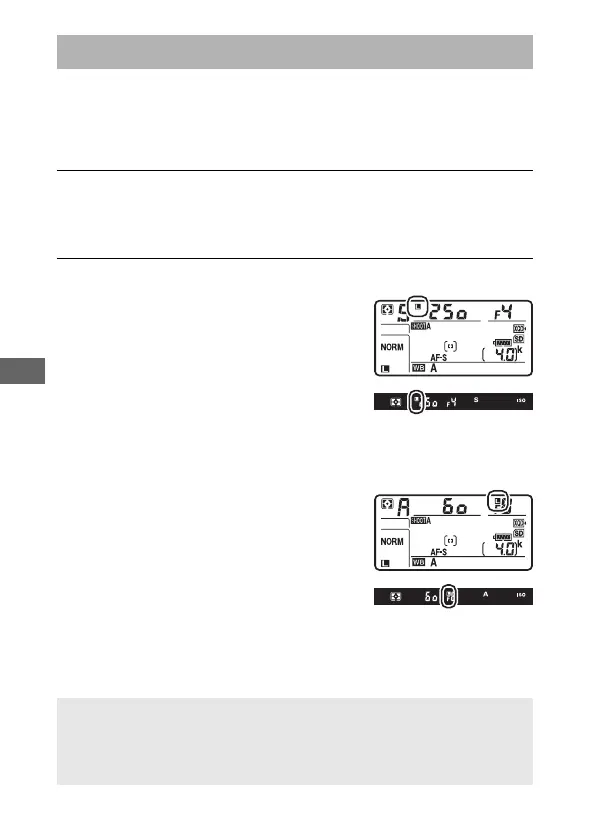
Shutter speed (exposure modes S and M):
Press the selected control and rotate
the main command dial until F icons
appear in the viewfinder and control
panel.
To unlock shutter speed, press the
control and rotate the main command dial until the F icons
disappear from the displays.
Aperture (exposure modes A and M): Press
the selected control and rotate the
sub-command dial until F icons
appear in the viewfinder and the
control panel.
To unlock aperture, press the control
and rotate the sub-command dial until the F icons disappear
from the displays.
Shutter-Speed and Aperture Lock
A See Also
For information on keeping shutter speed and/or aperture locked at
the selected values, see A > Custom Setting f3 (Shutter spd &
aperture lock; 0 268).



 To Next Page