193
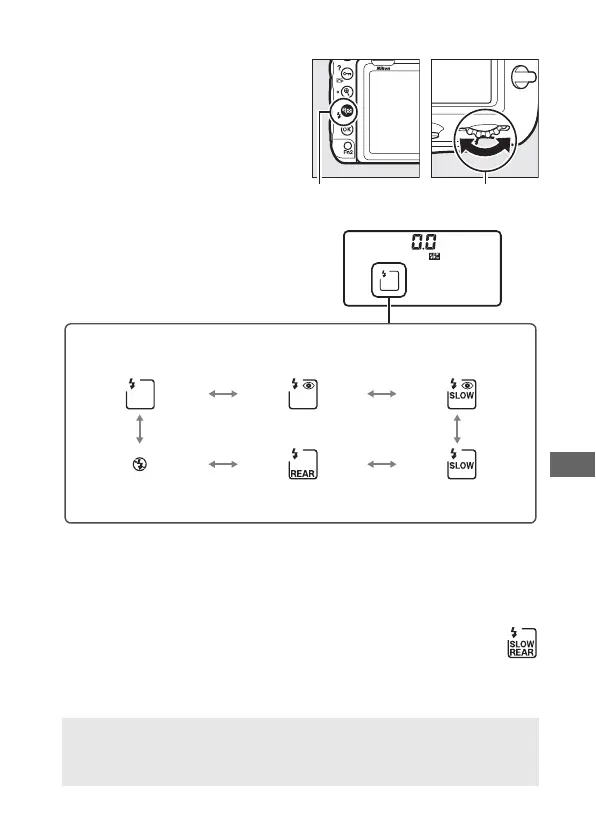
❚❚ Choosing a Flash Mode
To choose the flash mode, press
the W (M) button and rotate
the main command dial until
the desired flash mode is
selected in the control panel:
1 Y icon flashes if flash unit does not support red-eye reduction.
2 Red-eye reduction with slow sync is available only in exposure modes P and A. In modes S and
M, red-eye reduction with slow sync becomes red-eye reduction.
3 Available only in exposure modes P and A. In modes S and M, slow sync becomes front-curtain
sync.
4 In exposure modes P and A, flash-sync mode will be set to slow rear-curtain sync
when the W (M) button is released.
A Studio Flash Systems
Rear-curtain sync cannot be used with studio flash systems, as the
correct synchronization cannot be obtained.
W (M) button Main command
dial
Front-curtain sync Red-eye reduction
1
Red-eye reduction
with slow sync
1, 2
Flash off Rear-curtain sync
4
Slow sync
3



 To Next Page