EasyManua.ls Logo

Noahtec WESECUU - Step 6: Functions of app

Default Icon
33 pages
Print Icon
To Next Page IconTo Next Page
To Previous Page IconTo Previous Page
Loading...
16
Step 6: Functions of app
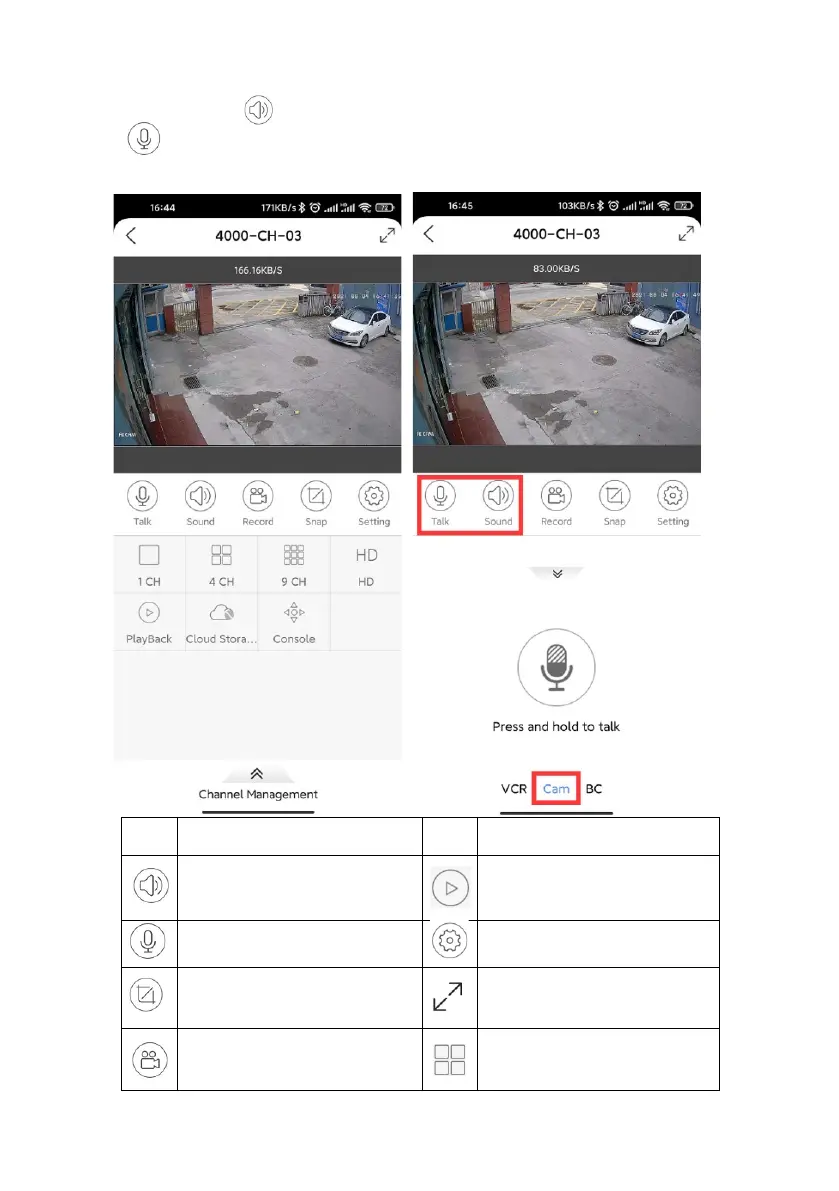
On your phone app, please navigate to the Preview page, double click to zoom in
one channel, click button to hear the sound from camera.
Click the icon, choose Cam page so you can press and hold to talk,
that you can speak to the person in front of this camera.

Sign
Meaning
Sign
Meaning
Hear the sound
from this camera
Click playback recordings
with HDD
Intercom
Setting for this camera
Take snapshot and save
it to phone local file
Full Screen
Record video and save it
to phone local file
View 4 cameras at the
same time