Nokia WiFi Beacon 6 Product Guide Beacon 6 (HA-0336W-B) unit data sheet
Issue: 01 3FE-47429-AAAA-TCZZA 39
Reset button Pressing the Reset button for less than 10 seconds reboots the Beacon; pressing
the Reset button for 10 seconds or more restores the Beacon to its factory
defaults.
Power input This connection is provided through the power connector. A power cable fitted
with a barrel connector is used to make the connection.
5.5 Beacon 6 (HA-0336G-A) LEDs
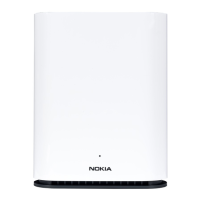
The circular top of the Beacon 6 (HA-0336G-A) functions as a multi-color LED
indicator. The LED color and pulse rate acts as a signal to the home user, which
indicates the state of the Beacon 6 and the quality of its backhaul link.
Table 9 provides LED descriptions for the Beacon 6 (HA-0336G-A).
Table 9 Beacon 6 (HA-0336G-A) LED indications
LED color LED behavior Router mode Bridge mode LED behavior description
Off Off
✓ ✓
Power off.
Blue-Green Solid
✓
Good backhaul connection to the Internet.
Solid
✓
Good backhaul connection. A link to the next node
is available.
Yellow Solid
✓
Backhaul connection is successful but not optimal.
A link to the next node is below standard.
Slow pulsing
✓ ✓
Configuration mode. The unit is waiting to be
configured.
Red Solid
✓
No connection to the Internet.
Solid
✓
Backhaul connection is not successful. A link to the
next node is not operational.
Fast pulsing
✓ ✓
Factory reset
White Slow pulsing
✓ ✓
WPS enabled
3 quick pulses
✓ ✓
WPS successful
Solid
✓ ✓
Powering on
5.6 Beacon 6 (HA-0336G-A) detailed
specifications
Table 10 lists the physical specifications for the Beacon 6 (HA-0336G-A).
Table 10 Beacon 6 (HA-0336G-A) physical specifications
Description Specification
Length 61 mm (2.40 in.)


 To Next Page