18
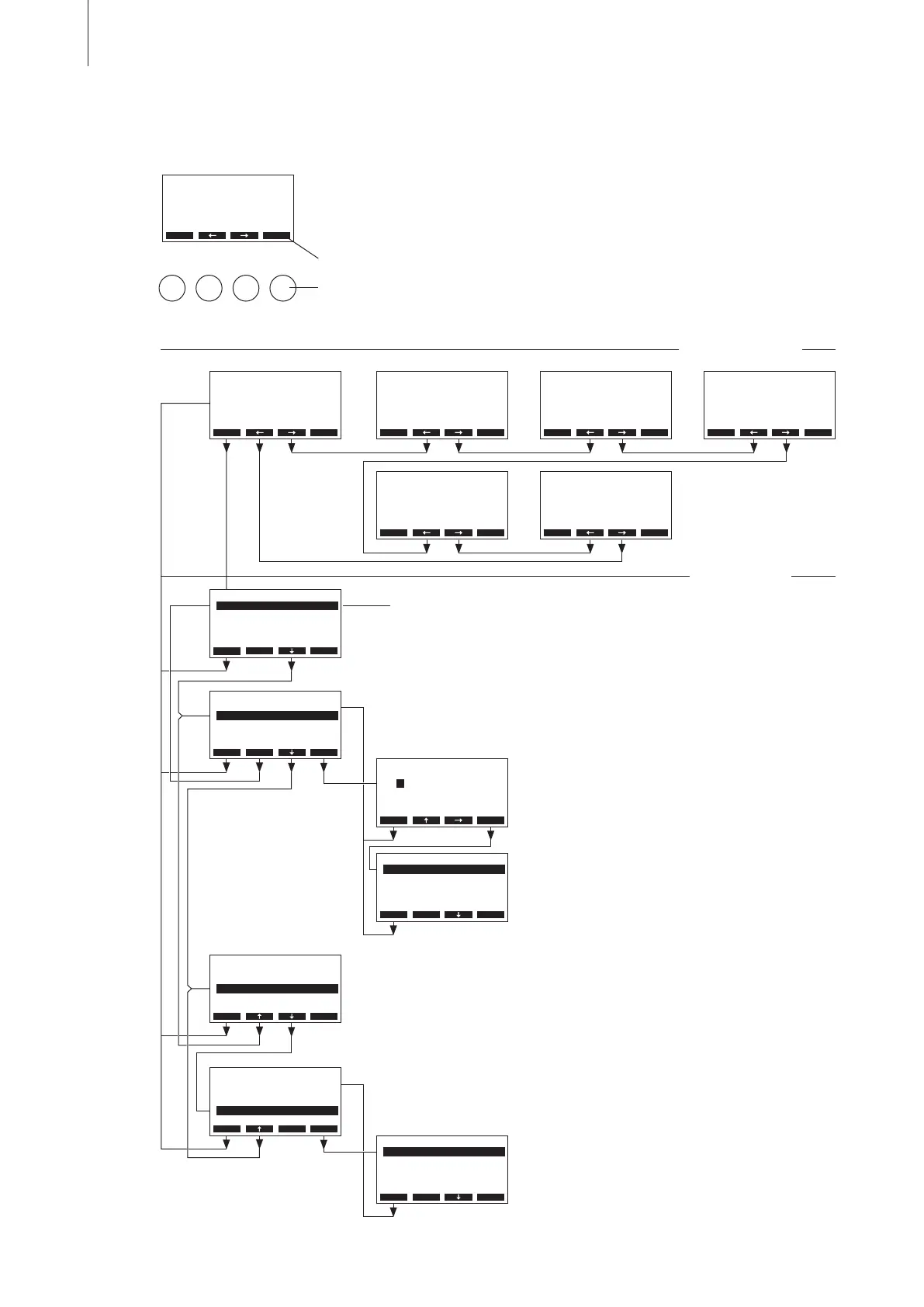
4.4 Overview and operating of the menu
The operating and display unit is operated via the four keys located just
below the display. The 4 status elds at the bottom of the display show the
active keys the functions assigned to them.
actual key setting
keys
Operating
Menu overview
Indication level
Menu level
Menu User
– Resetting the maintenance counter
– Unit settings
Menu Diagnostic
– Interrogation of the malfunction list
– Interrogation of unit information
– Carrying out relay tests
– Carrying out unit tests
RC4 230V2
Standby
2011-10-31 12.00.00
Menu
RC4 230V2
Power Limit :100%
Request :0%
∑ Steam :0kg/h
Menu
RC4 230V2
Drain Factor:1.0
Conductivity:>125µS
StandbyDrain:Full
Force Drain :O
Menu
RC4 230V2
Operating Hours
Cylinder :10h
Menu
RC4 230V2
Timer
On/O Timer :O
Power Limit :O
Hum.Setpoint:O
Menu
RC4 230V2
Software :1.20LA00
Controlsign.:0-10V
Limitsignal :0-10V
Menu
User Code
3562
Enter Number
Conrm with Set
Esc Set
User
Settings :Set
Maintenance :Set
Esc Set
Diagnostic
Unit Status :Set
Remote Test :Set
Module Test :Set
ErrorHistory:Set
Esc Set
Main Menu
User :Set
Engineering :Set
Diagnostic :Set
Hum.Setpoint:50%rH
Esc Set
Main Menu
User :Set
Engineering :Set
Diagnostic :Set
Hum.Setpoint:50%rH
Esc Set
Main Menu
User :Set
Engineering :Set
Diagnostic :Set
Hum.Setpoint:50%rH
Esc Set
Main Menu
User :Set
Engineering :Set
Diagnostic :Set
Hum.Setpoint:50%rH
Esc Set
Modifying humidity setpoint
Note: this menu item appears only, if the internal P/PI controller is activated
and the humidity setpoint timer is deactivated!
Menu Engineering
The engineering level requires special knowledge and
may only be served by a Nordmann service technician.
Menu
RC4 230V2
Standby
2011-10-31 12.00.00



 To Next Page