Using the BayStack 410-24T 10BASE-T Switch
C-8
309985-B Rev 00
Configuring IGMP Snooping
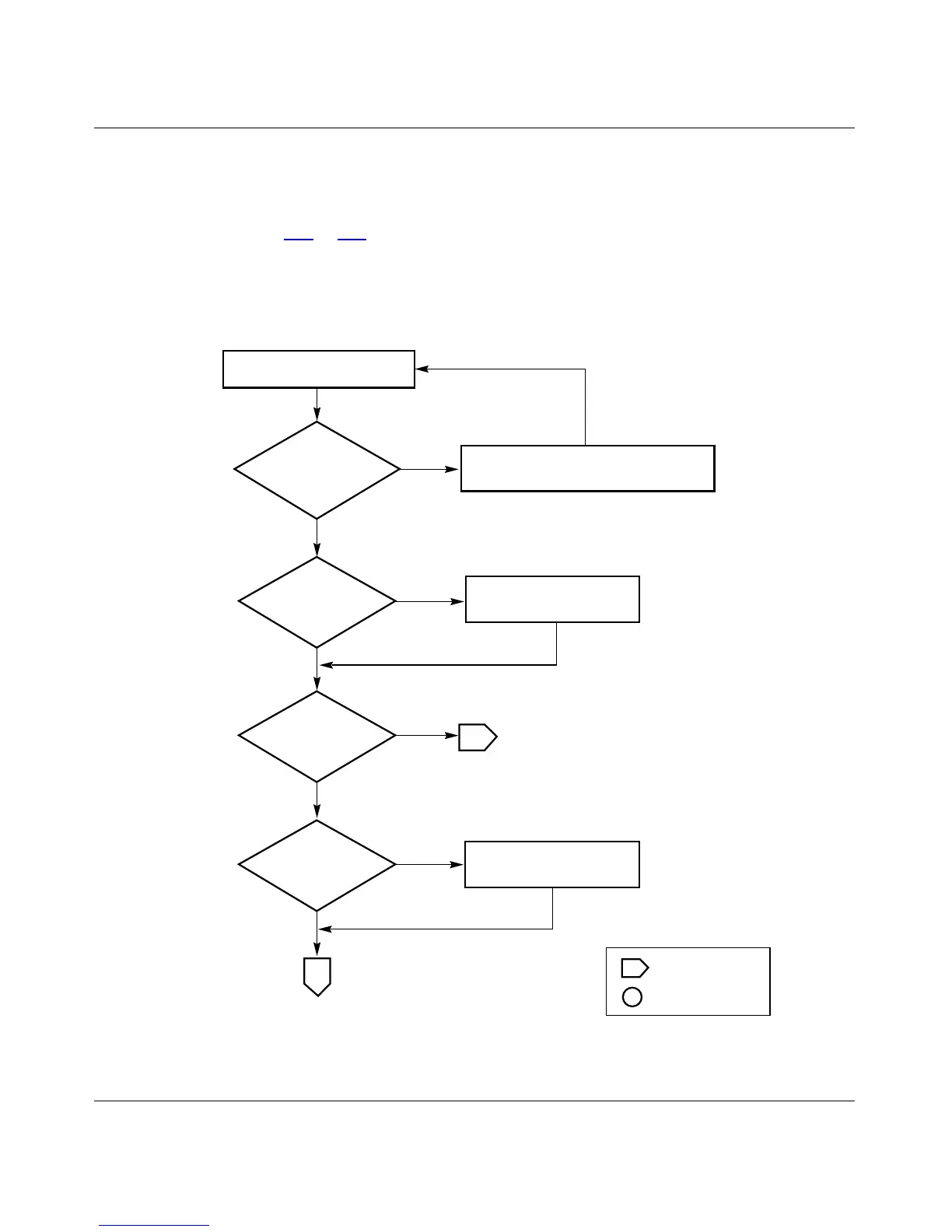
To create or modify IGMP Snooping ports, follow the flowcharts in
Figures C-7
to C-9).
Choose IGMP Configuration (or press g) from the Switch Configuration Menu
screen to open the IGMP Configuration screen.
Figure C-7. Configuring IGMP Snooping (1 of 3)
Yes
No
No
BS41055A
Are VLANs
created/port members
configured?
Is the
Snooping field set
correctly?
Yes
Is
Snooping field
set?
Yes
Yes
No
2
Is
the Proxy field set
correctly?
No
2
IGMP Configuration screen
Go to VLAN flowchart. Create VLANs/
configure port members, as required.
Set the correct value
for the Snooping field.
Set the correct value
for the Proxy field.
Off-page reference
On-page reference
Key













 To Next Page