9
Your Telephone Call Features
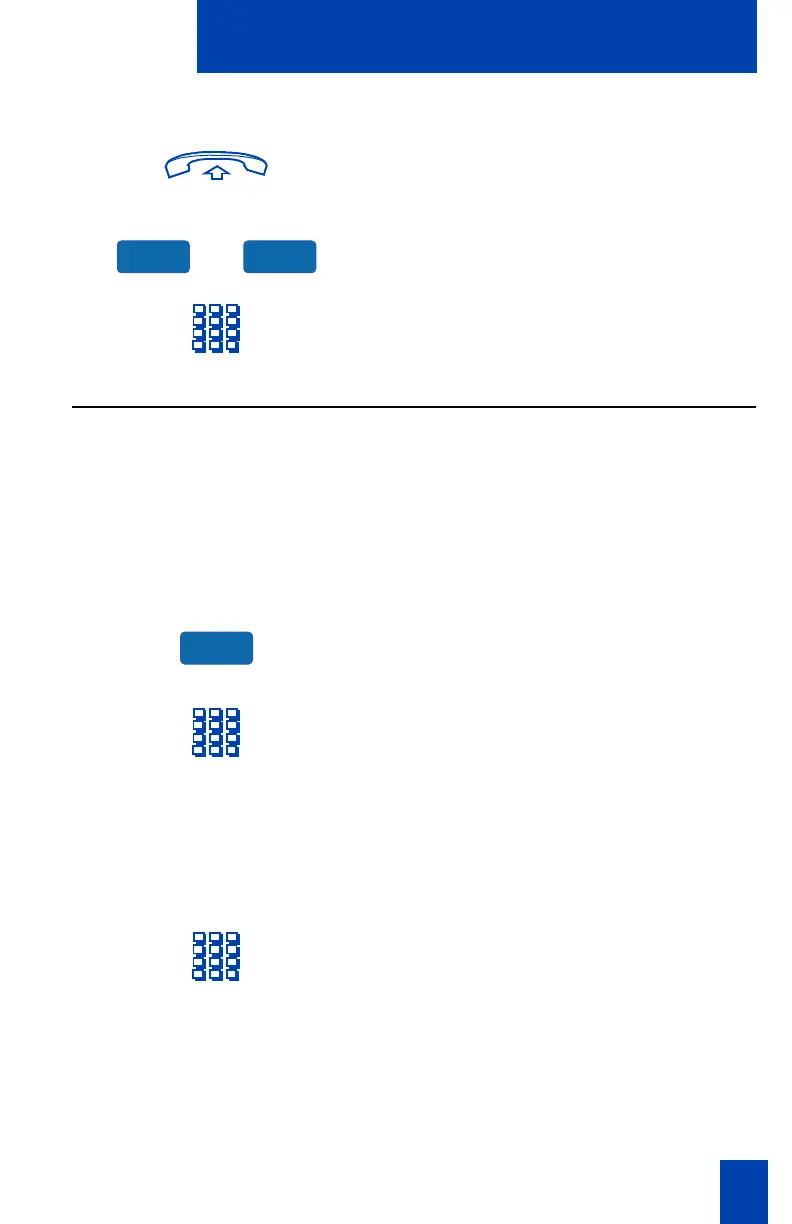
To make a Speed Call:
1. Lift the handset.
or
2. Press the Speed Call Controller Key or
the Speed Call User Key.
3. Dial the Speed Call code assigned to
the telephone number.
Use Speed Call (M3903 and M3904)
The Speed Call feature allows you to automatically dial frequently called numbers
by entering a one, two, or three digit code. Contact your network administrator to
determine the capacity of your Speed Call list.
A telephone designated as a Speed Call Controller can program or edit the Speed
Call list. This feature must be enabled by your network administrator.
To store a Speed Call number:
1. Press the Speed Call Controller Key.
The screen displays
Enter Code, then
number
.
2. Dial a one, two, or three digit code.
Use the Clear Key if you make a
mistake. Use the Exit Key to leave the
screen without storing a speed call
number.
Note: A dash is automatically inserted
after the required number of digits have
been entered.
3. Dial the associated telephone number.
Use the Clear Key or Delete Key if you
make a mistake. Use the Exit Key to
leave the screen without storing a
speed call number.
Note: Dial the access code (if required)
followed by the internal, external, or
long-distance telephone number.
SpcCtrl SpcUsr
SpcCtrl











 To Next Page