TouchPoint Console Installation and Setup Guide 45
Chapter 4: Additional Local Configuration
4
In the Filename field, enter the path where you have placed the FaxUpdate tool followed by FaxUpdate.exe. For
example,
c:\downloads\FaxUpdate.exe. Or, click Browse and navigate to where you have placed the tool.
5
Select ROOT from the drop down menu, if not already selected.
6
Click Upload. The dialog box displays the New Filename and Filesize of the upload.
7
From the top menu items, select RUN CMD.
8
In the Command String field, type Disk1\FaxUpdate.exe then press Enter.
9
If you have not already done so, use the IP address for the TPC to log in to DRC3 and open the remote viewer. The
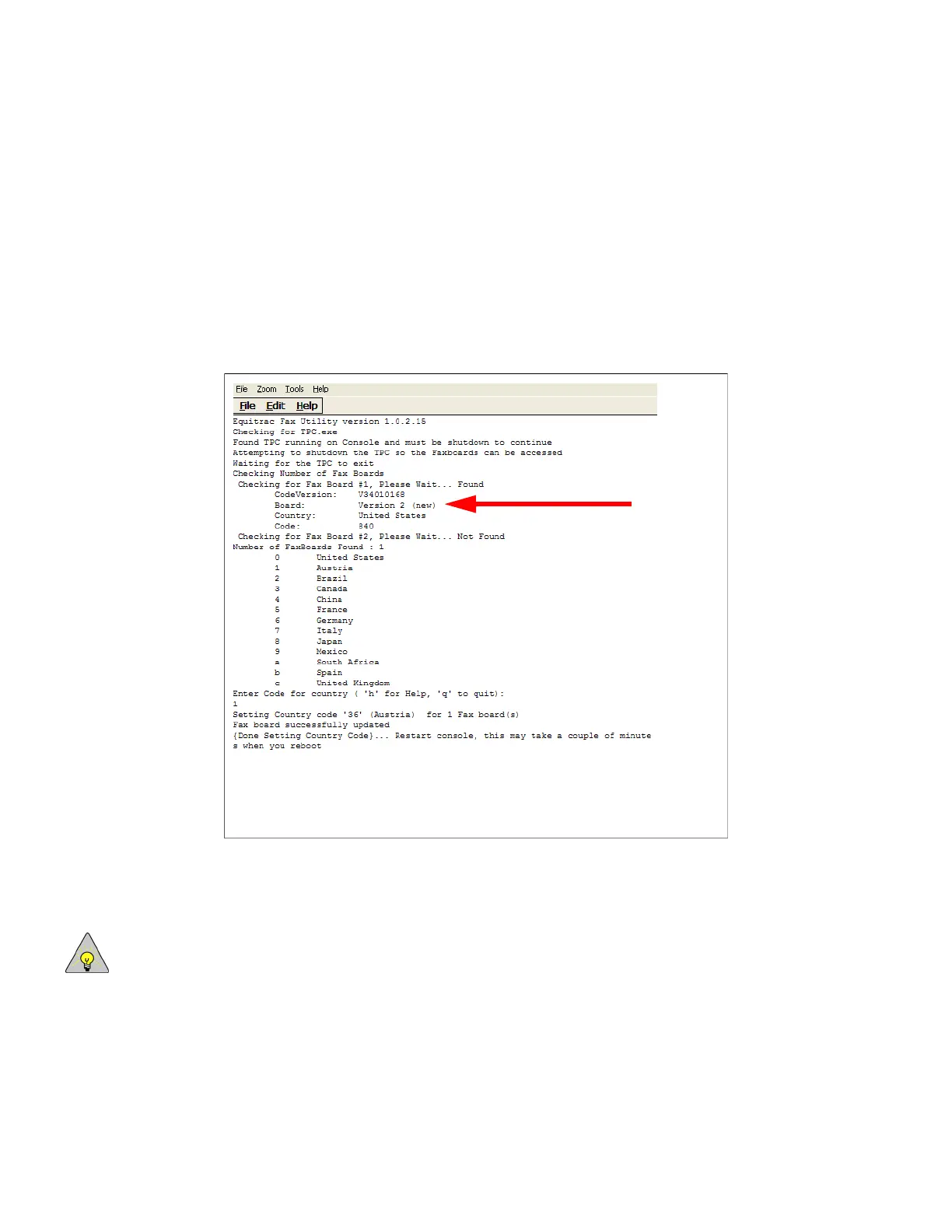
software takes some time to execute, and when complete displays the following information:
If the fax board is a new one, the Board component will read Version 2 (new).
10
To set a country code, enter the number of the country as listed on the screen above and press Enter. To skip, enter
q instead.
NOTE: The country code is set to 0-United States by default.
11
Restart the TPC.



 To Next Page