11
Setting the Cleaning Controls
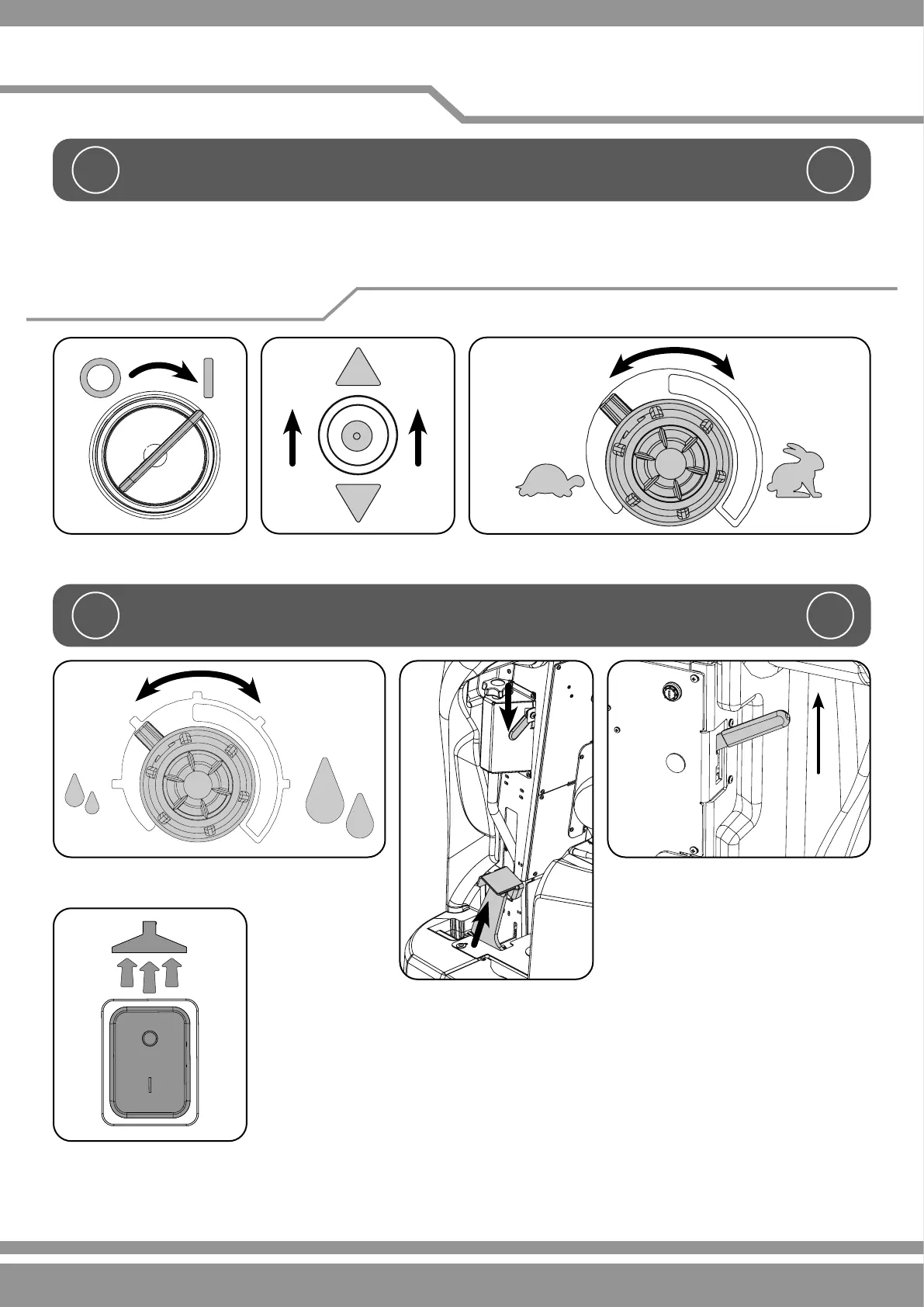
Drive the machine to the cleaning site.
Before cleaning operation, place out appropriate warning signs and sweep or dust-mop the oor.
When ready for cleaning lower the oor tool (page 6) and the brush deck (page 10).
The machine is now set up ready to start cleaning, depress the accelerator pedal
to start cleaning process.
Adjust waterow and speed according to oor type and level of soiling
ALWAYS ENSURE THAT THE FLOOR IS PRE-SWEPT AND RELEVANT SAFETY SIGNS
ARE DISPLAYED.
NOTE: MACHINE WILL NOT REVERSE WITH FLOOR TOOL IN LOWERED POSITION
!!
!!
Set direction switch to forward.
Turn dial to set desired water ow.
Turn speed dial to set desired cleaning speed.
Press the vacuum switch to the
on position to turn on suction.
Lower oor tool by lifting lever
Insert the Ignition key and
switch the machine on.
Lower brush deck by pushing
down on the left pedal, lower
handle and raise foot pedal.
Machine Operation





 To Next Page