GETTING
AROUND
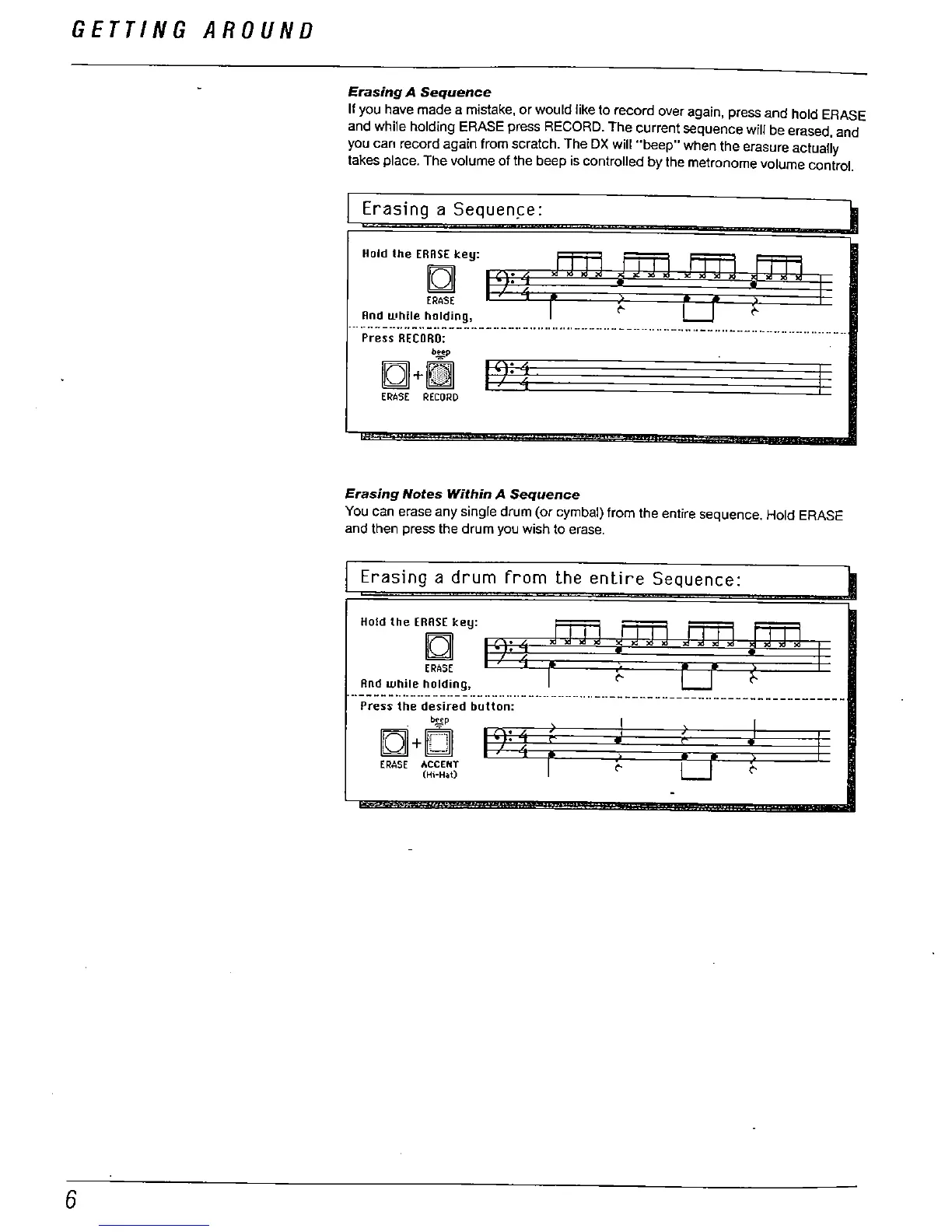
Erasing A Sequence
If you have made a mistake
, or would like to record over again
, press and hold ERASE
and while holding ERASE press RECORD. The current sequence will be erased, and
you can record again from scratch. The OX will "
beep
" when the erasure actually
takes place. The volume of the beep is controlled by the metronome volume control.
Erasing a Sequen
""""."",,...'
And while
ng,
_.-.- - ---.... -.. -.. - -- - --- - --- -............ ----.. - - - - --.... ---.... --.... -.--.. ._-.... ---.. ...-.. --
Press RECORD:
iQ+
ERASE RECORD
Erasing Notes Within
Sequence
You can erase any single drum (or cymbal) from the entire sequence. Hold ERASE
and then press the drum you wish to erase.
Erasing a drum from the entire
Sequence:
""'''.''
fJ'.''
ERASE
Rnd while holdmg,
. --- - - - - ---- - --- - - -.. -...... - --- ----..
Press the desired button:
iQ+
ERASE ACCENT
(Hi-Hat)
.. -- -- -- -- - ------.. --- -- - - - - ---------
Er



 To Next Page