n,u_
___.. ....
GETTING
AROUND
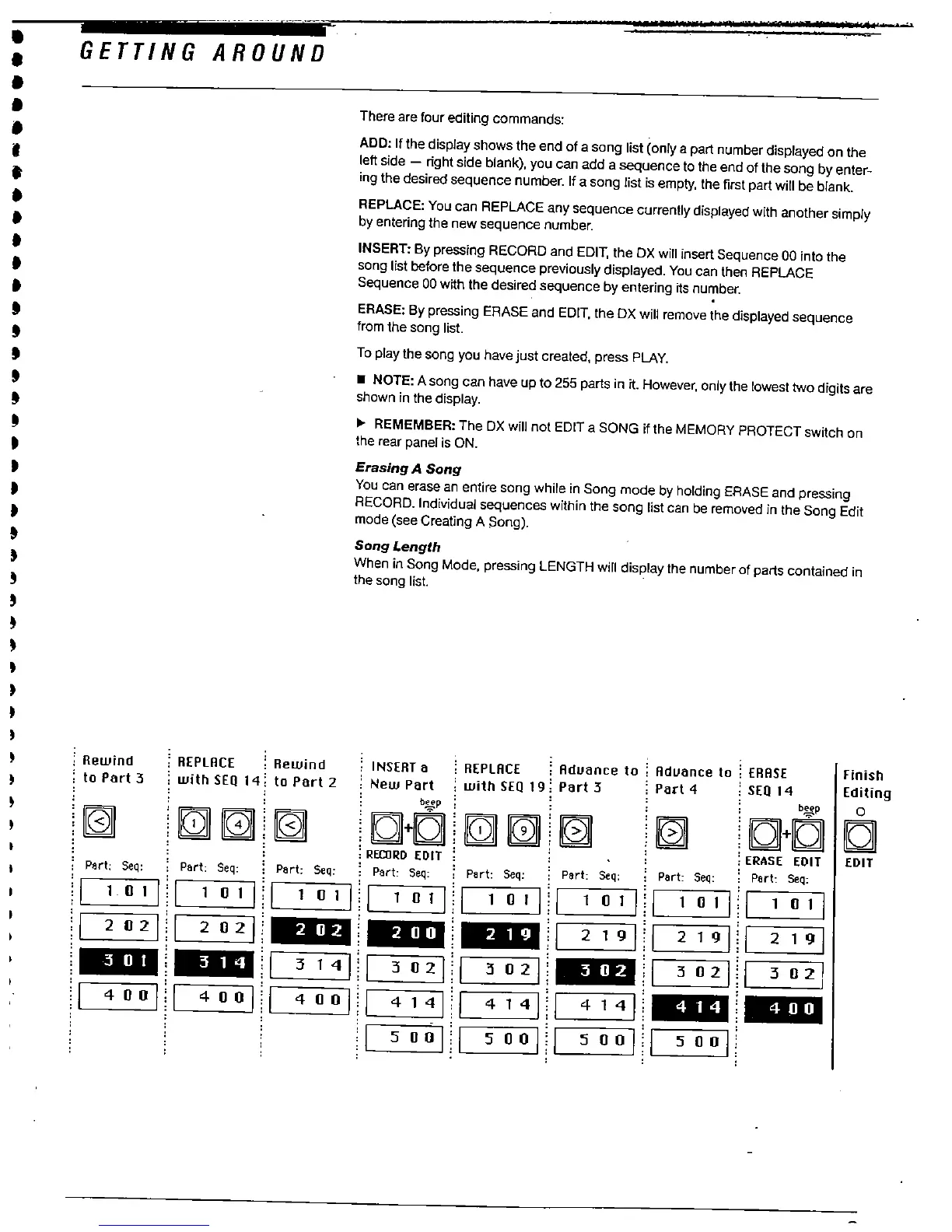
There are four editing commands:
ADD: If the display shows the end of a song list (only a part number displayed on the
left side - right side blank), you can add a
seuence to the end of the song byenter-
ing the desired sequence number. If a song list is empty, the first part wil be blank.
REPLACE: You can REPLACE any sequence currently displayed with another simply
by entering the new sequence number.
INSERT: By pressing RECORD and EDIT
, the DX wil insert Sequence 00 into the
song list before the sequence previously displayed. You can then REPLACE
Sequence 00 with the desired sequence by entering its number.
ERASE: By pressing ERASE and EDIT
, the DX will remove the displayed sequence
from the song list.
To play the song you have just created
, press PLAY.
. NOTE: A song can have up
to 255 parts in it. However
, only the lowest two digits are
shown in the display.
REMEMBER: The DX will not EDIT a SONG if the MEMORY PROTECT switch on
the rear panel is ON.
Erasing A Song
You can erase an entire song while in Song mode by holding ERASE and pressing
RECORD. Individual sequences within the song list can be removed in the Song Edit
mode (see Creating A Song).
Song Length
When in Song Mode
, pressing LENGTH will display the number of parts contained in
the song lisL
; Rewind
, to Part 3
REPLRCE : Rewind
with SEa 14: to Part 2
: INSERT a
: New Part
: REPLRCE : Rduance to :
Rduance to : ERRSE
with SEa 19: Part 3
' Part 4
: SEa 14
Finish
Editing
IC+C C
: ERASE EDIT
EDIT
; Part: Seq:
p ;
C+C1i
; RECRD EDIT,
Part Seq:
Part: Seq:
Part: Seq:
Part: Seq;
Part: Seq:
1011
1011
1011
1011
1011
1011
1011
1011
202
202
1 2191
1 2191
219
1 3141
302
302
1 3021
302
400
400
400
1 4141
l 4141
l 4141
500
500
500
500
; Part; Seq:
; Pert: Seq:



 To Next Page