MIDI NOTES
Setting MIDI Notes to OH Drums:
Rccess EDIT PARAMETERS:
EDIT
. - -.............. -........ - ----- --- -..... - -.. - --
Select EDIT PARRMETER 14:
(SET TRRNSPOS IT ON)
Parameter Numb
Current Se.ttinq (MIDI NOle
---.. ---- ---- - - ---- -- -- -- -.. - - - - - -..
Hold RECORD;
Play MIDI Source to
Set Lowest Trigger Note:
bE-fop
I""
'"II
RECORD MIDI
CONTROLLER
PIa\! MiddleC Nl''' Settinq
.-.. ---- ----- - -- -- --- ---- - - ---- - - --
Select EDIT
PRRRMETER 13:
(SET ORUM
TO MIOI NOTES)
K;
----- --- --- -.. - - ..- - - - -.... .----- - - - --
Hold down Drum to be Set;
Play Desired Notes on MIDI Source:
b.tt'
111111
11111
LOUD MIDI
CONTROLLER
(B8
. - - ..--- --- --- --.. - - ---.. -.. ---- - - - ---
EHit:
EDIT
The OX can transmit and receive notes played via MIDI. Drum notes are the same as
melodic notes. This means that a DX can be played from a keyboard
, MIDI drum pads
or even another DX. MIDI notes such as these can also be recorded andplayed back
as well.
Note that playing notes on synthesizers from MIDI drum machines usually does not
work
, because drum notes have a shorter duration than most synthesizers are capable
of playing.
Setting Notes to Drums
Since correlating drums with keys on a keyboard is a matter of personal taste
. the DX
enables programming a MIDI note to any of the DX drum buttons. This can be done
using EDIT PARAMETERS 13 & 14.
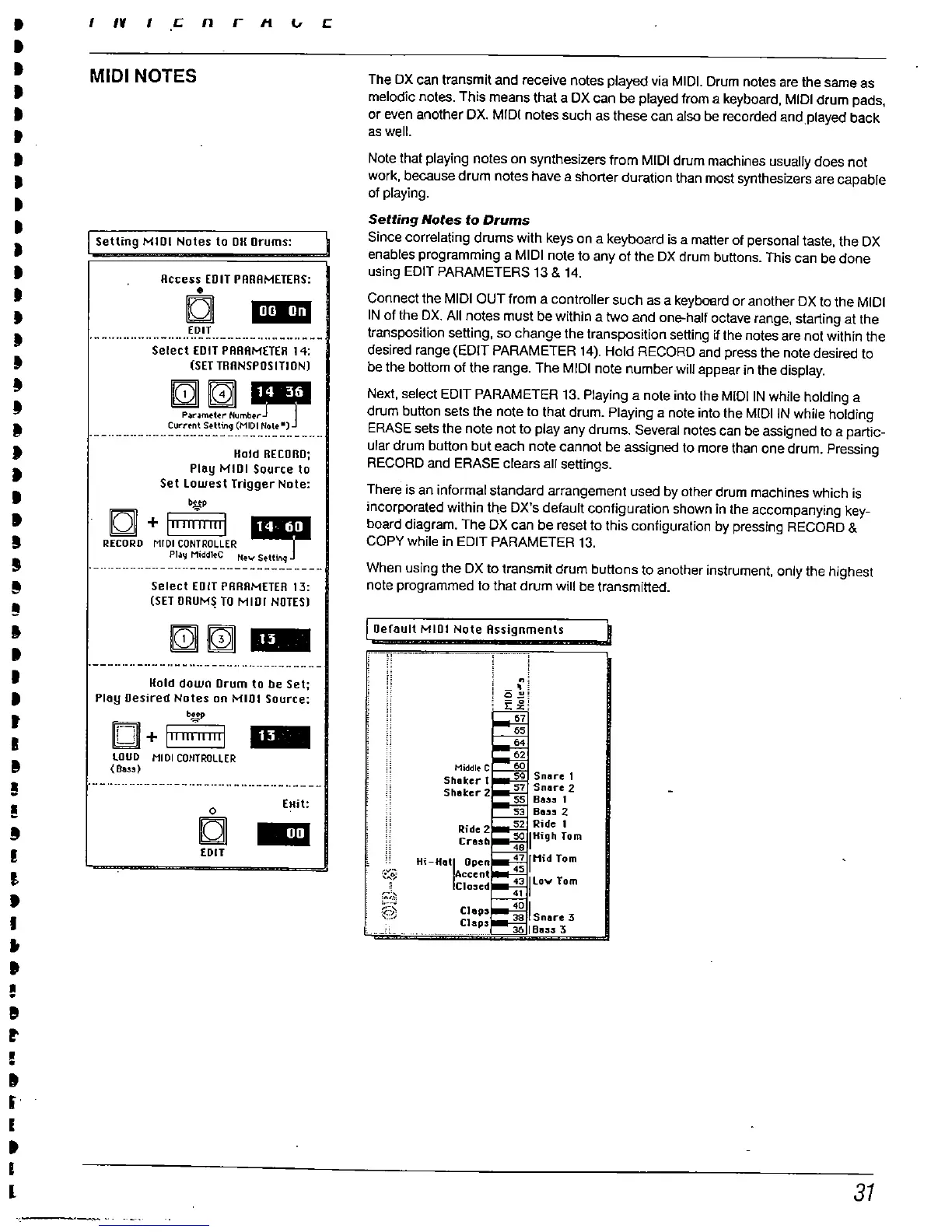
Connect the MIDI OUT from a controller such as a keyboard or another DX to the MIDI
IN of the DX. All notes must be withi" a two and one-half octave range
, starting at the
transposition setting, so change the transposition setting if the notes are not within the
desired range (EDIT PARAMETER 14). Hoid RECORD and press the note desired to
be the bottom of the range. The MIDI note number will appear in the display.
Next. select EDIT PARAMETER 13. Playing a note into the MiDI IN while holding a
drum button sets the note to that drum. Playing a note into the MIDI IN while holding
ERASE sets the note not to play any drums. Several notes can be assigned to a partic-
ular drum button but each note cannot be assigned to more than one drum. Pressing
RECORD and ERASE clears all settngs.
There is an informal standard arrangement used by other drum machines which is
incorporated within the DX'
s default configuration shown in the accompanying key-
board diagram. The DX can be reset to this configuration by pressing RECORD &
COpy while in EDIT PARAMETER 13.
When using the OX to transmit drum buttons to another instrument, only the highest
note programmed to that drum wil be transmitted.
Default MIDI Note Assignments
;:;
Hi-
Hat Open
Accent
Clo:sed



 To Next Page