SOPHIST/CA T/ON
METRONOME
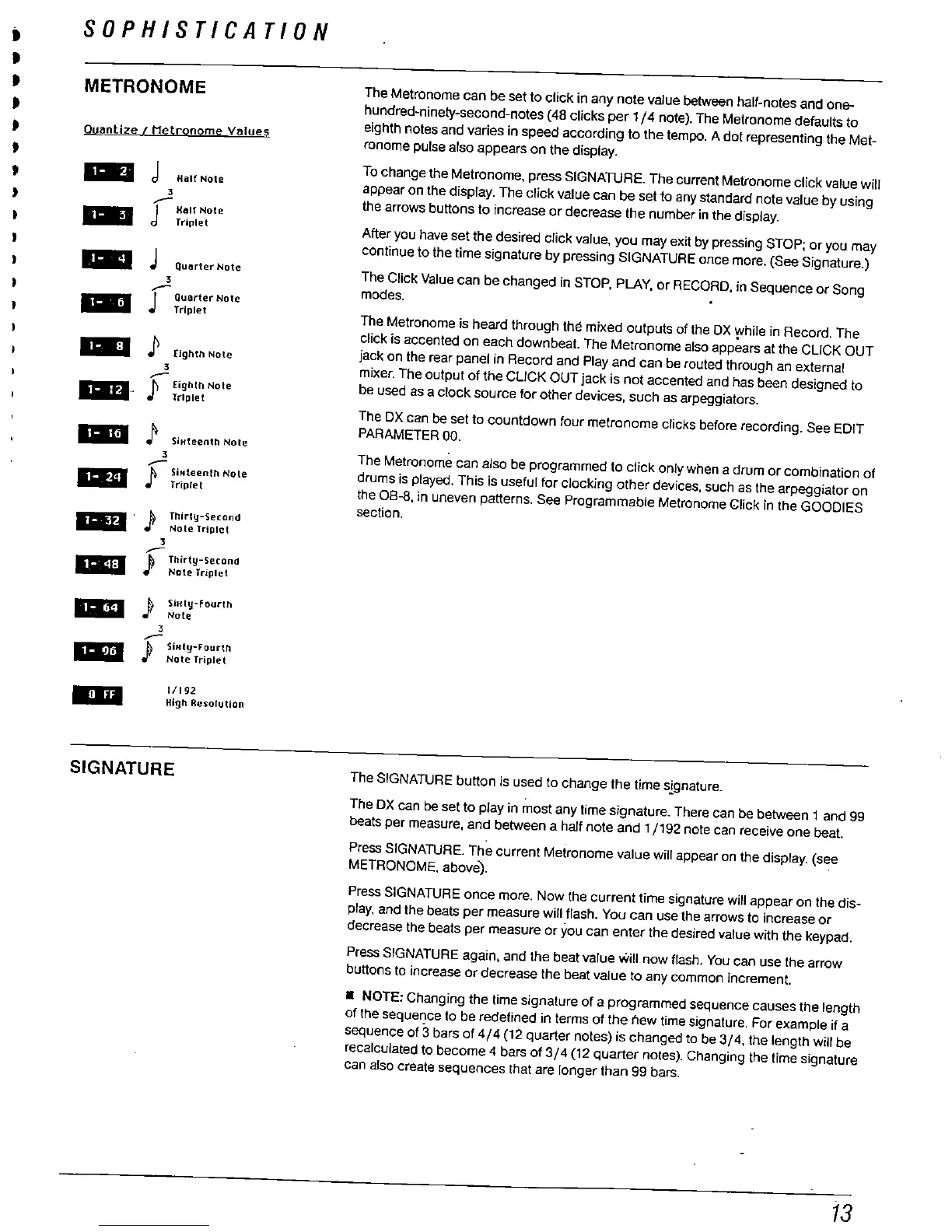
The Metronome can be set to click in any note value between half-notes and one-
hundred-ninety-second-notes (48 clicks per 1/4 note). The Metronome defaults to
eighth notes and varies in speed according to the tempo. A dot representing the Met-
ronome pulse also appears on the display.
To change the Metronome
, press SIGNATURE. The current Metronome click value wil
appear on the display. The click value can be set to any standard note value by using
the arrows buttons to increase or decrease the number in the display.
Ouantize
Metronome
lues
18 Half Note
Half Note
Triplet
--
Quarter Note
Quarter Note
Triplet
After you have set the desired click value
, you may exit by pressing STOP; or you may
continue to the time signature by pressing SIGNATURE once more. (See Signature.
The Click Value can be changed in STOP
, PLAY
, or RECORD
, in Sequence or Song
modes.
The Metronome is heard through the mixed outputs of the OX while In Record. The
click is accented on each downbeat. The Metronome also app
ars at the CLICK OUT
jack on the rear panel in Record and Play and can be routed through an external
mixer. The output of the CLICK OUT jack is not accented and has been designed to
be used as a clock source for other devices
, such as arpeggiators.
The OX can be set to countdown four metronome clicks before recording. See EDIT
PARAMETER 00.
18
Eighth Note
f) Eighth Note
.- .
Triplet
--
SiHteenth Nole
SiHteenlh Nole
88 .J" Triplet
. &
Thirty-Second
.)'
Note Triplel
Thirty-
erond
JT Note Tnplet
II
SiHly-Fourth
..
Note
Dr
SiHIY-F
urth
Note Tnplet
The Metronome can also be programmed to click only when a drum or combination of
drums is played. This is useful for clocking other devices. such as the arpeggiator on
the 08-8
, in uneven patterns. See Programmable Metronome blick In the GOODIES
section.
1/192
High Resolution
SIGNATURE
The SIGNATURE buttn
is used to change the time s!gnature.
The OX can be set to play in most any lime signature. There can be between 1 and 99
beats per measure
, and between a half note and 1/192 note can receive one beat.
Press SIGNATURE. The current Metronome value will appear on the display. (see
METRONOME. above).
Pres SIGNATURE once more. Now the current time signature will appear on the dis-
play, and the beats per measure wil flash. You can use the arrows to increase or
decrease the beats per measure or you can enter the desired value with the keypad.
Press SIGNATURE again
, and the beat value will now flash. You can use the arrow
buttons to increase or decrease the beat value to any common increment.
. NOTE: Changing the
time signature of a programmed sequence causes the length
of the
seque
ce
to be redefined in terms of the new time signature. For example if a
sequence of 3 bars of 4/4 (12 quarter notes) is changed to be 3/4
. the length will be
recalculated to become 4 bars of 3/4 (12 quarter notes). Changing the time signature
can also create sequences that are longer than 99 bars.



 To Next Page